Skip to content

Built in Prince Edward Island · Priced in Canadian dollars · Support from the people who built it

Daycares & early learning

It already calls them families.

Tell Daybook you run a centre and the whole app changes — its words, its screens, and what it asks you for. Enrolment that runs all year, families with their children and contacts, allergies and medications where staff will see them, waivers signed before the first day, the family portal, and billing that goes out every month without the chase.

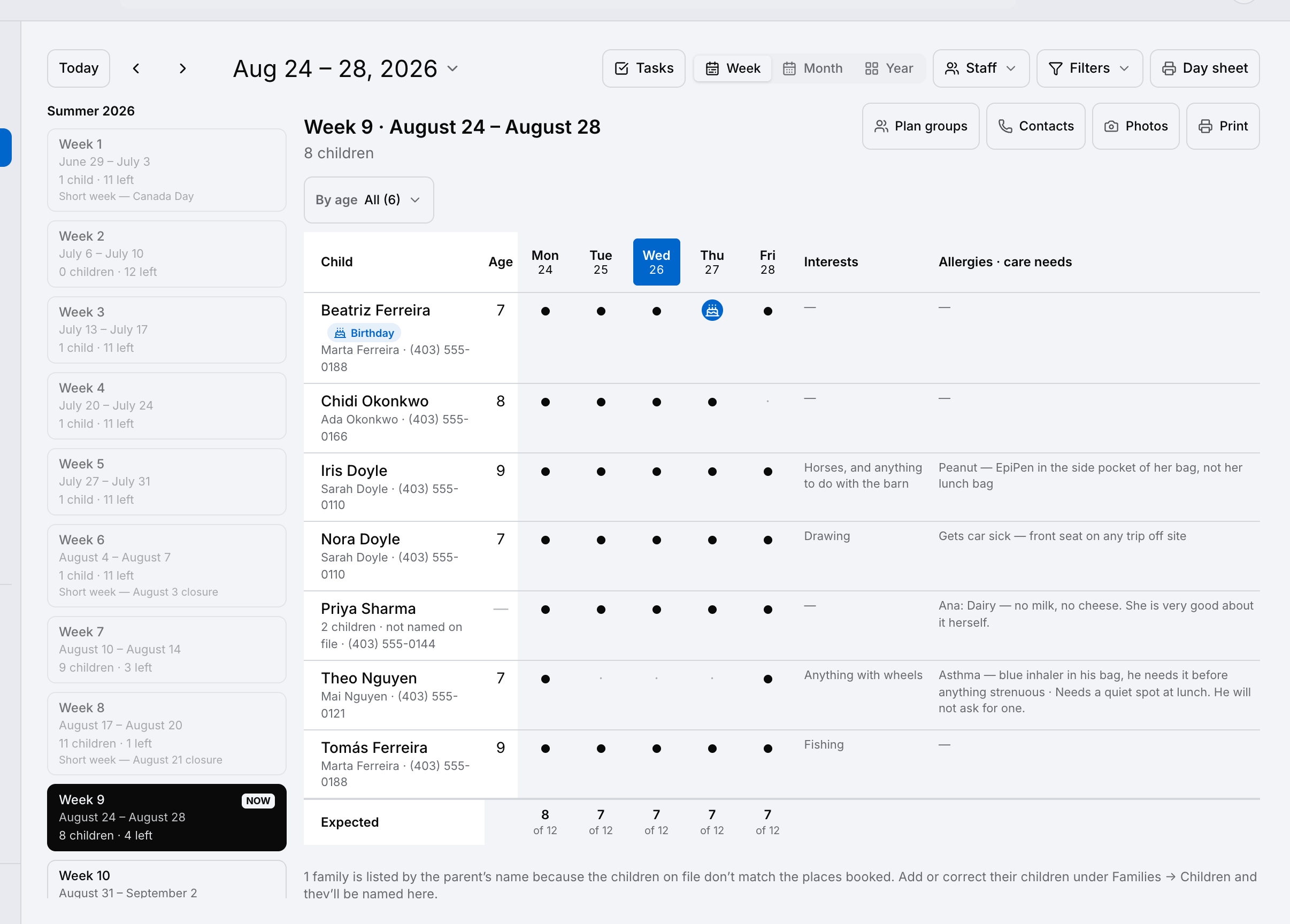
The week board: every child down the side, the five days across, and allergies and care needs beside each name — shown here on a day camp’s summer; a centre’s board reads the same.
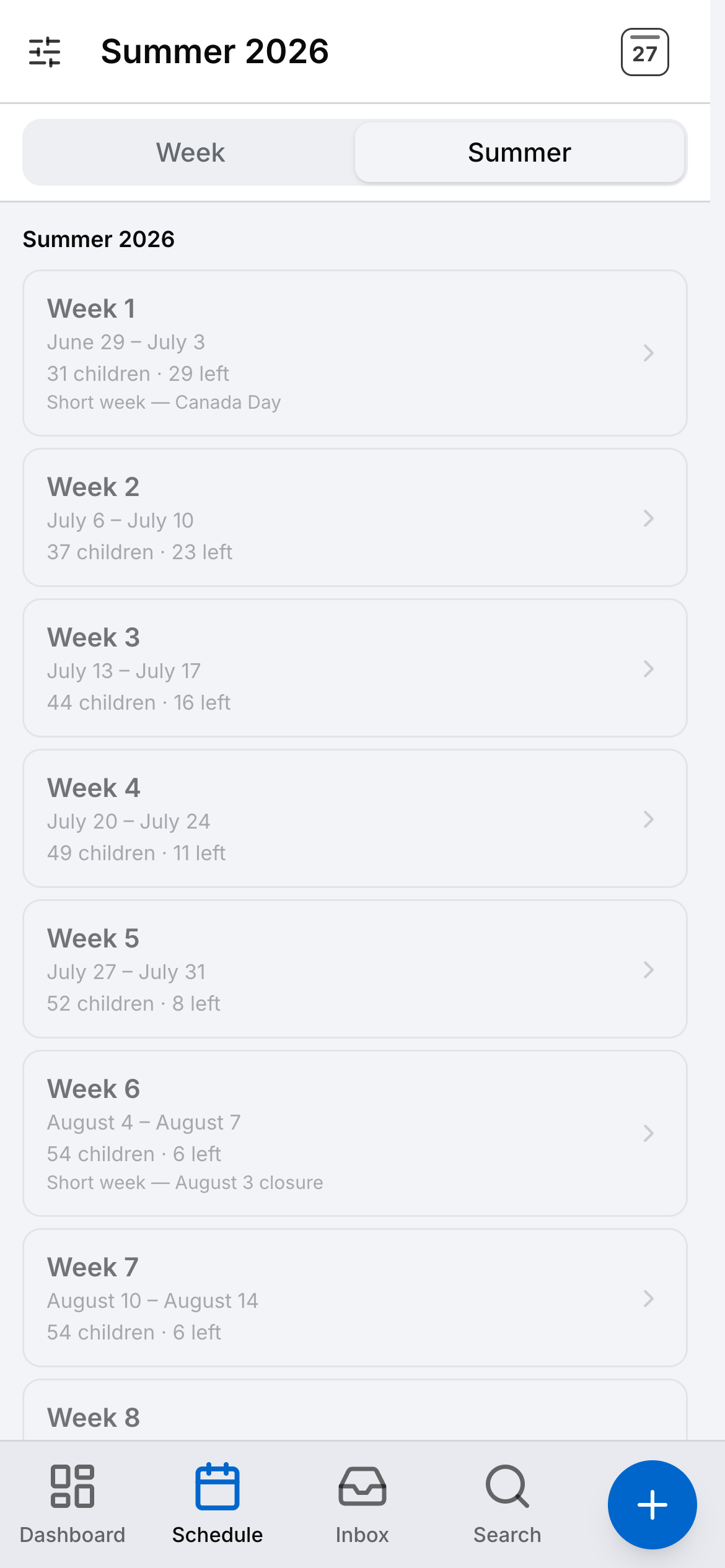
The weeks on a phone, each with the children booked and the places left.

The rules a centre lives under

Built around the paperwork a licensed centre already answers to.

  • Provincial child-care acts and licensing

    Children’s records are not optional on a daycare account — they are required, and kept until the youngest child turns 21 — flagged on that day, never deleted on their own. The roster, the contacts and who may collect each child are on one record.

  • PIPEDA

    Your database lives in Toronto, encrypted in transit and at rest; photo consent is asked for each child and checked on every photo; the owner can export the account’s data or delete the account.

  • Provincial subsidy paperwork

    Invoices carry a reference line you label yourself — a subsidy file number, an employer account — so the paper the province sees matches yours.

  • The year-end receipts families ask for

    Every invoice and every payment sits on the family’s record and in their portal, so what a family paid in the year is on one screen.

Daybook names these so you can see where it helps. It is not a compliance product: it does not count room ratios, it does not reconcile subsidies with the province, and nothing it prints is a tax form — your accountant has the last word.

Three things that go wrong

The headaches every director knows.

The allergy on page three

The thing a new staff member most needs to know about a child is in a binder, three pages into a registration form.

In Daybook Allergies and medications are recorded on the child and shown where staff will actually look — on the day’s list and the room sheet, beside the name.
Billing day, every month

The same invoices, the same reminders, the same families to ring — thirty of them, on the first of every month, by hand.

In Daybook Invoice the families on a schedule, take payment by card or e-transfer, and let the overdue reminders run themselves with a Pay Now link.

The form that never came back

A waiver sent home in a backpack, a photo permission nobody can find, a parent who swears they signed it.

In Daybook Waivers and acknowledgements are signed online by the family before the first day, with a record of who signed what and when — and photo consent is checked at the moment a photo is shown.

What running a centre looks like.

On top of everything Daybook does for every business — the full list is here — a daycare gets its own. And the parts that make no sense for a centre are not hidden, they are switched off: quotes, material takeoffs, subcontractors and hazard assessments. Nobody on your staff walks past a screen that belongs to somebody else’s trade.

The week

Every child, every day, and what you need to know.

The week board is the one screen a centre lives on: who is in, which days, and the things you cannot afford to forget about any of them — allergies and care needs on the same row as the child, not buried in a profile.

The week board: each child with their age, a dot for every day they attend, their interests, and an allergies and care-needs column — shown here on a day camp’s summer; a centre’s board reads the same.

The week

Every child, every day, and what you need to know.

The week board is the one screen a centre lives on: who is in, which days, and the things you cannot afford to forget about any of them — allergies and care needs on the same row as the child, not buried in a profile.

  • A dot for every day each child attends, and the places left underneath
  • Allergies and medications on the same row as the child
  • Who to ring first, and who may collect them, one tap away
  • A day sheet that prints for the person at the door
Scheduling

Families

One family. Their children. Who to ring first.

A child is enrolled, not booked for a week. The roster carries from month to month, siblings sit together under one family instead of being two unrelated customers, and next September is a change to a record you already have.

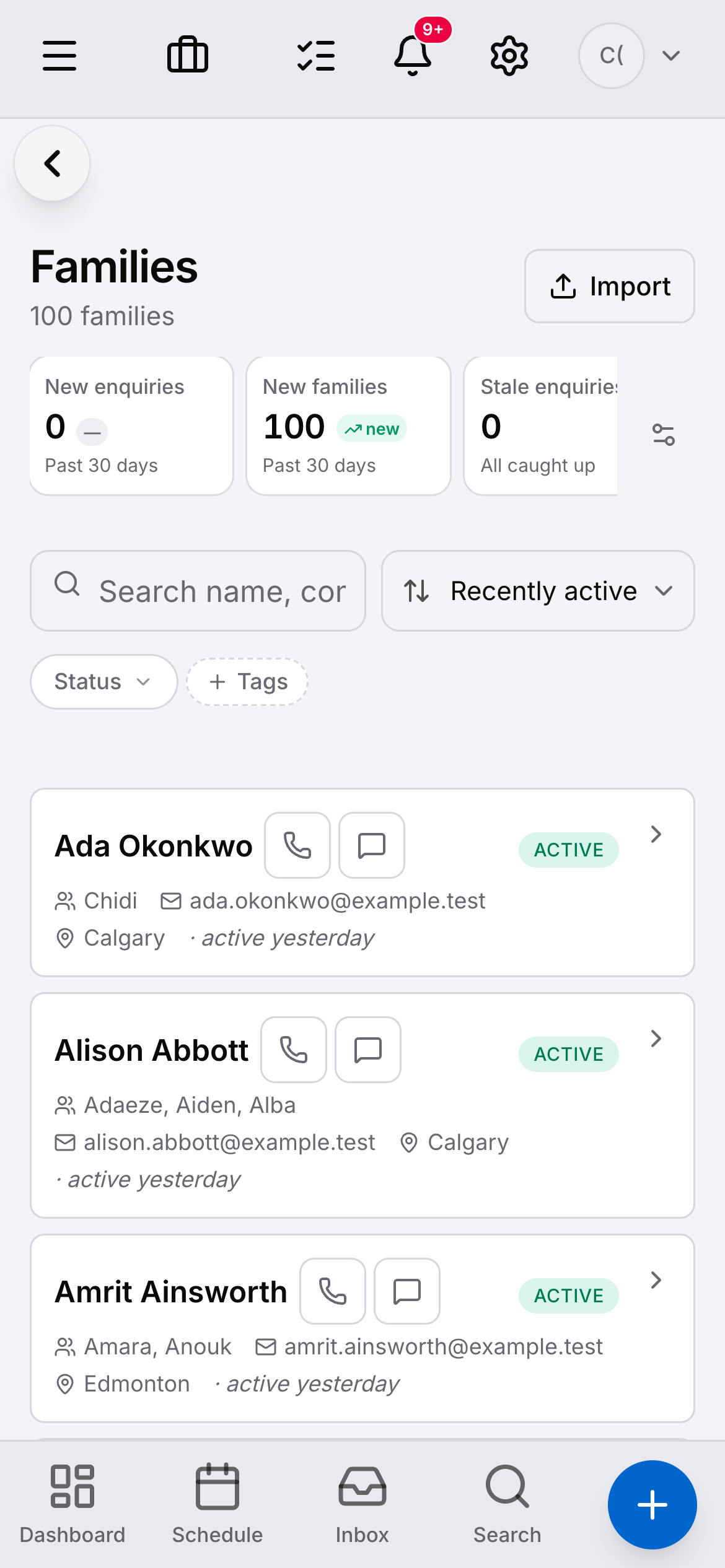
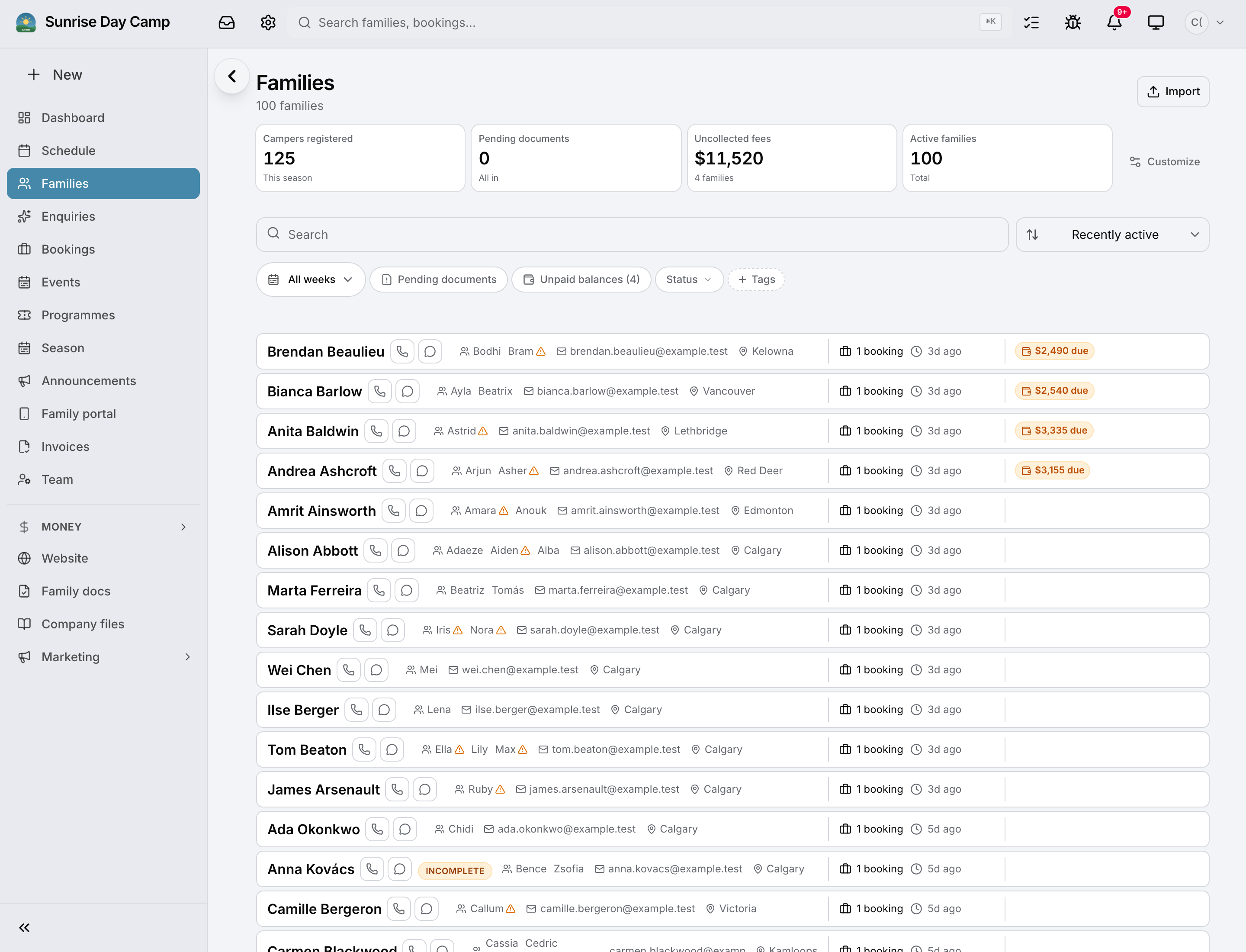
The families list: each family with its children’s names, contact details, what is active and what is owed — shown here on the day-camp demo; a centre’s list reads the same with enrolments in place of bookings.

Families

One family. Their children. Who to ring first.

A child is enrolled, not booked for a week. The roster carries from month to month, siblings sit together under one family instead of being two unrelated customers, and next September is a change to a record you already have.

  • Enrolment that runs all year — not a week at a time
  • Siblings under one family, with the contacts the family shares
  • Children’s records required on every daycare account, flagged when they expire, never deleted on their own
  • Enquiries from your website become a real enquiry, not an email to re-type
The family portal

The family portal

What they owe, what they signed, and a way to ask.

Parents log in to see their invoices and pay them, the agreements they signed, the schedule, the photos their consent allows — and to message you, so the question lands on the family’s record and not in somebody’s pocket.

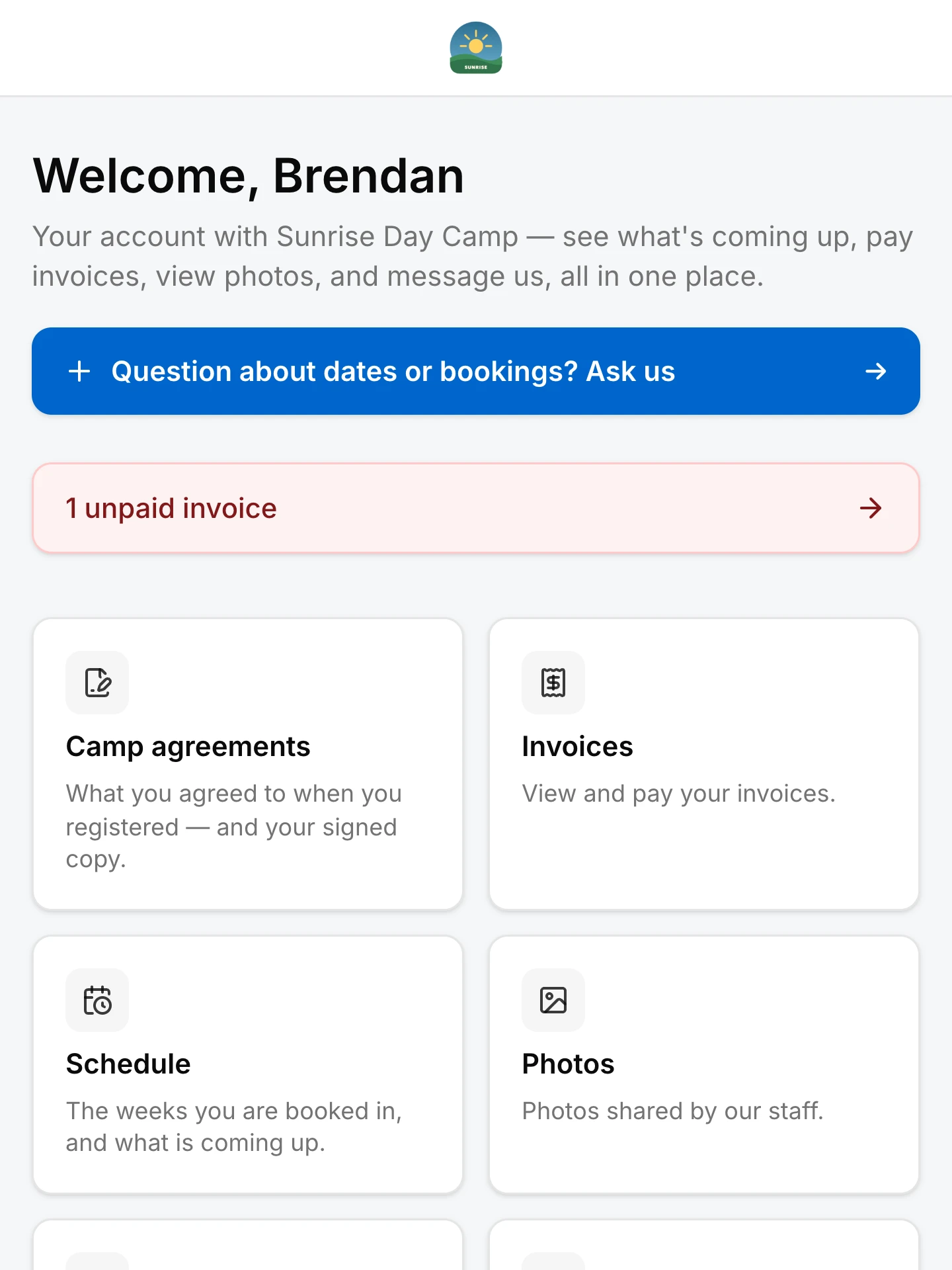
The family portal on a phone: a welcome by name, an unpaid invoice flagged, and cards for agreements, invoices, the schedule and photos.

The family portal

What they owe, what they signed, and a way to ask.

Parents log in to see their invoices and pay them, the agreements they signed, the schedule, the photos their consent allows — and to message you, so the question lands on the family’s record and not in somebody’s pocket.

  • Invoices to view and pay, by card or e-transfer
  • Signed agreements and waivers, with their signed copy
  • Photos a family sees are decided by their consent, not by the album
  • Every message lands on the family’s record
The family portal

Billing

Every month, without the chase.

Invoice the families on a schedule. Take payment by card or e-transfer. Let the overdue reminders run themselves, with a Pay Now link. GST/HST by province where it applies, and the Sales Tax report ready for filing.

Every month invoices on a schedule, reminders that run themselves, payments matched to the family

Billing

Every month, without the chase.

Invoice the families on a schedule. Take payment by card or e-transfer. Let the overdue reminders run themselves, with a Pay Now link. GST/HST by province where it applies, and the Sales Tax report ready for filing.

  • Invoices on a schedule, all year
  • Cards online; e-transfers matched to the invoice for you to confirm
  • A reminder you set once does the following-up
  • Every invoice and payment on the family’s record and in their portal
Invoicing & payments

Staff

The room, on the phone in their pocket.

Staff see the day’s children, the allergies, the contacts and their own hours from the phone they already carry — and the office sees what they log the moment it lands. Every daycare plan includes its staff seats.

  • The families list on a phone.
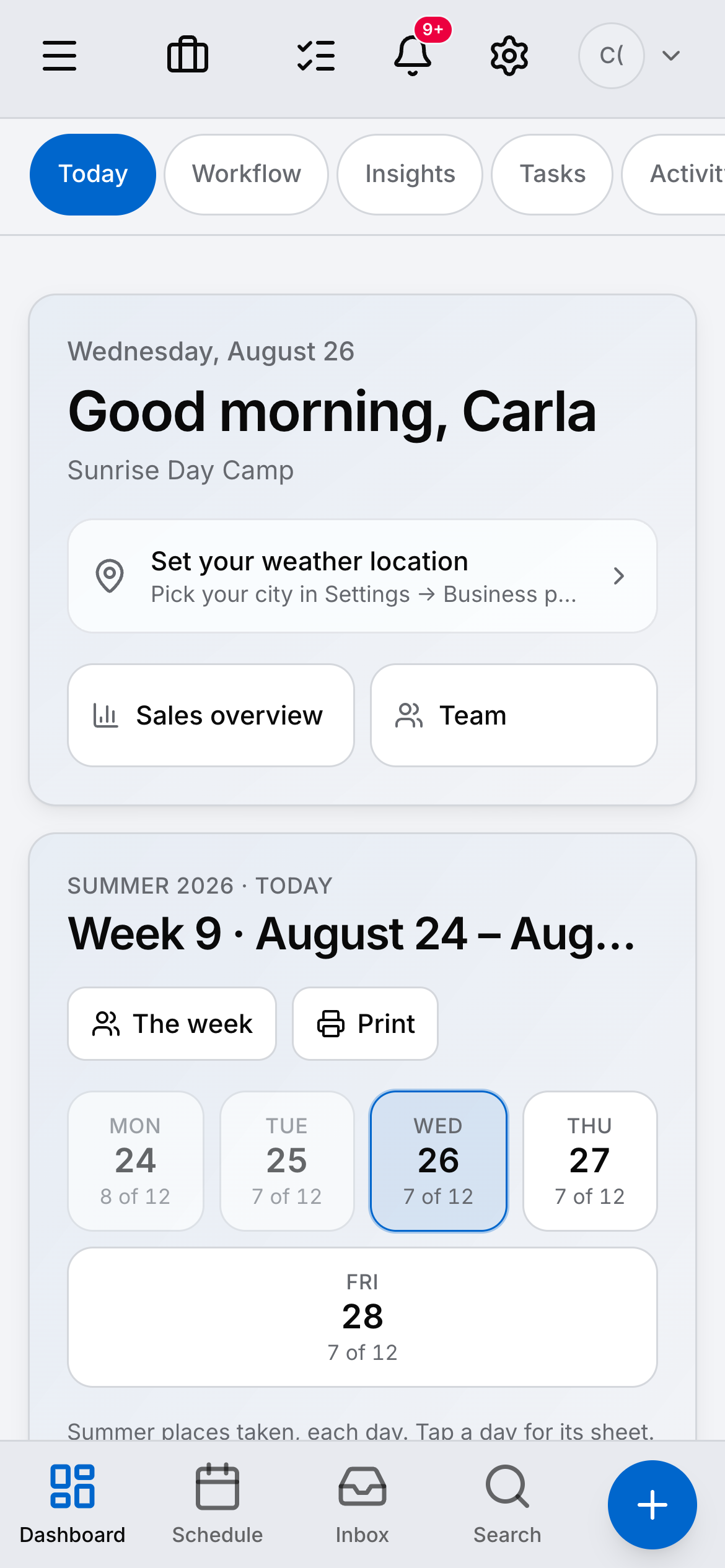
  • The dashboard on a phone, showing the week and the places taken on each day.
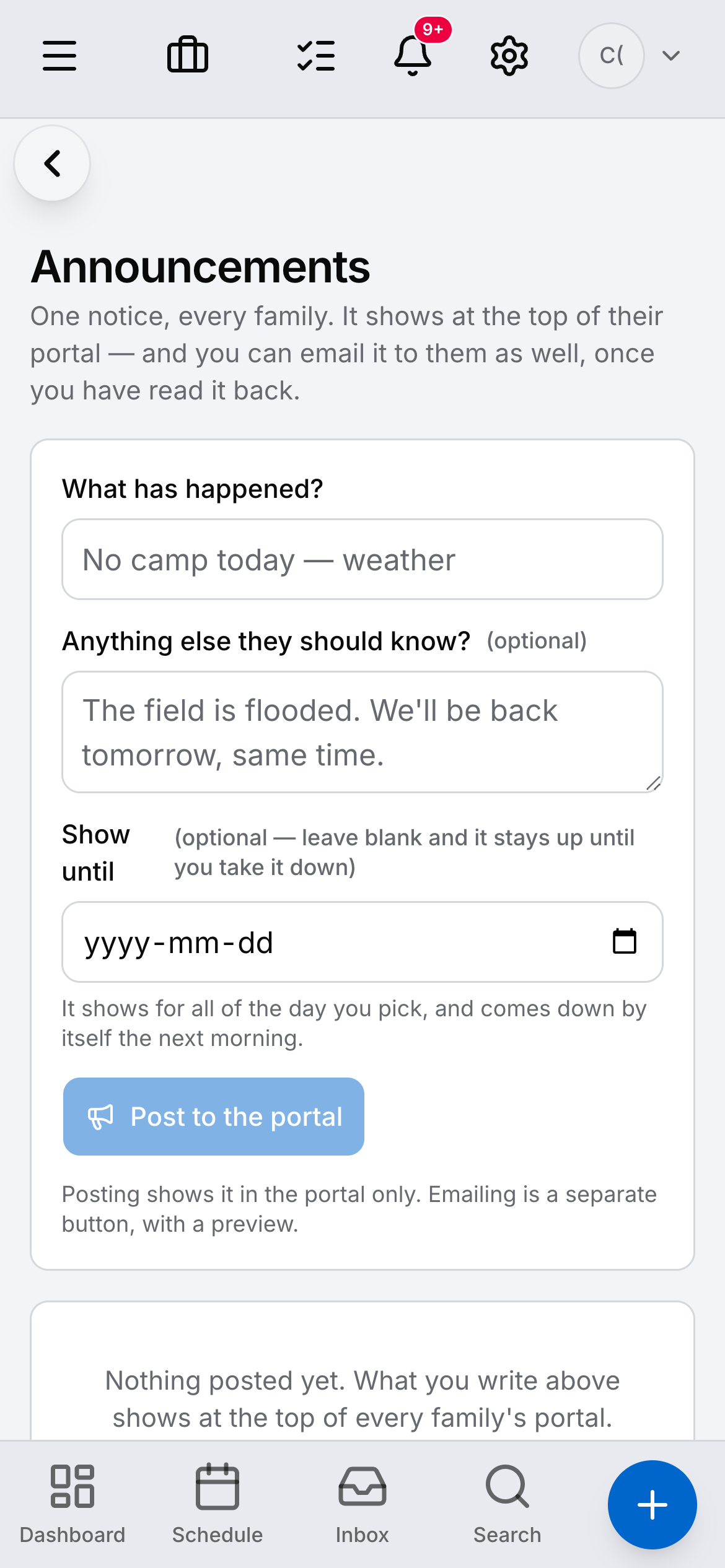
  • Announcements on a phone: a message sent to the families of one week.
  • The weeks on a phone, each with the children booked and the places left.

The economics

Priced on the children you enrol.

Care software tends to charge per child, per classroom or per staff login, with the modules priced separately and often in another currency. Daybook is three plans sized on enrolled children, in Canadian dollars, every one the whole app.

Workflow Care platforms priced per child or per room Daybook
Currency Often billed in US dollars, with the modules priced separately. Canadian dollars. Every plan, every add-on, printed on the pricing page.
Staff Typically an extra fee per staff login, per classroom or per child. Every plan includes its staff seats, and the pricing page prints how many.
Billing the families Usually a separate billing module, or a spreadsheet and e-transfer by hand. Monthly invoicing on a schedule, cards and e-transfer, reminders that run themselves — included.
Your website Usually not provided. A website on every plan, edited in the app and live when you press Publish, with an enquiry form that mints a real enquiry.
Canadian tax Usually worked out by hand. GST/HST by province where it applies, and the Sales Tax report ready for filing.

Nothing here is a discount, and there is no setup fee.

Three plans, priced in CAD.

Daycares bill families all year, so Daybook bills daycares monthly — three plans sized on enrolled children, every one the same app. Homecare $139 / Center $279 / Campus $429 a month CAD, priced on enrolled children. Staff seats included on every plan. Center and Campus include selling online, and Campus also includes your own domain and texting — a plan without them can add them.

  • Homecare — $139/mo CAD · Up to 25 enrolled children · +$3.50/enrolled child/mo after · 2 staff seats · +$25/mo each after · Start on Homecare
  • Center — $279/mo CAD · Up to 75 enrolled children · +$2.50/enrolled child/mo after · 8 staff seats · +$20/mo each after · Start on Center
  • Campus — $429/mo CAD · Up to 175 enrolled children · +$1.75/enrolled child/mo after · 20 staff seats · +$15/mo each after · Start on Campus

Start the free trial on CenterSee the plans

Switching

Moving from paper, a spreadsheet, or another platform.

There is no importer for another product’s export, and the page does not pretend there is. What there is gets a centre running before the next billing day.

Bring your families

Upload a CSV or paste it in — parents, phones, emails — and the families are there. Add the children and their contacts on each family’s record.

Send the forms once

Waivers and acknowledgements go out to every family and come back signed online, with a record of who signed what and when.

Your website, live day one

A website comes with the account and you edit it in the app — your photographs and your words go in, and the enquiry form drops a real enquiry into Daybook.

Questions directors ask.

Does it track room ratios?

No. Daybook keeps the roster, the day’s list and the staff schedule; counting the room against your province’s ratio stays the director’s call. The page does not claim otherwise.

Does it reconcile subsidies with the province?

No. Invoices carry a reference line you can label — a subsidy file number, an employer account — so your paper and the province’s match. The reconciliation itself stays yours.

Does it print the receipt families ask for in February?

It does not print a tax form. Every invoice and payment is on the family’s record and in their portal, so what a family paid in the year is on one screen; what counts for a claim is the accountant’s to say.

What happens to quotes, takeoffs and the trade tools?

They are switched off, not hidden. A daycare account never shows a screen that belongs to a contractor.

How are staff charged?

Every daycare plan includes its staff seats — the pricing page prints how many on each plan, and what one more costs.

Bring your own roster. Watch it run.

Your own rooms, your own families and your own billing beat any feature list. Start the trial and set the centre up in it.

14-day free trial · No credit card · Bring your client list