Skip to content

Built in Prince Edward Island · Priced in Canadian dollars · Support from the people who built it

Masonry — the flagship trade

The CRM that knows what a wall costs.

Daybook runs a masonry company end to end: quotes priced from your own labour, materials and markup; a brick and stone library with matching and supplier RFQs; FLHA forms, clock-in and photos from the crew’s phones; progress invoicing on the long jobs; GST/HST by province. It was built inside a Calgary masonry company, and it runs there every working day.

A masonry quote in Daybook, and nothing of the app beside it: a chimney rebuild written out line by line — the rebuild above the roofline, a concrete crown, a flue cap, flashing, scaffold and roof protection — each with its price and, beside it, its cost and margin: $3,460.00 and 49% on the rebuild.

The rules the trade lives under

Built around the paperwork a masonry contractor already answers to.

  • CCA and CCDC standard contract documents

    Your quote carries your own terms and is approved — or sent back for a revision — in the client’s portal, so the paper under the contract is yours and signed.

  • Provincial OH&S hazard assessments (FLHA)

    FLHA forms in the crew app, on Crew and up: the hazards, the controls, the conditions and the crew on site, filled in on the phone at the start of the day and filed on the job the moment they land.

  • Builders’ lien holdbacks

    Progress invoicing by stage — what is billed, what is paid and what is still owed, plain on every statement — so the holdback your accountant tracks has a clean trail under it.

  • CRA automobile allowance rates

    A mileage log that keeps itself, at the per-kilometre rate you set, ready for the accountant at year end.

Daybook names these so you can see where it helps. It is not a compliance product: the hazard assessment is yours to fill in, the holdback is yours to hold, and your accountant has the last word.

Three things that go wrong

The headaches every masonry company knows.

Pricing a wall from the truck

A wall gets priced fast, often from a truck, and a number guessed on a Tuesday is the number you live with for three months.

In Daybook The quote builder does the masonry math — bricks to lay and bricks to buy, mortar, labour — from your own costs, and shows the cost and the margin beside the price.

What happened on site, and who knows

The FLHA is on a clipboard, the hours are in a text, the photos are on three phones, and the office finds out on Friday.

In Daybook Clock-in, the FLHA, checklists and photos from the crew’s own phones, filed on the job the moment they land — with no signal, if it comes to that.

Long jobs, slow money

A six-week job billed at the end is six weeks of carrying payroll and material before the first dollar comes back.

In Daybook Progress invoices by stage, a reminder that chases itself with a Pay Now link, and e-transfers matched to the invoice for you to confirm.

The brief

Everyone talks at once. The job gets one brief.

A job is a week of emails, texts, notes and updates from the crew. Daybook files each one on the job it belongs to and writes the brief: the gate code, the deadline, what the customer asked for, what you owe them and what they owe you — rewritten whenever something new arrives.

The brief and the Assistant

Texting comes with the top plan of every rate card (Company, for a trade), from a verified toll-free number of your own.

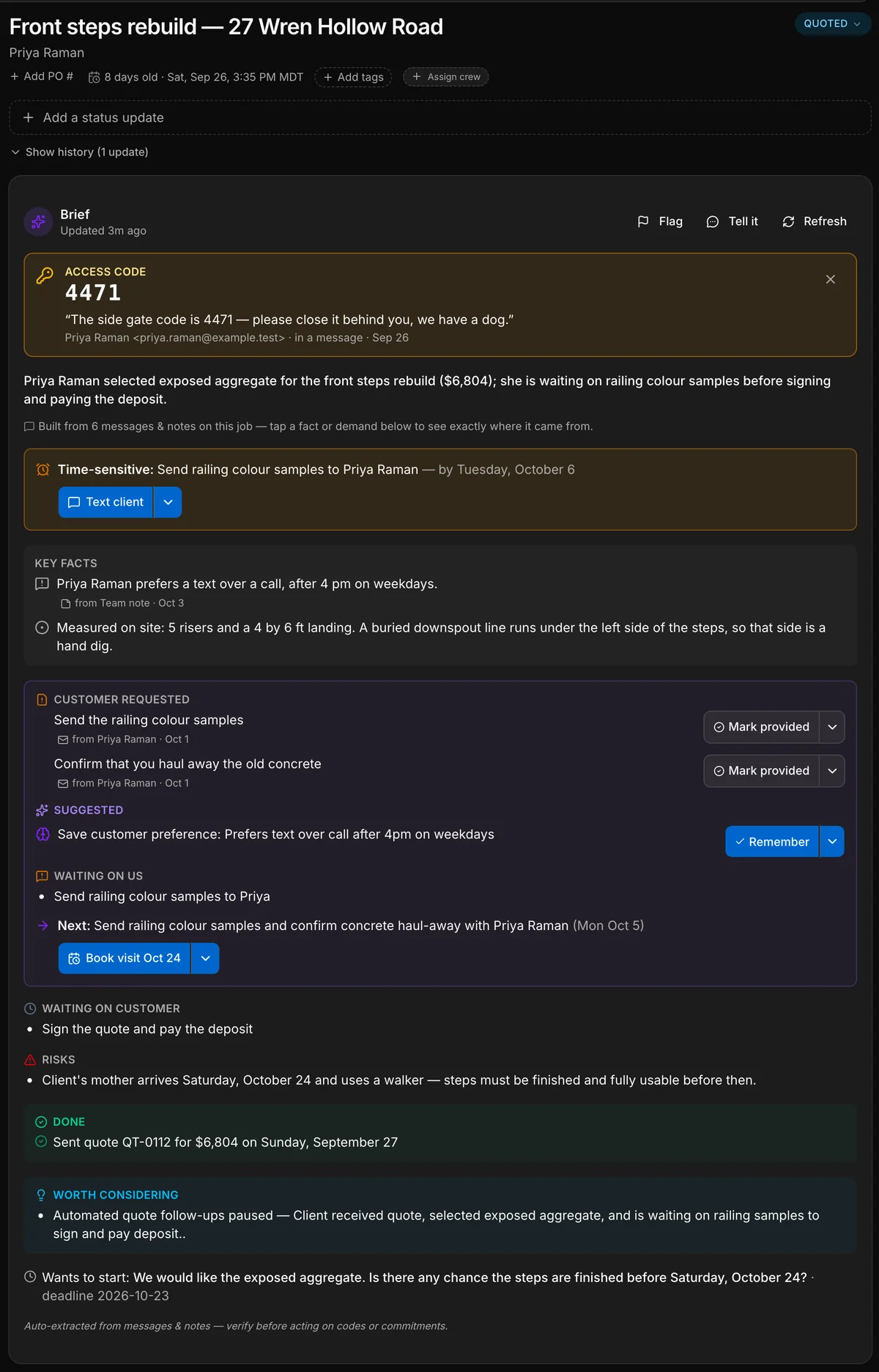
A job in Daybook and its brief: the gate code pinned at the top, a one-line summary, a time-sensitive deadline, key facts, what the customer requested, what is waiting on us with the next step and its date, and what is waiting on the customer.
1The gate code, pinned
2The deadline
3What the customer asked for
4What we owe, and the next step
5What the customer owes

A real capture of a contractor’s job. Daybook wrote every line of this brief from the messages on the job; only the five teal labels are added. A camp gets the same brief on a booking, a property manager on a work order.

The customerThe customer, textingThe officeA crew memberA crew memberA crew member
  • Our front steps are crumblingThe customer, by email
  • 5 risers. Hand dig on the leftThe crew, from the site
  • Your quote is attachedThe office, by email
  • 3 photosThe crew, from the site
  • Done before the 24th?The customer, by text
  • Gate code 4471. Mind the dogThe office, to the crew
  • Checklist doneThe crew, from the site
A job in Daybook and its brief: the gate code pinned at the top, a one-line summary, a time-sensitive deadline, key facts, what the customer requested, what is waiting on us with the next step and its date, and what is waiting on the customer.
1The gate code, pinned
2The deadline
3What the customer asked for
4What we owe, and the next step
5What the customer owes
  1. The gate code, pinned. Said once in an email, and now at the top of the job for the crew.
  2. The deadline. What is time-sensitive, and by when.
  3. What the customer asked for. Each request, with the message it came from.
  4. What we owe, and the next step. One next step, and a button that starts it.
  5. What the customer owes. So nobody chases the wrong person.

A real capture of a contractor’s job. Daybook wrote every line of this brief from the messages on the job; only the five teal labels are added. A camp gets the same brief on a booking, a property manager on a work order.

The masonry toolkit.

On top of everything Daybook does for every one of its 44 trades — the full list is here — masonry gets its own tools. None of them was invented for a brochure. Every one earned its place on a job before it earned a line on this page.

The quote

A wall, priced the way you price it.

Pick the job type — chimney, block, full brick, natural or manufactured stone, thin brick — put in the dimensions and your own costs, and the builder writes the labour, the materials and the line items. The math is deterministic: computed, never guessed.

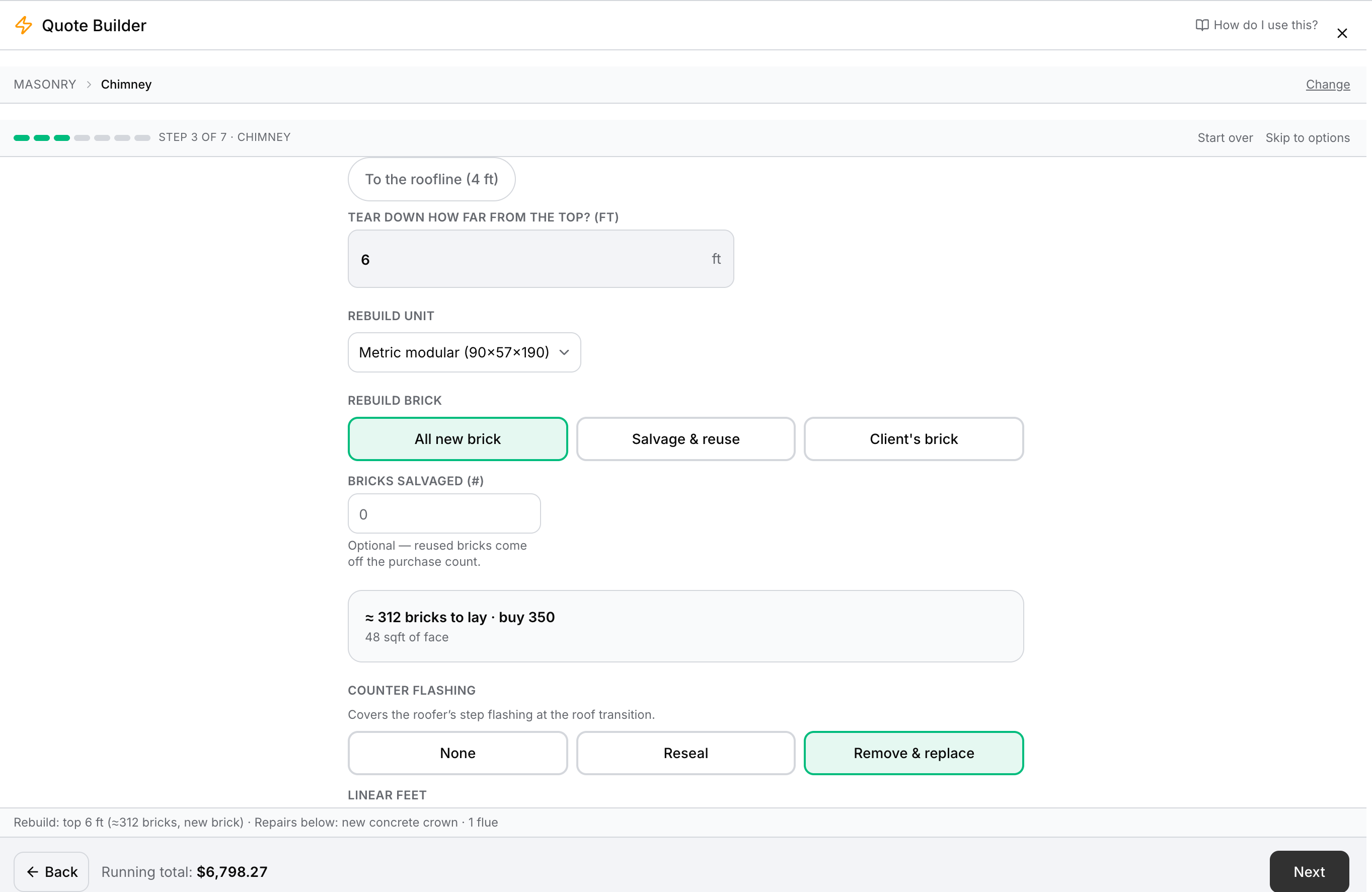
The chimney rebuild step of the quote builder, computing 312 bricks to lay and 350 to buy from the tear-down height.

The quote

A wall, priced the way you price it.

Pick the job type — chimney, block, full brick, natural or manufactured stone, thin brick — put in the dimensions and your own costs, and the builder writes the labour, the materials and the line items. The math is deterministic: computed, never guessed.

  • Chimney, block, full brick, natural stone, manufactured stone and thin brick job types
  • Bricks to lay and bricks to buy, worked out from the tear-down height
  • Every assumption behind the price listed, each one editable
  • Cost and margin beside the price, on every line
  • Approved, or sent back for a revision, in the client’s portal
Quoting

Brick and stone

Hundreds of bricks and stones. The closest match in seconds.

A product library in the hundreds, on every plan from day one. On Crew and up, matching finds the closest brick or stone from a photo and the quote drafts the RFQ for you to send to your suppliers, and the price book keeps itself current — scan a supplier invoice and the prices update.

Hundreds of bricks and stones in the library, with your own products alongside

Brick and stone

Hundreds of bricks and stones. The closest match in seconds.

A product library in the hundreds, on every plan from day one. On Crew and up, matching finds the closest brick or stone from a photo and the quote drafts the RFQ for you to send to your suppliers, and the price book keeps itself current — scan a supplier invoice and the prices update.

  • A brick and stone library in the hundreds, from day one
  • The closest brick or stone from a photo, the RFQ drafted for you to send — Crew and up
  • A price book that updates when you scan a supplier invoice — Crew and up
  • The material takeoff hands the crew the list straight off the quote
  • The visualizer puts the stone on the customer’s own photo of their house — Company
Products & matching

Trade knowledge

It says crown, not cap.

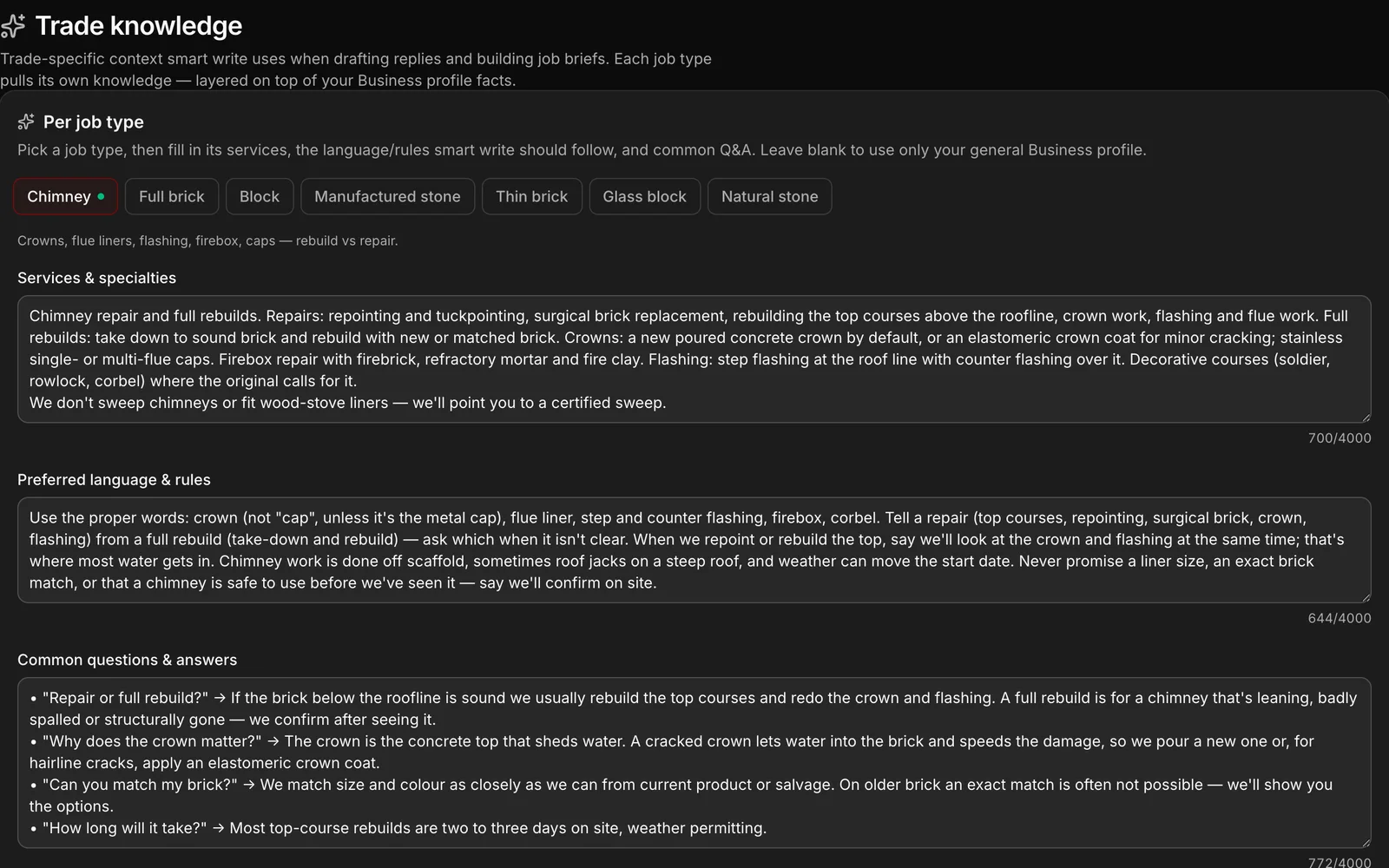
Trade knowledge per job type — chimney, block, stone — so every draft, reply and job brief uses a mason’s words: crown not cap, flue liner, step and counter flashing, repair against full rebuild. Written once by you, used on every job after.

The Trade knowledge screen for a masonry company: per job type, the services, the preferred language and rules, and the common questions a reply should answer the way a mason would.

Trade knowledge

It says crown, not cap.

Trade knowledge per job type — chimney, block, stone — so every draft, reply and job brief uses a mason’s words: crown not cap, flue liner, step and counter flashing, repair against full rebuild. Written once by you, used on every job after.

  • Services, preferred language and the common questions, per job type
  • Replies and job briefs drafted in the trade’s own words
  • Never promises a liner size, an exact brick match or a safe chimney before someone has seen it — because you told it not to
Communications

Safety on site

The FLHA, filled in on the phone. Filed before the first brick.

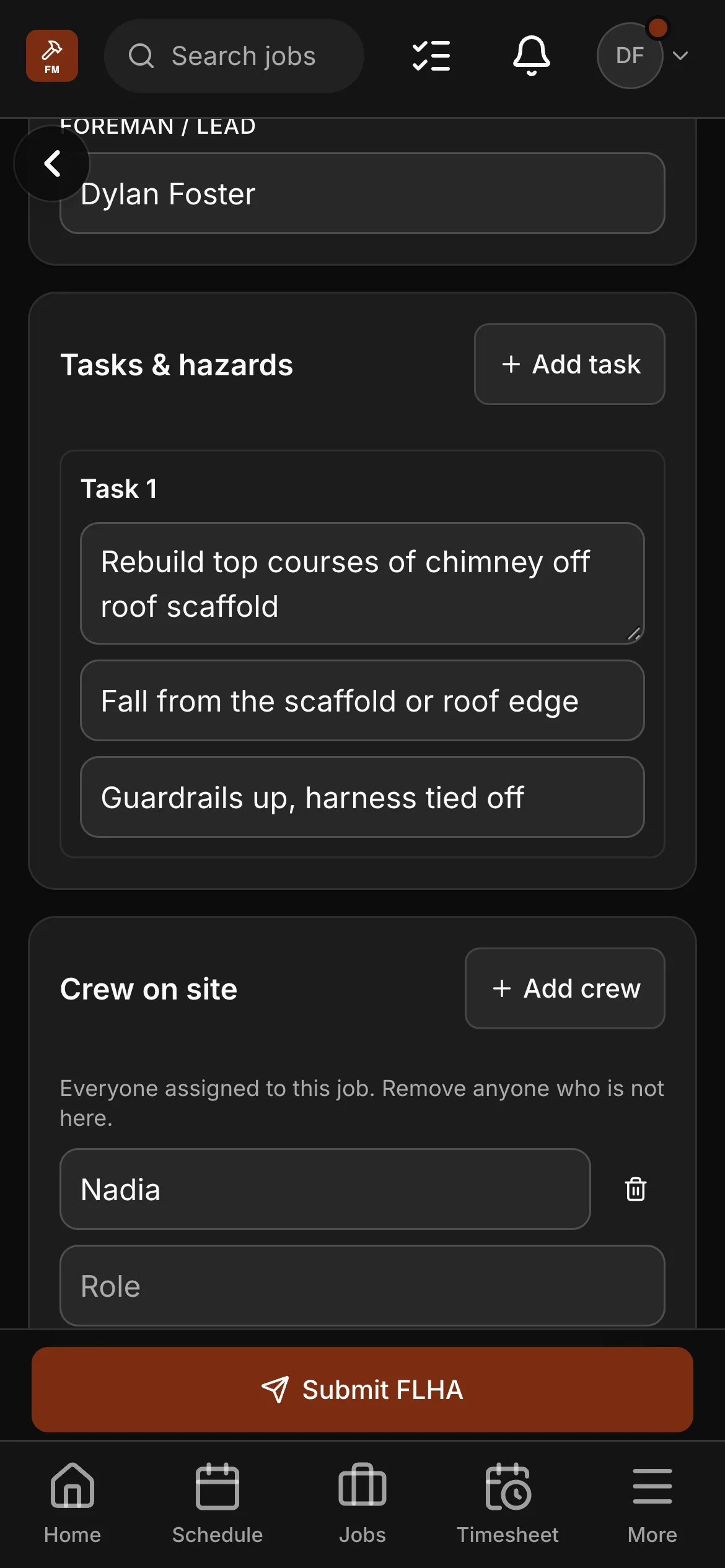
Pick the job and the address and the crew come with it; the day’s conditions, each task with its hazard and its control — submitted from the phone at the start of the day and on the job’s record the moment it lands. Then clock-in, checklists and photos, with no signal if it comes to that.

The FLHA on a crew member’s phone: the foreman, the conditions, and a task — rebuilding a chimney’s top courses off a roof scaffold — with its hazard and its control, and the crew on site under it.

Safety on site

The FLHA, filled in on the phone. Filed before the first brick.

Pick the job and the address and the crew come with it; the day’s conditions, each task with its hazard and its control — submitted from the phone at the start of the day and on the job’s record the moment it lands. Then clock-in, checklists and photos, with no signal if it comes to that.

  • FLHA forms on Crew and up: job, site, conditions, tasks with hazard and control, the crew on site
  • Clock-in and timesheets from the phone in their pocket
  • Checklists filled in on the job — with a signature if you want one
  • Photos taken where there is no signal, filed when it returns
The crew app

Getting paid

Progress invoices by stage. Chased without you.

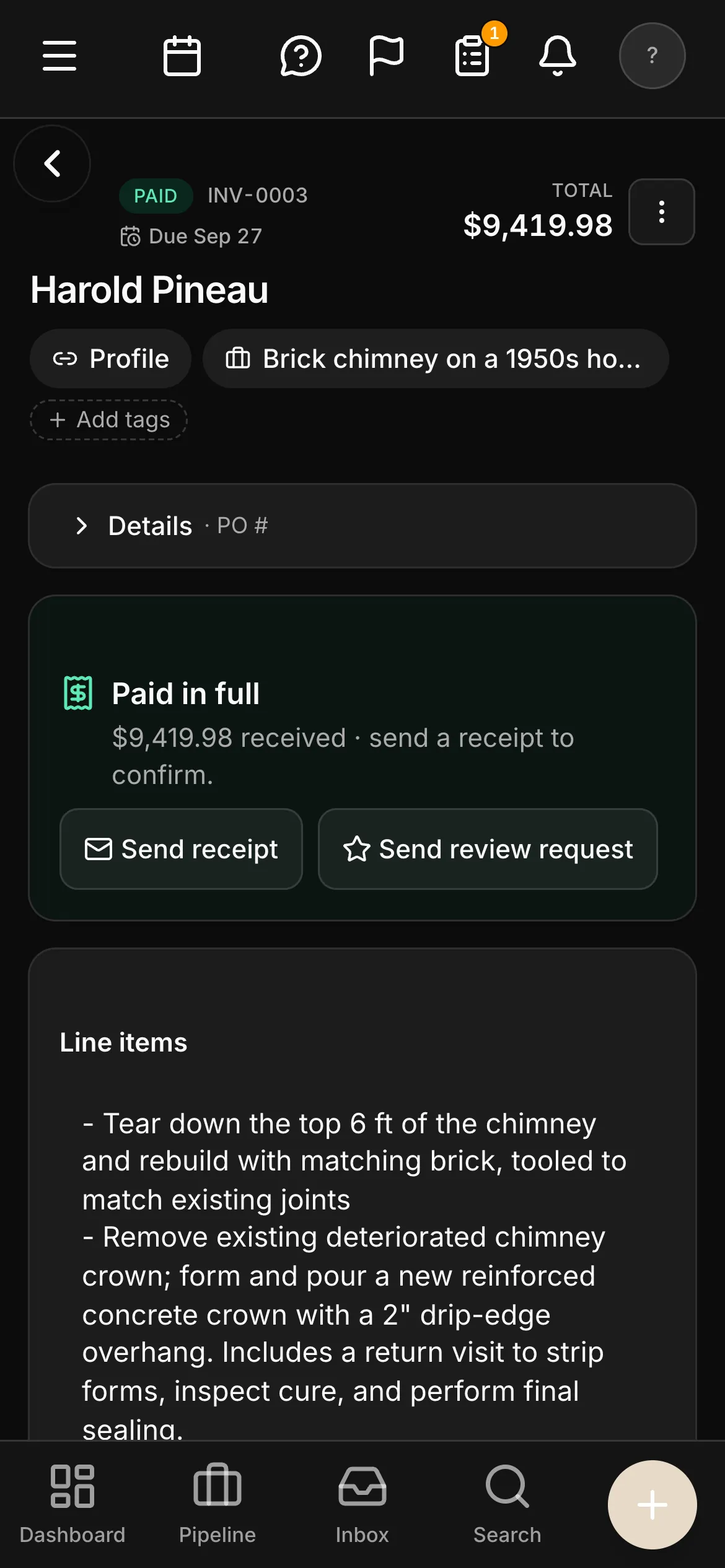
Invoices raised off what was agreed, by stage on the long jobs. A reminder you set once does the following-up, with a Pay Now link. E-transfers are matched to their invoices for you to confirm; cards online; EFT read and reconciled.

A paid invoice on a phone in dark mode: INV-0003 marked PAID, “Paid in full”, with Send receipt beside it.

Getting paid

Progress invoices by stage. Chased without you.

Invoices raised off what was agreed, by stage on the long jobs. A reminder you set once does the following-up, with a Pay Now link. E-transfers are matched to their invoices for you to confirm; cards online; EFT read and reconciled.

  • Progress invoicing on long jobs — billed, paid and still owed on every statement
  • An overdue invoice chases itself, with a Pay Now link
  • E-transfer matched for you to confirm; cards online; EFT
  • GST/HST by province, and the Sales Tax report ready for filing
  • Profit & Loss, Cash Flow and A/R Aging, built from the work itself
Invoicing & payments

The crew

The phone already in their pocket.

Field seats are free and unlimited on Crew and Company, so every mason and labourer has the app: the day’s jobs, clock-in, the FLHA, the checklists, the photos — and the office sees it the moment it lands.

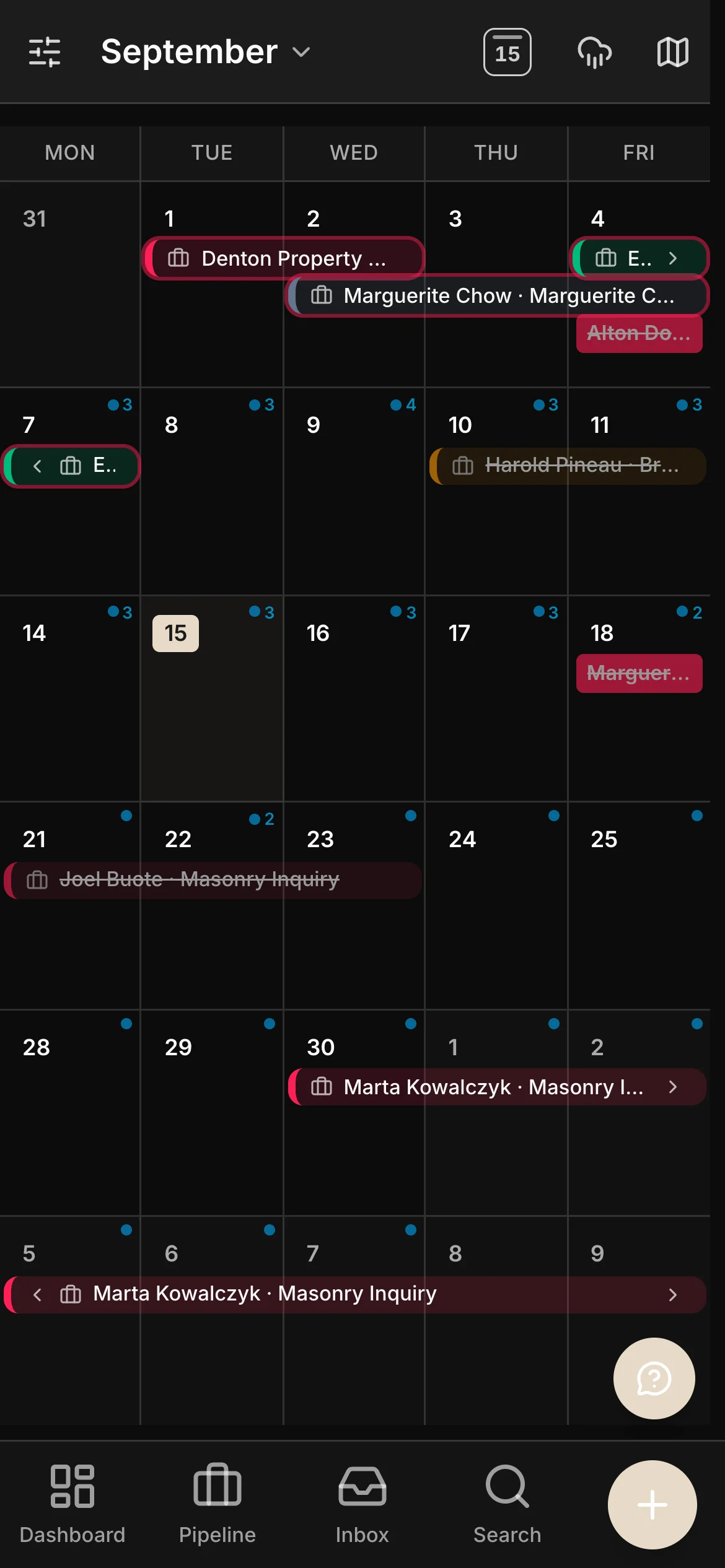
  • A month of work on a phone: job bars running across the month, each one a client and a job.
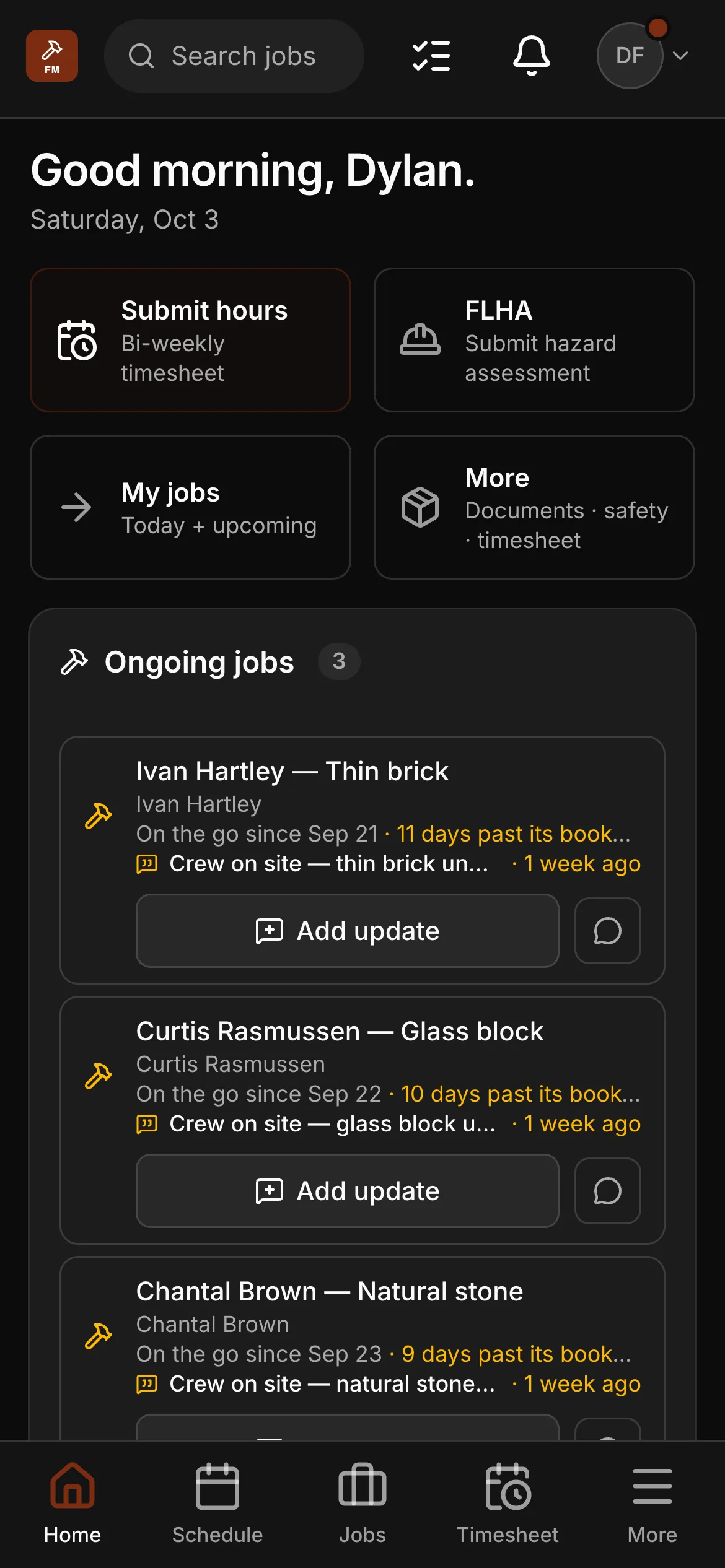
  • The crew app’s home on a phone: “Good morning, Dylan”, Submit hours, FLHA, My jobs, and the ongoing masonry jobs — a thin-brick job and a glass-block job — each with an Add update button.
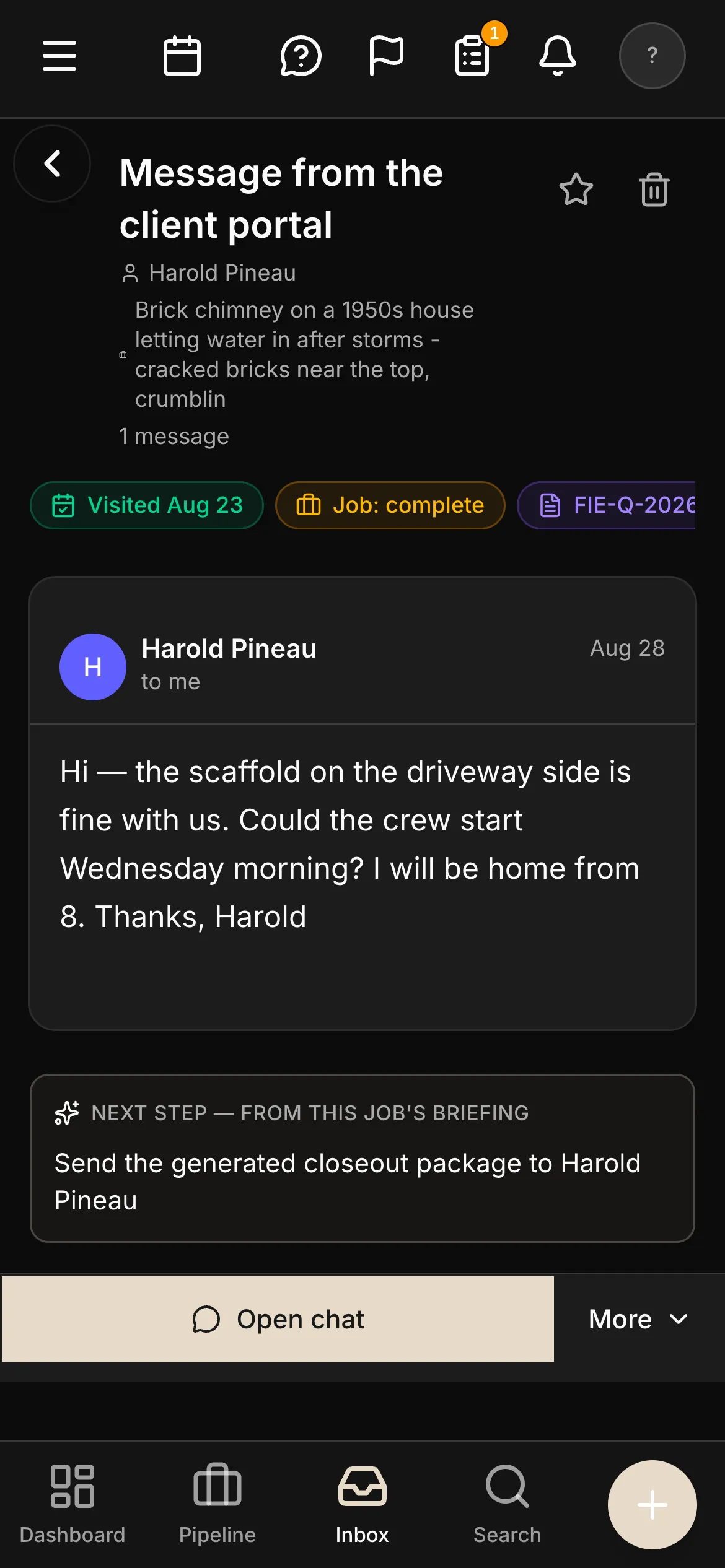
  • A message from the client portal on a phone: a homeowner confirming the crew can start Wednesday on a chimney rebuild, with the job’s next step under it.
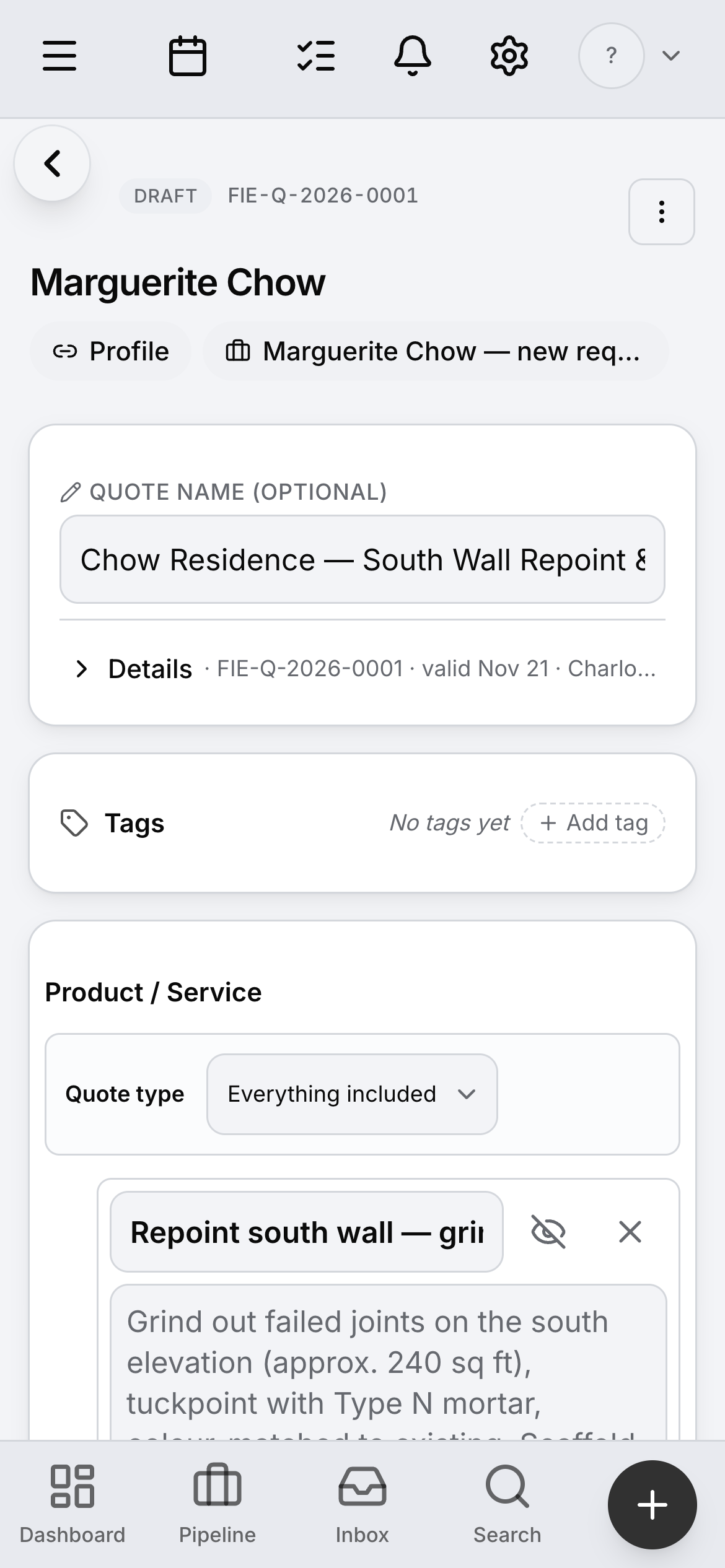
  • A quote open on a phone — the app does on site what the desktop does at the desk.
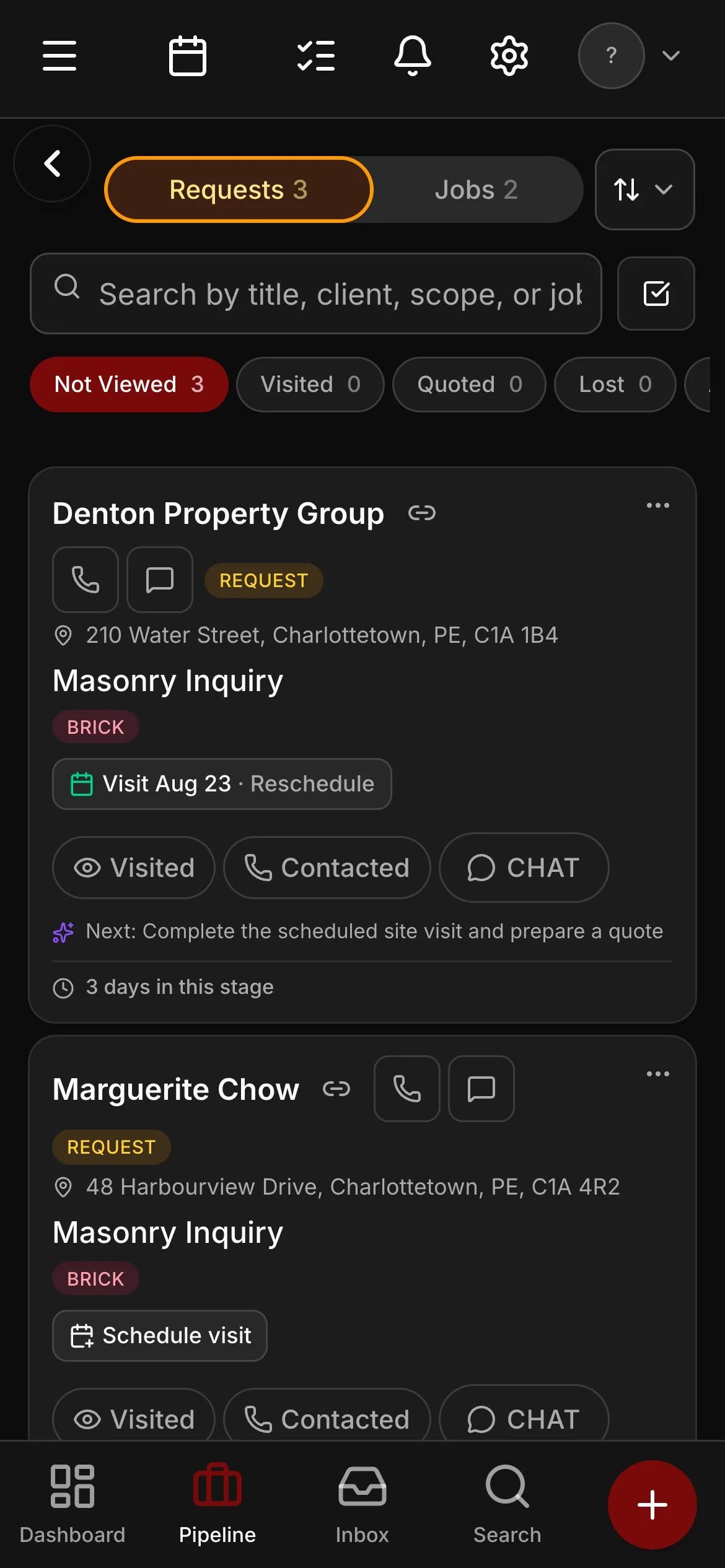
  • The requests pipeline on a phone in dark mode.

The economics

Priced on the office. Free for the crew.

Most field-service software charges by the head, in another currency. Daybook charges the office seats, in Canadian dollars, and leaves the people laying brick alone.

Workflow Field-service platforms priced per user Daybook
Currency Often billed in US dollars — the exchange rate and your card’s foreign fee ride along. Canadian dollars. Every plan, every add-on, printed on the pricing page.
The crew Typically an extra monthly fee for every field user past the plan’s cap. Field seats free and unlimited on Crew and Company — every mason and labourer gets the app.
Masonry tools A generic quote form; the takeoff lives in a spreadsheet. The masonry quote builder, the brick and stone library, matching with supplier RFQs, a self-updating price book.
Canadian tax and mileage Usually an accounting add-on, or by hand. GST/HST by province on every invoice, the Sales Tax report, a mileage log at your own rate, receipts read for you.
Your website Usually a separate builder, or a designer. A masonry site template on every plan, live when you press Publish, with a quote-request form that mints a real lead.

Nothing here is a discount, and there is no setup fee.

Three plans, priced in CAD.

Masonry runs on the trades rate card — every plan the same app, the office seats counted and the crew free from Crew up. Solo $99 / Crew $249 / Company $449 a month CAD. Office seats included on every plan. Field seats are free and unlimited on Crew and Company. Crew and Company include selling online, and Company also includes your own domain and texting — a plan without them can add them.

  • Solo — $99/mo CAD · 1 seat · no additions · Start on Solo
  • Crew — $249/mo CAD · 3 office seats · +$39/mo each after · Start on Crew
  • Company — $449/mo CAD · 10 office seats · +$39/mo each after · Start on Company

Start the free trial on CrewSee the plans

Switching

Moving from a spreadsheet, or from another platform.

There is no importer for another product’s export, and the page does not pretend there is. What there is gets a masonry company running in an afternoon.

Bring your client list

Upload a CSV or paste it in — names, phones, emails, addresses — and the clients are there. A QuickBooks client list imports straight across.

Bring a supplier invoice

Scan it and the price book fills with your real prices. Bring a real quote from your shop and watch the builder price it from your numbers.

Your website, live day one

The masonry template is already written for the work — your photographs and your words go in, and the quote-request form drops leads straight into Daybook.

Questions masonry companies ask.

Does it do holdback invoicing?

No. Daybook does progress invoicing — bill the stage, and the statement shows what is billed, paid and still owed. The holdback itself stays with your accountant, who has a clean trail to work from.

Is the FLHA a real form, or a checkbox?

A real form in the crew app, on Crew and up: the job and site, the day’s conditions, each task with its hazard and its control, and the crew on site — filled in on the phone at the start of the day and filed on the job. Checklists for the rest of the day work the same way, with a signature if you want one.

What does a crew member cost?

Nothing on Crew and Company — field seats are free and unlimited. The office seats are what is counted, and the pricing page prints exactly how many each plan includes.

Can I bring my own prices?

Yes. Scan a supplier invoice and the price book updates; put your own products alongside the library; set your own labour rates and markups. The quote builder prices from your numbers, not ours.

Does it work with no signal on site?

Clock-in, checklists and photos work with no signal and file themselves when the signal returns. The office sees them the moment they land.

Bring a real quote. Watch it built.

Your own numbers beat any feature list — masonry is what we know best. Start the trial, bring a wall from your shop, and price it in Daybook.

14-day free trial · No credit card · Bring your client list