Skip to content

Built in Prince Edward Island · Priced in Canadian dollars · Support from the people who built it

Gymnastics clubs

Every class, every level, every ribbon.

Tell Daybook you run a club and the app is built around classes, not jobs: classes in terms with their places and their waiting lists, your own level ladder with the skills a child shows to pass each one, roll call and skill ticks on the coach’s phone, and a family portal where parents see the next class and every ribbon earned. Then billing by the term or by the month.

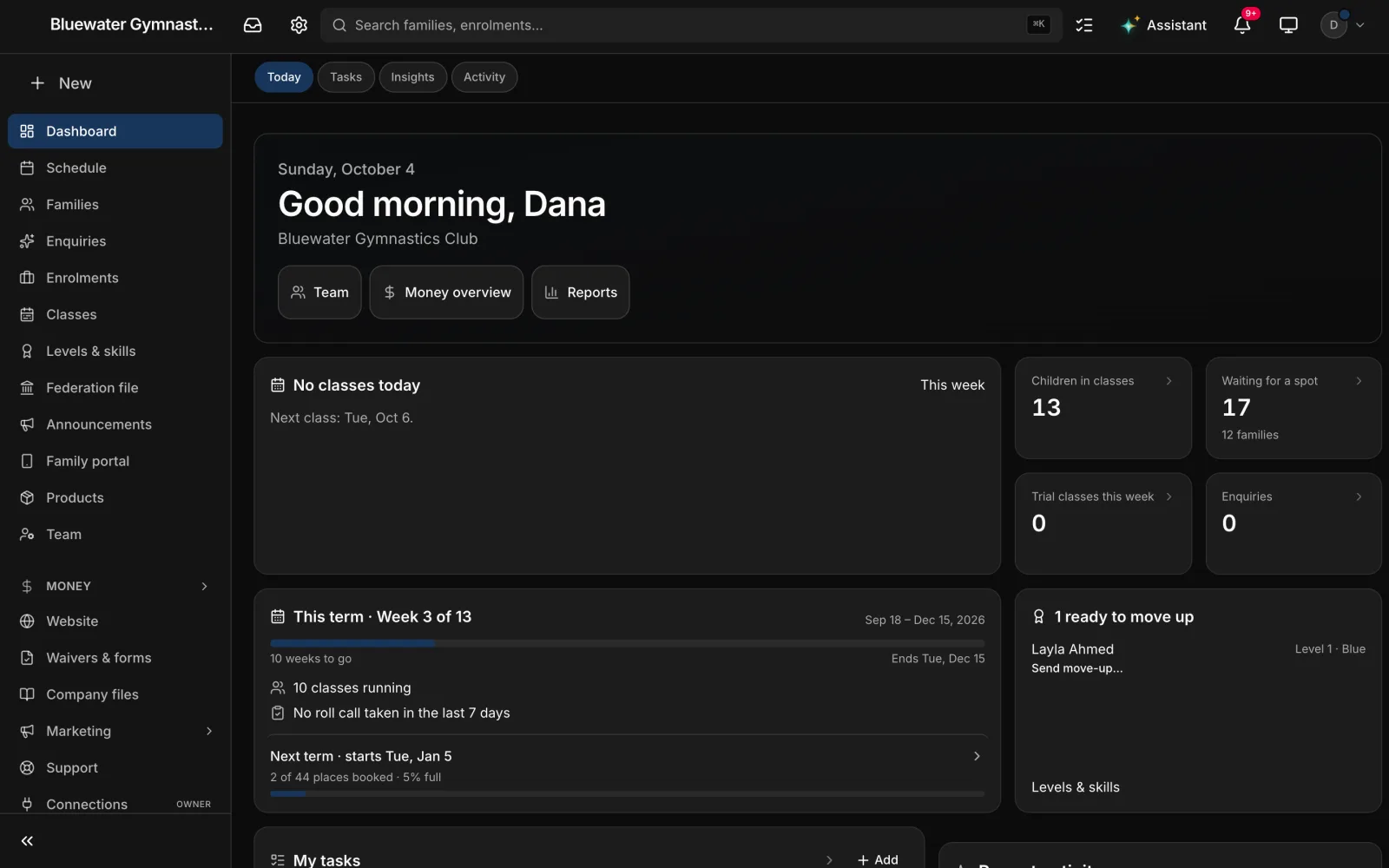
A gymnastics club’s dashboard in Daybook: “Good morning, Dana”, the children in classes and the families waiting for a spot, this term at week 3 of 13 with next term’s first places booked, and a child ready to move up a level with Send move-up under the name.
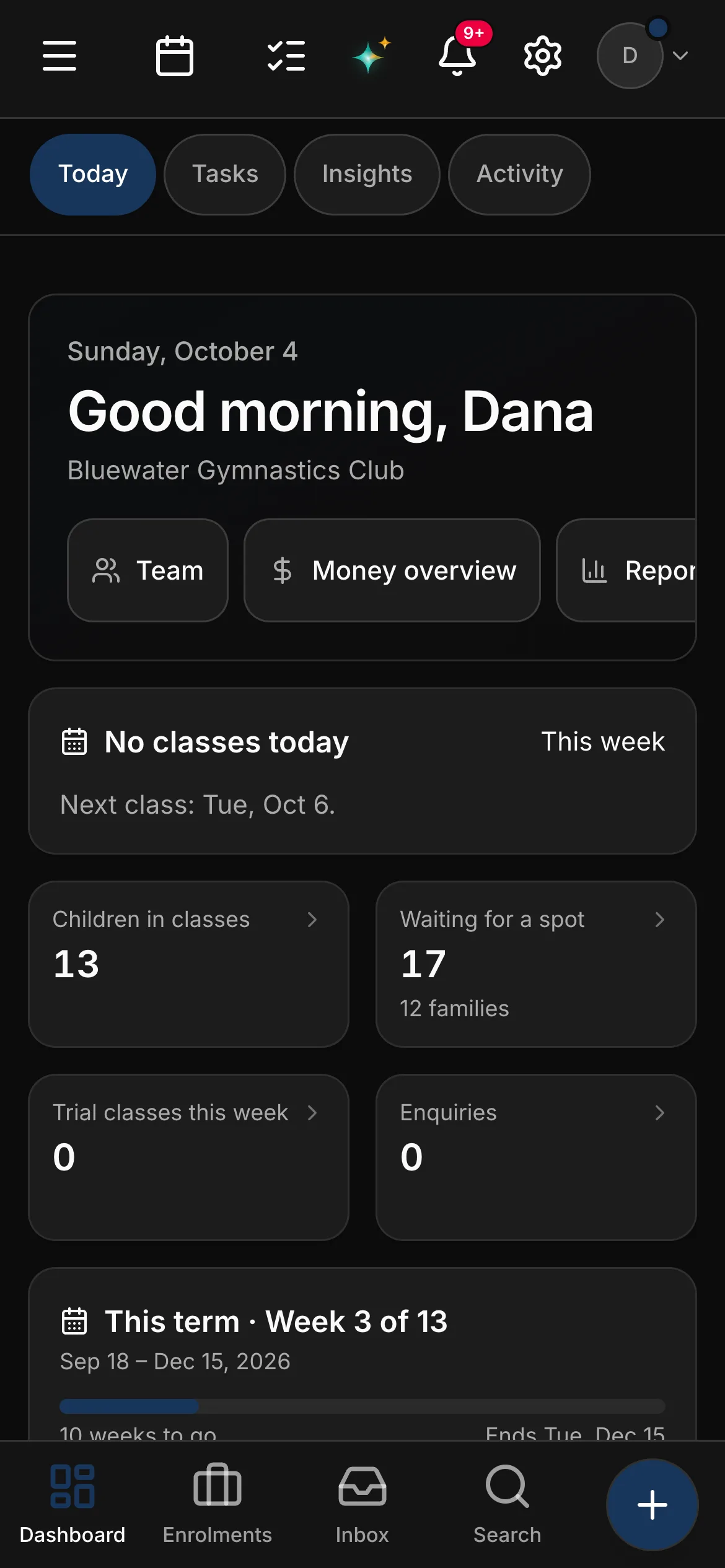
The same dashboard on a phone: the next class, the children in classes, the families waiting for a spot, and this term at week 3 of 13.

The rules a club lives under

Built around the paperwork a club already answers to.

  • Your provincial federation’s member file

    Daybook builds your members for the year in your federation’s own format — and first lists every member who cannot go on it yet and why, because one blank cell fails a whole upload. It submits nothing: you check the file and upload it the way you do now.

  • PIPEDA, and records about other people’s children

    Children’s records are required on a club account and kept until the youngest child turns 21 — flagged when that day comes, never deleted on their own. Your database lives in Toronto, encrypted in transit and at rest; the owner can export the account’s data or delete the account.

  • Photo consent

    Asked for each child when the family registers. A child whose family said no carries a No photos badge on the register and on the coach’s phone, and a class’s photos reach only that class’s families.

  • Coach certifications and sanctions

    NCCP and first-aid certificates, sanction and insurance certificates go in Company files with the date each one expires, and the owners are reminded before one runs out — 30, 14 and 7 days ahead, unless you choose otherwise.

Daybook names these so you can see where it helps. It is not a compliance product: it registers nobody with your federation, it does not check a coach’s certification, and nothing it prints is a tax form — your federation and your accountant have the last word.

Three things that go wrong

The headaches every club office knows.

The waiting list on a sticky note

The level everyone wants is full in the first week of registration, a dozen families want in, and the list of who asked first is a sticky note by the desk.

In Daybook Full is full: once a class is full, families join its waiting list from your website. When a place frees up, offer it to the next family for 24 hours — the email is shown to you before it goes — and enrol them from the list.
The trial nobody followed up

A parent books a free trial, the child loves it, and nobody rings back — so the family signs up somewhere else.

In Daybook Enquiries open on a board — new enquiry, trial booked, trial attended, enrolled — and every card has one next step: book the trial, say whether they came, book a class.

“Which level are they on?”

A parent asks at pickup which skills are left before the next ribbon, and the answer is on a clipboard in the coaches’ room.

In Daybook Your ladder lives in Daybook. Coaches tick skills off from the register on their phone, and parents see the same ladder in the family portal — every skill, every ribbon earned — unless you hold progress until the report card.

The gymnastics club toolkit.

On top of everything Daybook does for every business — the full list is here — a club gets its own: classes in terms, a level ladder, roll call, a coach’s phone and a family portal, in a club’s words. And the parts that make no sense for a club are switched off: quotes, material takeoffs, subcontractors and hazard assessments. Nobody at the front desk walks past a screen that belongs to a contractor.

The week

Every class in its colour. A full one says so.

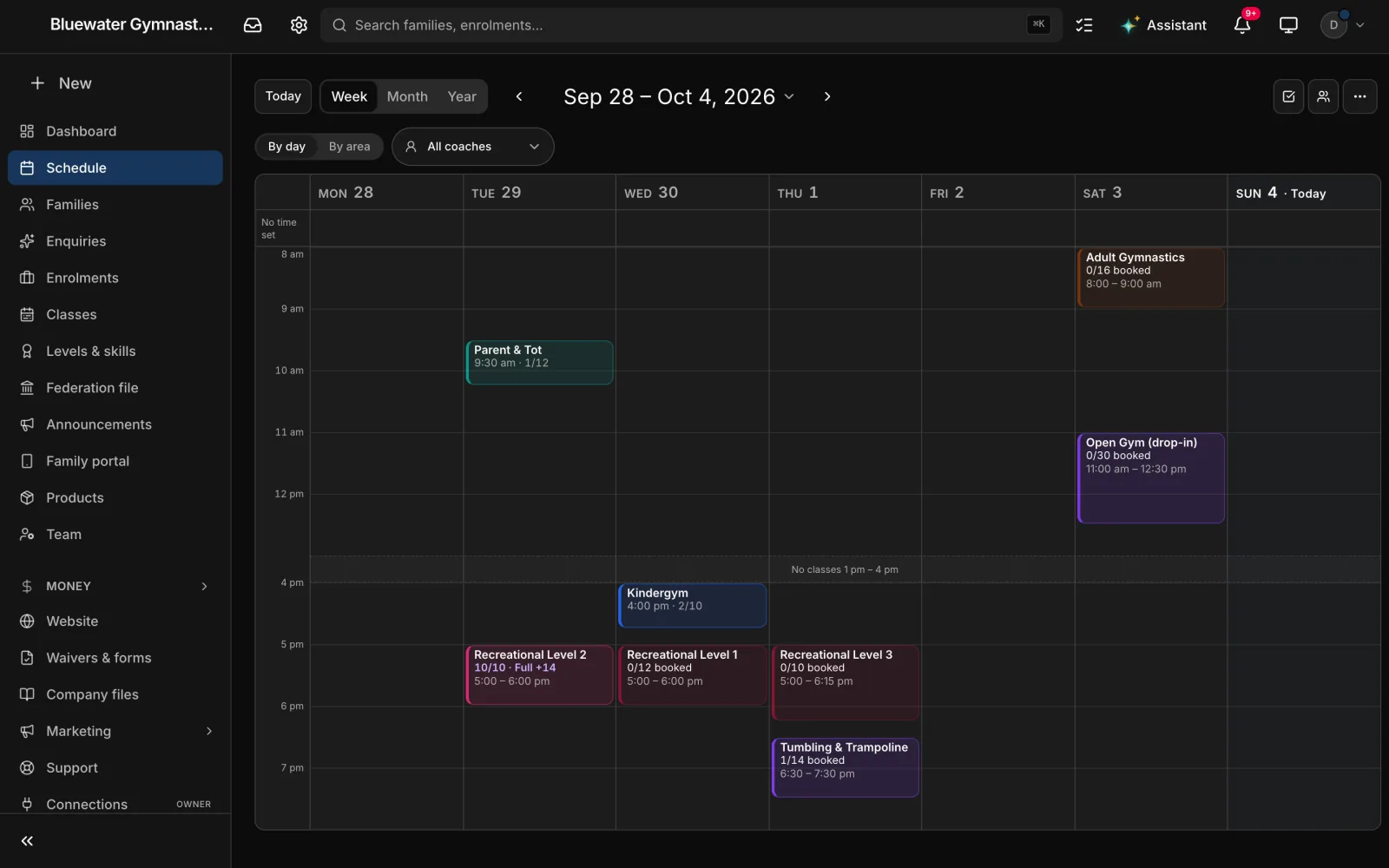
The Schedule draws the week the way the gym runs it: each class in the colour of the lowest level it teaches, the places taken, and a full class with its waiting list counted on it. Switch to By area to see which classes share a part of the gym, or pick one coach’s week.

A gymnastics club’s week on the Schedule: Parent & Tot on Tuesday morning, Kindergym and three recreational levels after school, Tumbling & Trampoline, and Adult Gymnastics and Open Gym on Saturday, each in its own colour with its places taken — Recreational Level 2 full with fourteen waiting — and the empty hours from 1 to 4 pm folded away.

The week

Every class in its colour. A full one says so.

The Schedule draws the week the way the gym runs it: each class in the colour of the lowest level it teaches, the places taken, and a full class with its waiting list counted on it. Switch to By area to see which classes share a part of the gym, or pick one coach’s week.

  • A colour per class, from the ribbon of the lowest level it teaches
  • The places taken on every class; a full one says how many are waiting
  • By area: the classes that share a part of the gym, with a warning when two clash — or one coach’s week
  • A class says when its coach is away, and a trial class shows on the class it is in
  • The hours with no class fold away; the year view shows each term as one band
Scheduling

Classes and terms

Full is full. Then the waiting list.

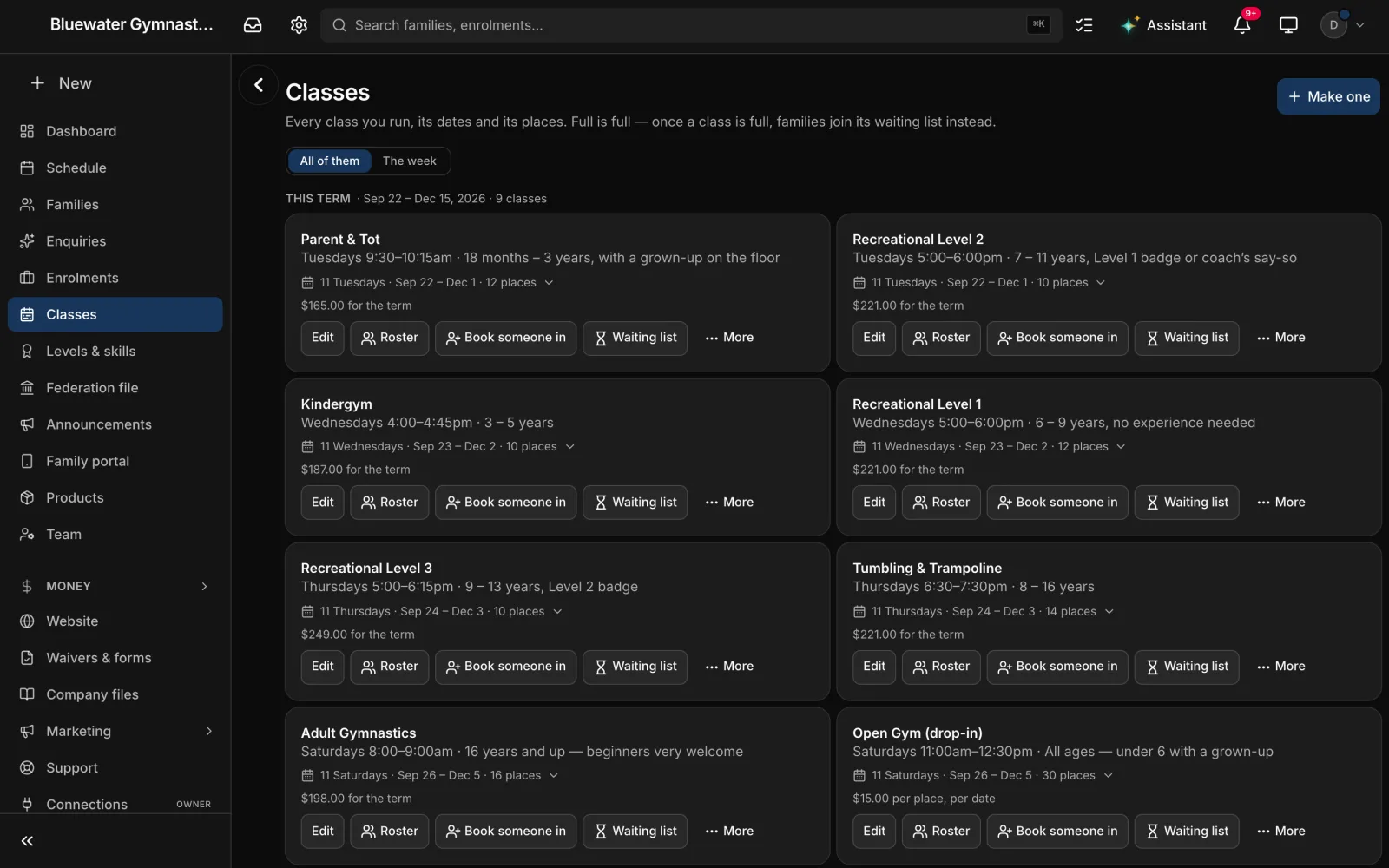
Every class carries its term, its dates, its places and its price — for the term, or by the month. Book a family in from the office, or let them register and pay from your website. Once a class is full, families join its waiting list, and when a place frees up you offer it to the next family for 24 hours.

The Classes page of a gymnastics club: this term’s classes, from Parent & Tot to Open Gym, each with its day and time, the ages it is for, its weeks and places, its price for the term, and Roster, Book someone in and Waiting list buttons.

Classes and terms

Full is full. Then the waiting list.

Every class carries its term, its dates, its places and its price — for the term, or by the month. Book a family in from the office, or let them register and pay from your website. Once a class is full, families join its waiting list, and when a place frees up you offer it to the next family for 24 hours.

  • Classes grouped by term, with past terms folded away
  • Registration and payment from your website, with the waiver signed in the same form
  • A waiting list per class; a free place offered for 24 hours, the email shown to you first
  • Drop from class with a date and a reason, and the place offered to the waiting list
  • End-of-term report cards — drafted, put in the family portal, printed or emailed
The family portal

Roll call

The register, with what a coach needs on it.

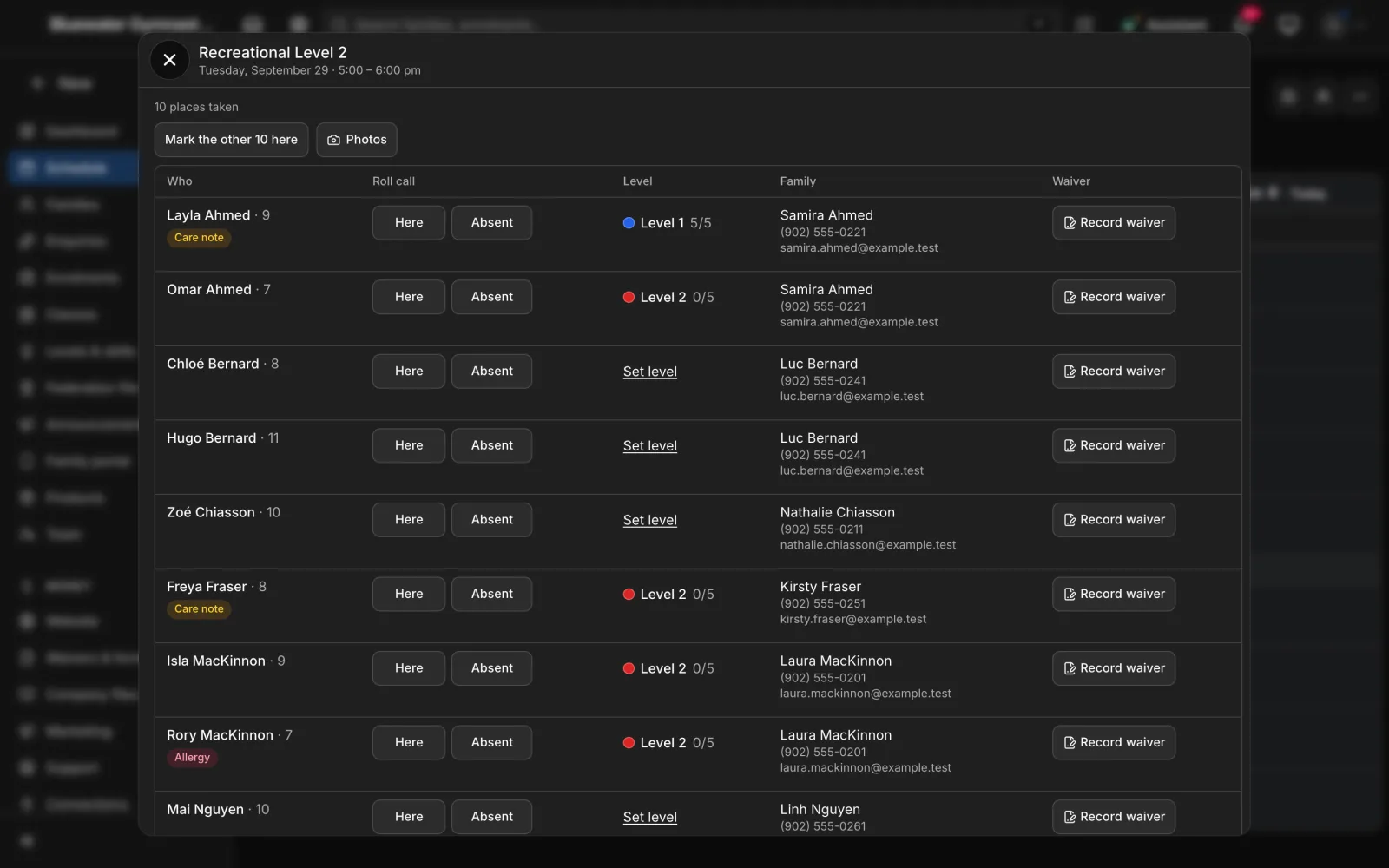
Open a class on the Schedule and its register is there for that date: each child with their age, Here and Absent, their level and how many of its skills they have, an allergy or care note, a No photos badge where the family said no, and the waiver. Mark the rest here in one tap, and tick skills off as they come.

A class register in Daybook: Recreational Level 2 on a Tuesday, ten places taken, Mark the other 10 here, and each child with their age, Here and Absent buttons, their level and skills passed — Level 1 five of five, Level 2 none yet — a care note or allergy badge where there is one, the family’s phone and email, and Record waiver.

Roll call

The register, with what a coach needs on it.

Open a class on the Schedule and its register is there for that date: each child with their age, Here and Absent, their level and how many of its skills they have, an allergy or care note, a No photos badge where the family said no, and the waiver. Mark the rest here in one tap, and tick skills off as they come.

  • Here and Absent for each child, or the rest marked here in one tap
  • Each child’s level and how many of its skills they have — tap it to tick skills off
  • Allergy, care note and No photos badges beside the name
  • An email to the parent of a child marked absent, if you switch it on — shown to you before it goes
  • A Photos button on the register; the album reaches only that class’s families
Coaches on their phones

Levels & skills

Your ladder. Your skills. Your ribbons.

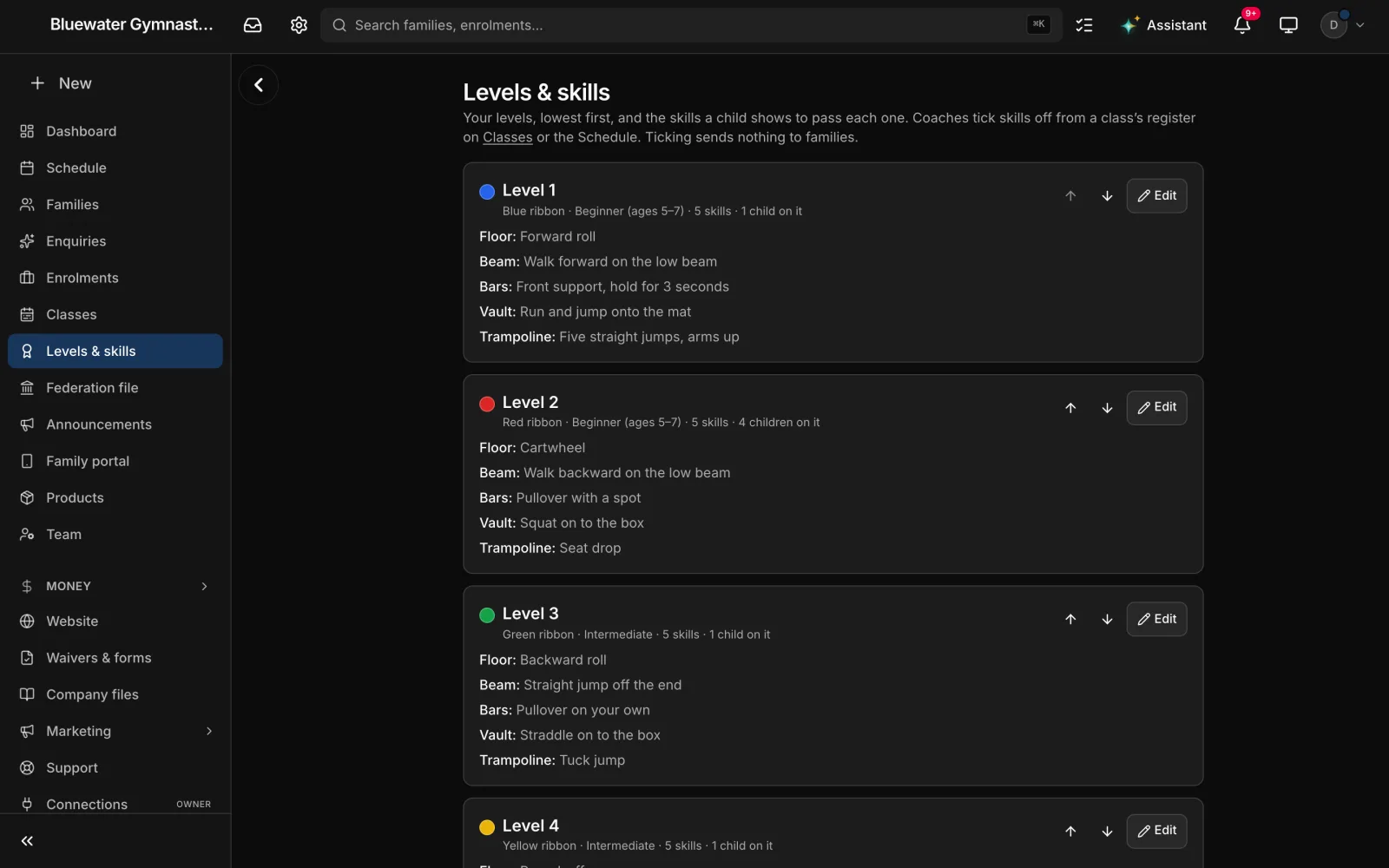
Type or paste your own levels, lowest first, each with its ribbon colour and the skills a child shows to pass it — floor, beam, bars, vault, trampoline, whatever your programme counts. Daybook never writes a curriculum for you. When a child has every skill, the dashboard says they are ready to move up, and Send move-up offers the family the next level’s classes with the places left.

Levels & skills in Daybook: Level 1 with a blue ribbon, Level 2 red, Level 3 green and Level 4 yellow, each with its age group, how many children are on it, and its five skills — a forward roll on the floor, walking forward on the low beam, a front support on the bars, a run and jump onto the mat, five straight jumps on the trampoline.

Levels & skills

Your ladder. Your skills. Your ribbons.

Type or paste your own levels, lowest first, each with its ribbon colour and the skills a child shows to pass it — floor, beam, bars, vault, trampoline, whatever your programme counts. Daybook never writes a curriculum for you. When a child has every skill, the dashboard says they are ready to move up, and Send move-up offers the family the next level’s classes with the places left.

  • Levels lowest first, each with its ribbon colour and its own skills
  • One tap puts every child without a level on the level you pick
  • Coaches tick skills from the register — ticking sends nothing to families
  • “Ready to move up” on the dashboard, and Send move-up with the next level’s classes
  • When the family books next term, the class at the child’s level says “Coach recommends”
The family portal

The family portal

The next class, and every ribbon earned.

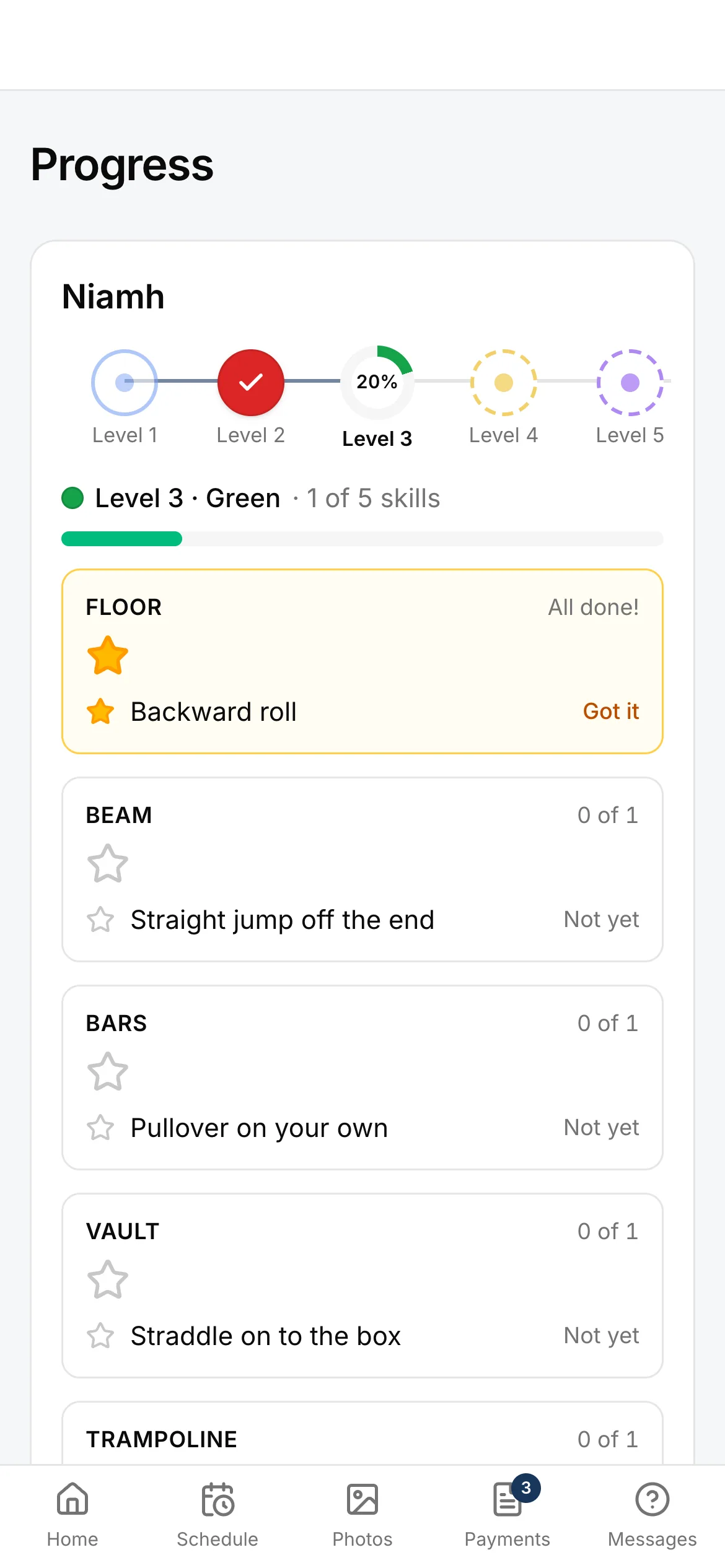
Parents open the portal to the next class and a Can’t make it button. Progress shows each child’s ladder as a path of ribbons — the skills they have, the ones still to come, the ribbons earned and the term’s report card. Booking next term, paying and messaging the club happen in the same place.

Progress in the family portal on a phone: a child’s ladder as a path of ribbons — Level 2 earned, Level 3 a fifth of the way — then Level 3, green, one of five skills, a star on the floor for the backward roll, and the beam, bars and vault still to come.

The family portal

The next class, and every ribbon earned.

Parents open the portal to the next class and a Can’t make it button. Progress shows each child’s ladder as a path of ribbons — the skills they have, the ones still to come, the ribbons earned and the term’s report card. Booking next term, paying and messaging the club happen in the same place.

  • The next class, with Can’t make it to tell the coaches
  • Progress: the ladder, the skills got and the ones to come, the ribbons earned, the report cards
  • Hold progress until the report card, if you would rather
  • Book next term, with “Coach recommends” on the class at the child’s level
  • Payments, and messages that land on the family’s record
The family portal

Billing

By the term, or by the month.

Price a class for the term, or by the month: the month a child joins is prorated by the classes left in it, and every month after that gets one invoice on the 1st, at the price the family booked at. The registration fee is charged once per child in your membership year, a second child can come at a family rate, and a KidSport approval or a refund can sit on the family’s account as a credit.

Term or month priced for the term, or one invoice on the 1st with the joining month prorated

Billing

By the term, or by the month.

Price a class for the term, or by the month: the month a child joins is prorated by the classes left in it, and every month after that gets one invoice on the 1st, at the price the family booked at. The registration fee is charged once per child in your membership year, a second child can come at a family rate, and a KidSport approval or a refund can sit on the family’s account as a credit.

  • Term prices, or monthly tuition invoiced on the 1st
  • The registration fee once per child per membership year
  • A family rate for a second child
  • KidSport approvals and refunds kept as a credit on the family’s account
  • A statement of what a family paid in the year — paid, not billed, and no tax position
Invoicing & payments

Live

The class on the floor, live.

Give a class its plan once — the warm-up, beam, bars, floor, with the minutes for each — and Daybook runs it on the club’s clock: what is on now, how long is left, what is next. The office sees every class live, the lobby TV shows it to the parents waiting, and the family portal shows it too. Coaches tap nothing.

Live what is on now and how long is left — in the office, on the lobby TV and in the family portal

Live

The class on the floor, live.

Give a class its plan once — the warm-up, beam, bars, floor, with the minutes for each — and Daybook runs it on the club’s clock: what is on now, how long is left, what is next. The office sees every class live, the lobby TV shows it to the parents waiting, and the family portal shows it too. Coaches tap nothing.

  • A plan per class — each event and its minutes, typed once
  • The Live view from the dashboard: every class that is on
  • A lobby screen to leave on the TV, with no roll call and no counts on it
  • The live strip in the family portal
Scheduling

Coaches and families

The coach’s phone, and the parent’s.

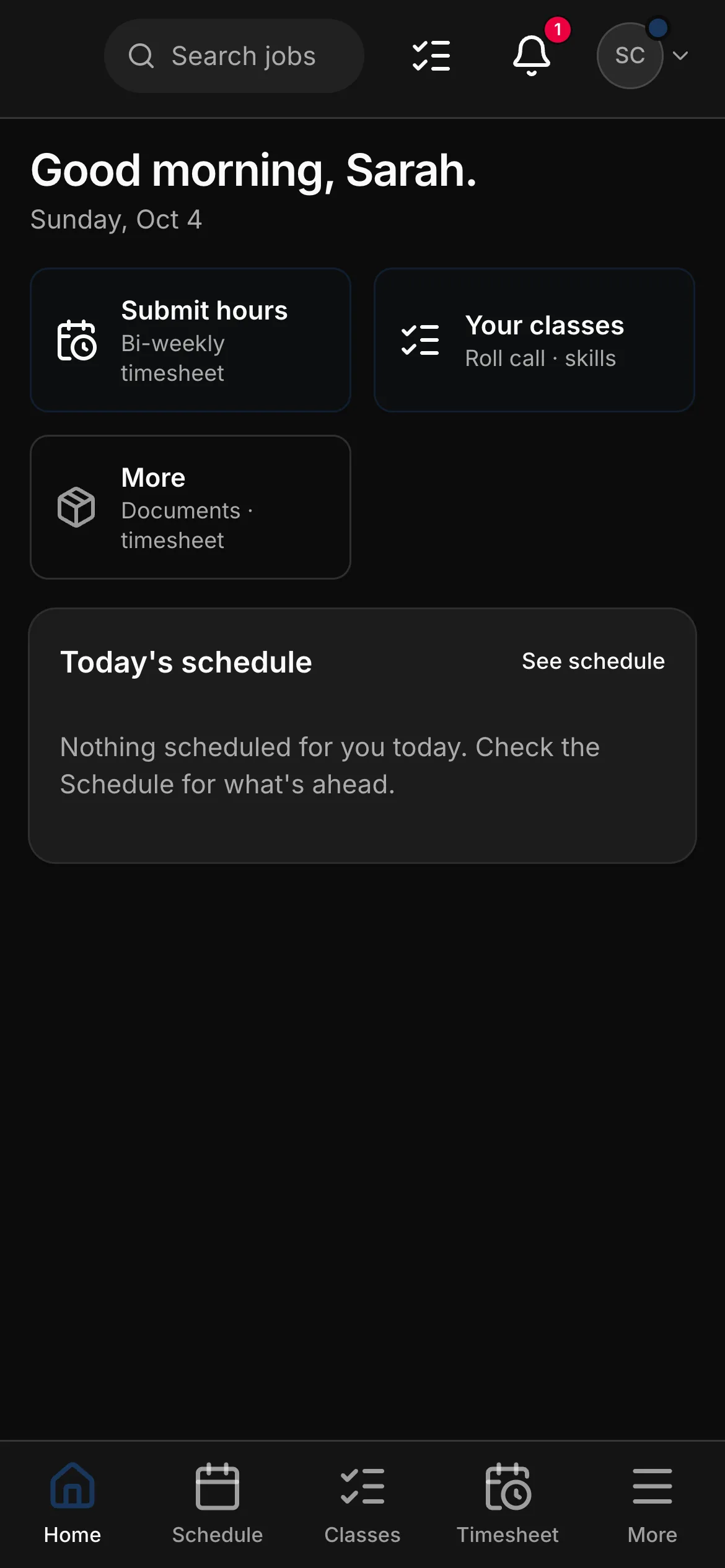
Coaches and instructors are free and unlimited on every club plan, so every coach has the app: their classes, roll call, skill ticks, time off and their hours. Parents have the family portal on theirs — a link, with nothing to install.

  • A coach’s home on a phone: “Good morning, Sarah”, Submit hours, Your classes for roll call and skills, More, and today’s schedule.
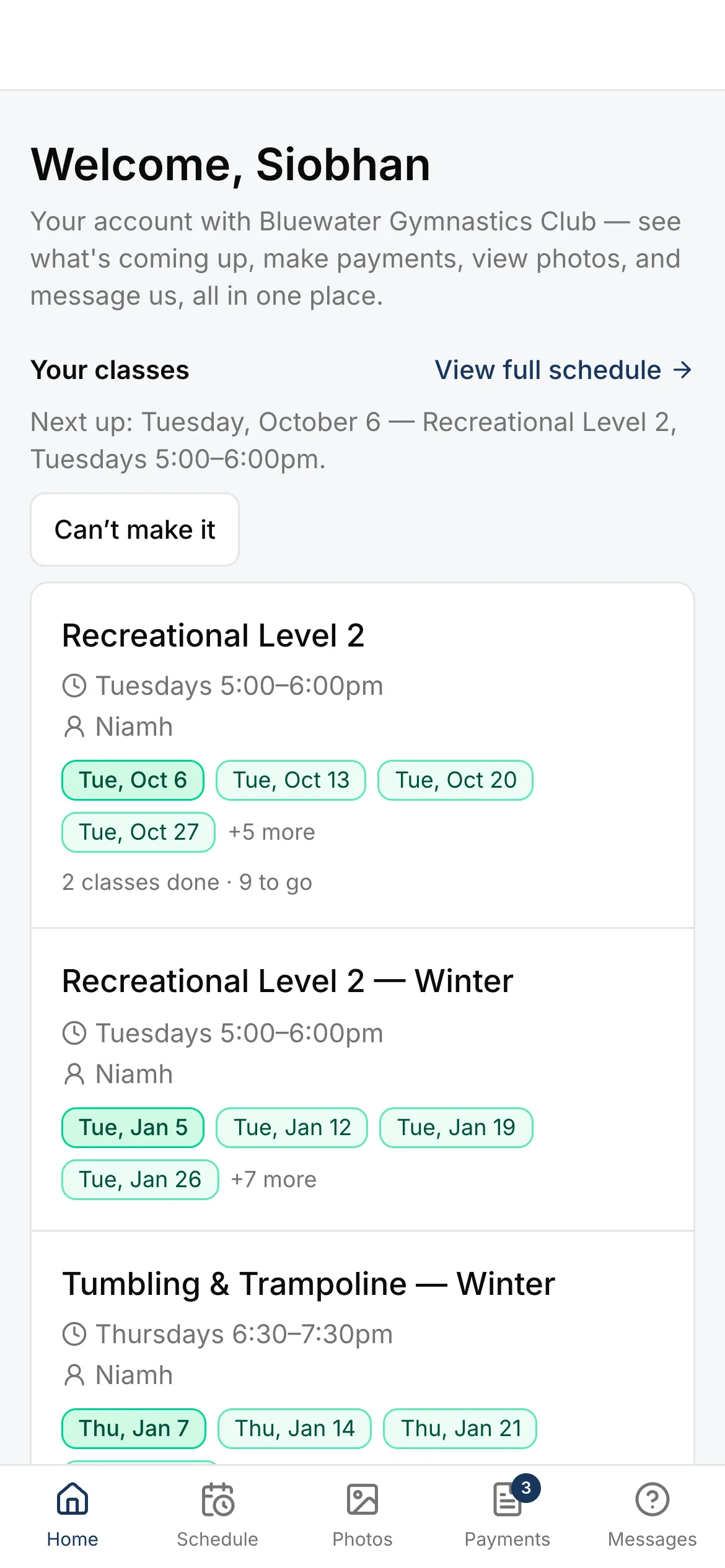
  • The family portal’s home on a phone: “Welcome, Siobhan”, the next class on Tuesday with Can’t make it, and each of the child’s classes with its dates — two classes done, nine to go.
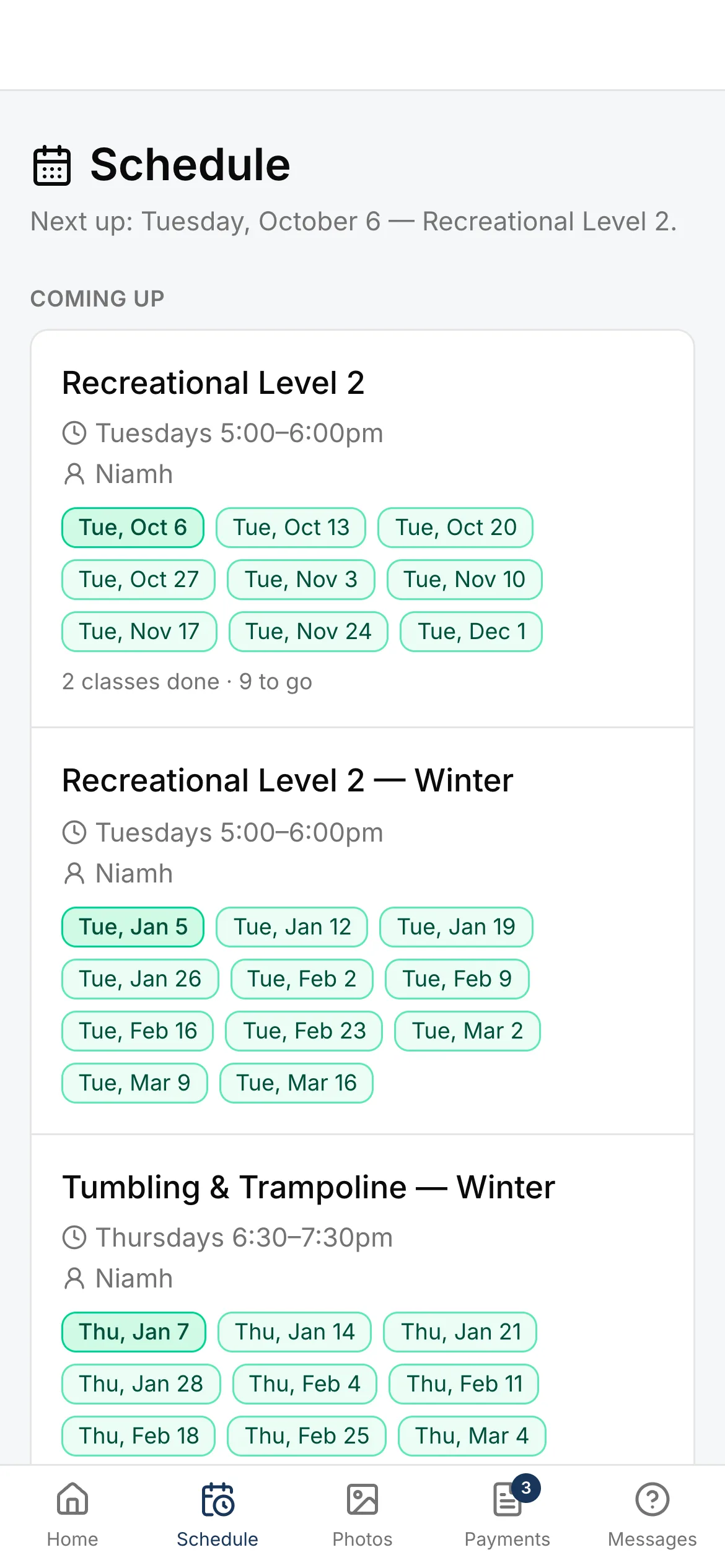
  • The family portal’s schedule on a phone: every class the child is in this term and next, each date shown, to tap when they will miss it.
  • The club’s dashboard on the office phone: the next class, the children in classes, the families waiting for a spot, and this term at week 3 of 13.

The economics

Priced on your active students. Coaches free.

Club software tends to charge per member or per registration, with the staff logins and the website on top, and often in another currency. Daybook is three plans sized on active students, in Canadian dollars, with the coaches free.

Workflow Club platforms priced per member or per registration Daybook
Currency Often billed in US dollars, with the modules priced separately. Canadian dollars. Every plan, every add-on, printed on the pricing page.
Coaches Typically a fee for every staff login. Coaches and instructors free and unlimited on every plan.
Registration Usually a separate registration site, and the payments matched up by hand. Families register and pay from your own website, and land in Daybook as enrolments.
Progress A paper skill sheet, or a separate app. Your own levels and skills, ticked from the register, in the family portal.
Your website Usually a separate builder, or a designer. A gymnastics club’s website on every plan — classes with the places left, membership, new to the gym, the competitive team.

Nothing here is a discount, and there is no setup fee.

Three plans, priced in CAD.

A club has its own rate card — three plans sized on active students. Studio $119 / Academy $249 / Club $399 a month CAD, priced on active students. Admin seats included on every plan. Coaches and instructors are free and unlimited on every plan. Club includes your own domain, selling online and texting — any plan can add them.

  • Studio — $119/mo CAD · Up to 150 active students · +$0.50/active student/mo after · 2 admin seats · +$19/mo each after · Start on Studio
  • Academy — $249/mo CAD · Up to 500 active students · +$0.40/active student/mo after · 6 admin seats · +$19/mo each after · Start on Academy
  • Club — $399/mo CAD · Unlimited active students · 15 admin seats · +$15/mo each after · Start on Club

Start the free trial on AcademySee the plans

Switching

Moving from a spreadsheet, paper, or another platform.

There is no importer for another product’s export, and the page does not pretend there is. What there is gets a club running before the next term.

Bring your families

Upload a CSV or paste it in — parents, phones, emails — and the families are there. Add the children, their allergies and who may collect them on each family’s record.

Type your ladder once

Type or paste the levels and skills your coaches already teach, with your ribbon colours — then put every child without a level on one in a single tap.

Your website, live day one

Open the Website page and a gymnastics club’s pages are already written — classes with the places left, membership, new to the gym, the competitive team. Your photographs and your words go in, and registrations land in Daybook.

Questions club owners ask.

Does it register our members with the federation?

No. It builds your federation’s member file in its own format, and tells you who cannot go on it yet and why. You check the file and upload it the way you do now — Daybook sends nothing to the federation.

Does it print the statement parents ask for in February?

It prints a statement of what the family paid in the year — what was paid, not what was billed. It is not a tax form and takes no tax position; what counts for a claim is the parent’s accountant’s to say.

Do we have to use your levels?

There are none. Levels & skills starts empty: you type or paste your own ladder, with your ribbon colours and the skills a child shows to pass each level.

Do parents see every skill as it is ticked?

Yes, in Progress in the family portal — unless you switch on Hold progress until the report card. Ticking a skill sends nothing to families.

We run a summer camp too. Can it live here?

Yes. Switch on “We also run a summer camp” and a Summer camp page appears, and the week on the Schedule shows the classes and the camp side by side.

What do coaches cost?

Nothing — coaches and instructors are free and unlimited on every club plan. The admin seats are what is counted, and the pricing page prints how many each plan includes.

Bring your own timetable. Watch it run.

Your own classes, your own levels and your own families beat any feature list — start the trial and set the term up in it.

14-day free trial · No credit card · Bring your client list