Skip to content

Built in Prince Edward Island · Priced in Canadian dollars · Support from the people who built it

Septic services

The CRM that quotes at the tank.

Daybook runs a septic company end to end: a request becomes a booked service call, the pumper quotes at the tank from your own price list, and the pump-out report, the inspection report and the install close-out are filled in on the phone — the levels, the gallons, the manifest number, the permit. Then the invoice, with GST/HST by province.

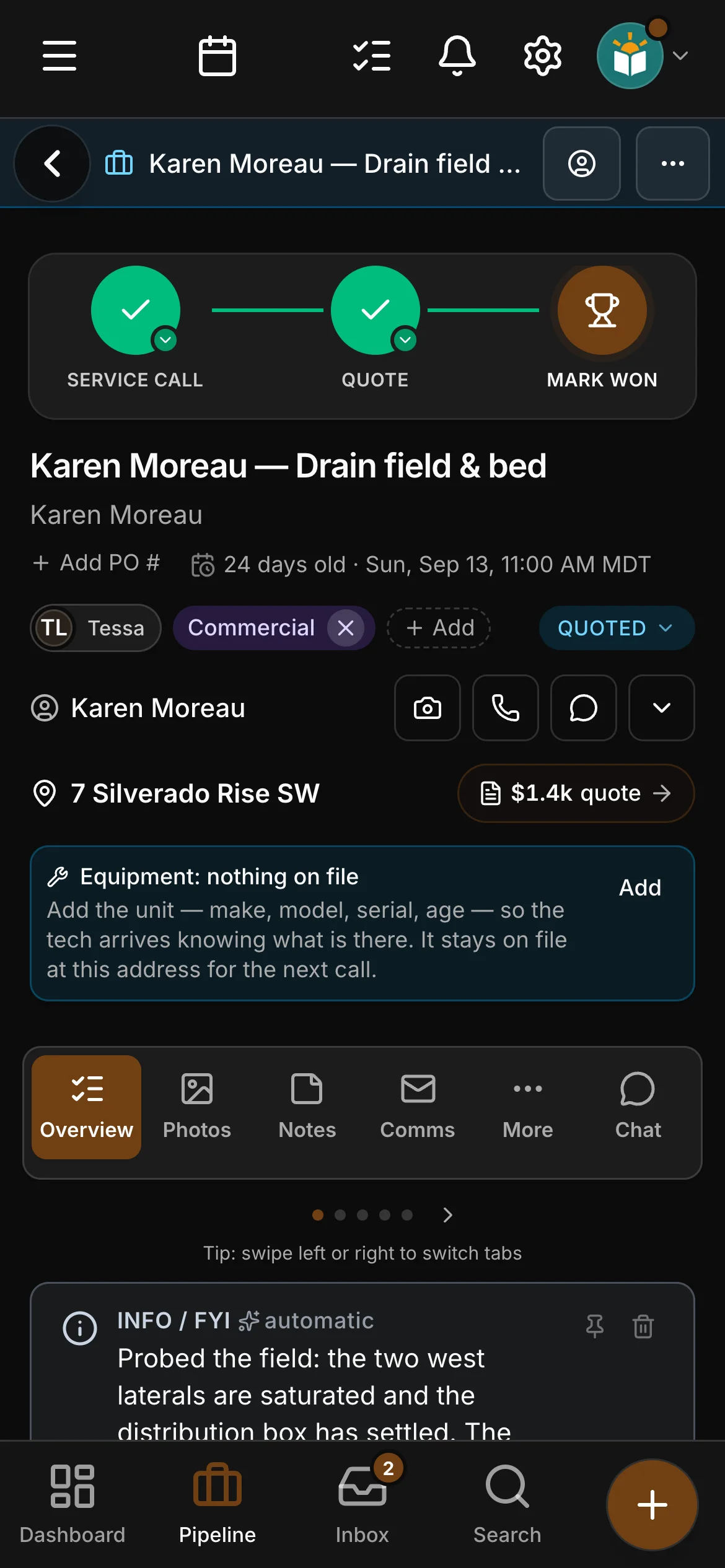
The job “Karen Moreau — Drain field & bed” in Daybook, and its brief: an update from the crew, the access code pinned from the customer’s email, a short summary of where it stands, the key facts, what the customer asked for (each with the message it came from), suggested next moves, what is waiting on us and the next step.

The rules the trade lives under

Built around the paperwork a septic contractor already answers to.

  • On-site sewage permits and inspections

    A new system or a drain-field job does not close without the permit number, the tank and the field that went in, whether the authority’s inspection passed before backfill, the as-built photographs and the customer’s sign-off. On Crew and up.

  • Septage disposal records

    The pump-out report has a place for the gallons pumped and the disposal site or manifest number, beside the tank’s condition and the date the next pump-out is due.

  • Ontario’s rules for contracts signed at a client’s home

    A quote signed at an Ontario client’s home shows them their right to cancel for 10 days, and their copy is emailed with the last day to cancel.

  • Provincial OH&S hazard assessments (FLHA)

    FLHA forms in the crew app, on Crew and up: the hazards, the controls, the conditions and the techs on site, filled in on the phone at the start of the day and filed on the job the moment they land.

Daybook names these so you can see where it helps. It is not a compliance product: it does not apply for a permit, design a system, file an as-built or a manifest, or certify an inspection. The sheets record what you did, the hazard assessment is yours to fill in, and the authority and your province have the last word.

Three things that go wrong

The headaches every septic contractor knows.

Where is the lid, and when was it last pumped

The customer does not know where the tank is, the driver who did it last has retired, and the first half hour of the call is spent with a probe bar.

In Daybook The tank stays on file at the address — its size, where the lids are and when the next pump-out is due — and the pump-out report keeps the access, the levels found and the tank’s condition from the last call.

The lawyer wants the report by Friday

A house sale is waiting on the septic inspection, and the report is a page of handwriting and six photographs on somebody’s phone.

In Daybook The inspection report is one sheet per system: who it is for, the system type, the tank, the liquid level and baffles, the field walked, the dye or load test, the verdict, the photographs and the inspector’s sign-off.

The field is backfilled, and where is the permit

The system is in the ground, the excavator has been paid, and the as-built photographs and the inspection are nowhere anyone can find them.

In Daybook The install and permit close-out wants the permit number, what went in, whether the authority’s inspection passed before backfill, the as-built photographs and the customer’s sign-off — and the job is not complete until it is filled in.

The brief

Everyone talks at once. The job gets one brief.

A job is a week of emails, texts, notes and updates from the crew. Daybook files each one on the job it belongs to and writes the brief: the gate code, the deadline, what the customer asked for, what you owe them and what they owe you — rewritten whenever something new arrives.

The brief and the Assistant

Texting comes with the top plan of every rate card (Company, for a trade), from a verified toll-free number of your own.

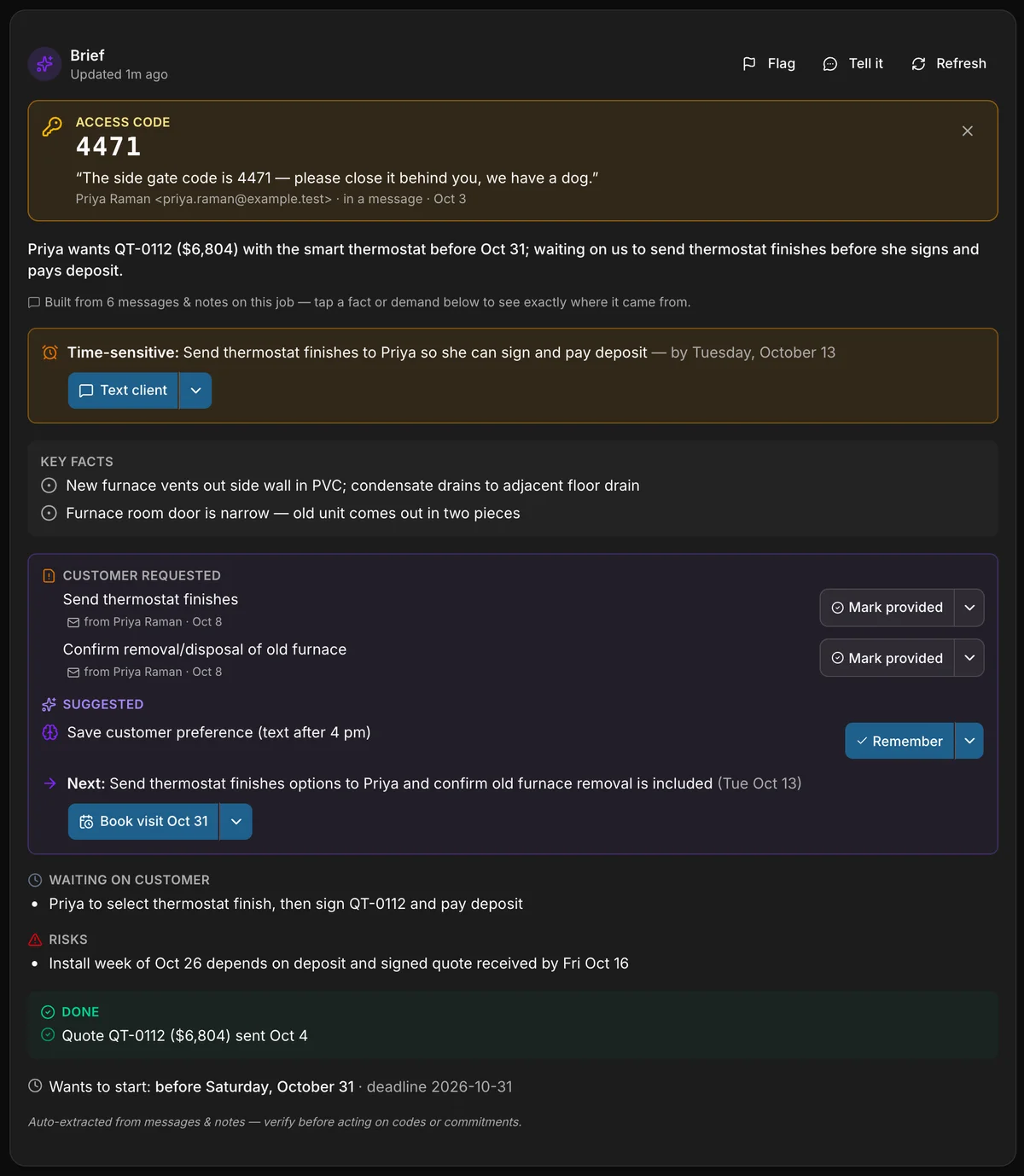
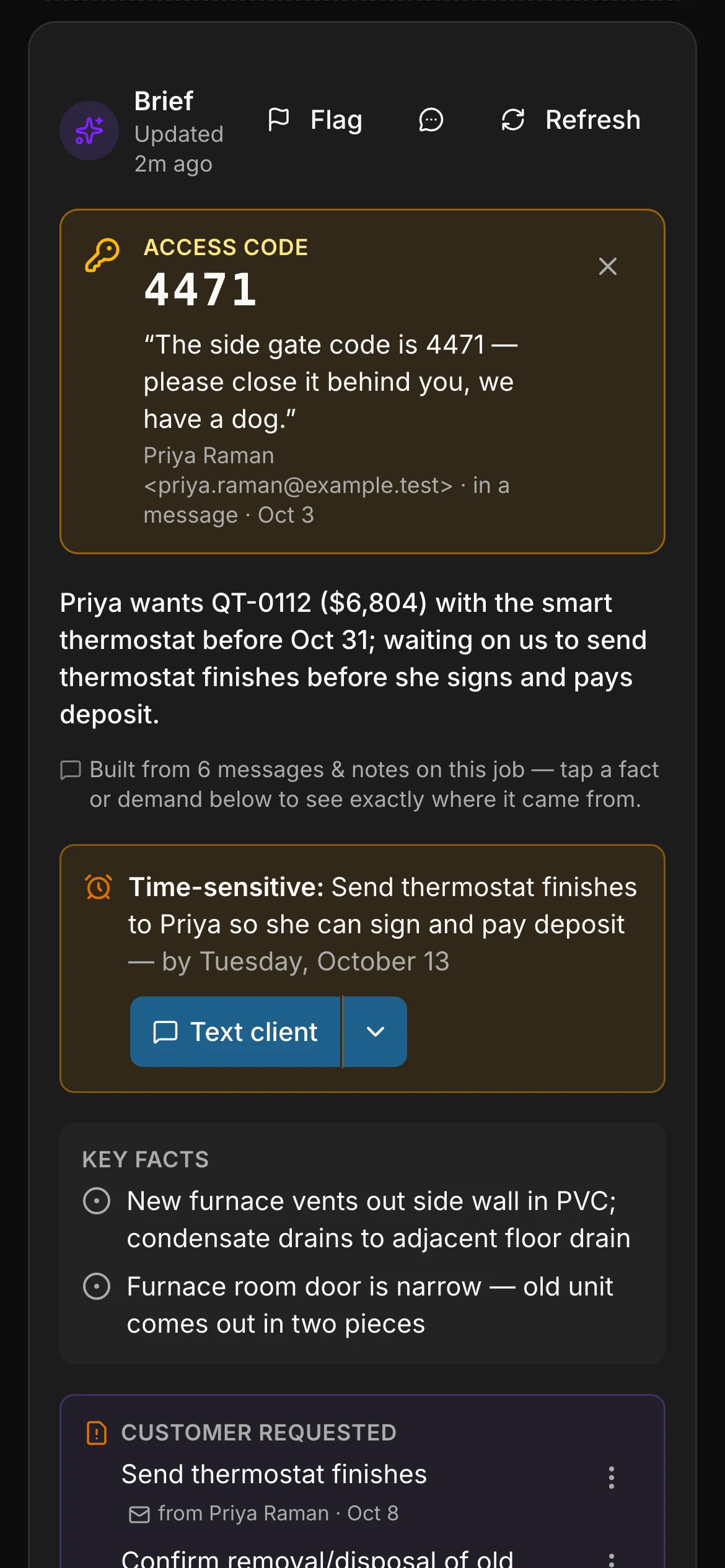
A job’s brief in Daybook: the gate code pinned at the top, a one-line summary, a time-sensitive deadline, key facts, what the customer requested, a suggestion, the next step and its date, and what is waiting on the customer.
1The gate code, pinned
2The deadline
3What the customer asked for
4What we owe, and the next step
5What the customer owes

A real capture of a contractor’s job. Daybook wrote every line of this brief from the messages on the job; only the five teal labels are added. A camp gets the same brief on a booking, a property manager on a work order.

The customerThe customer, textingThe officeA crew memberA crew memberA crew member
  • Our furnace keeps shutting offThe customer, by email
  • Side-wall vent. Narrow doorThe crew, from the site
  • Your quote is attachedThe office, by email
  • 3 photosThe crew, from the site
  • Done before the 24th?The customer, by text
  • Gate code 4471. Mind the dogThe office, to the crew
  • Checklist doneThe crew, from the site
  • The brief’s access code on a phone: 4471, with the customer’s own words — “The side gate code is 4471 — please close it behind you, we have a dog.”

    The gate code, pinned. Said once in an email, and now at the top of the job for the crew.

  • The brief’s time-sensitive line on a phone: send the thermostat finishes to Priya so she can sign and pay the deposit, by Tuesday, October 13, with a Text client button.

    The deadline. What is time-sensitive, and by when.

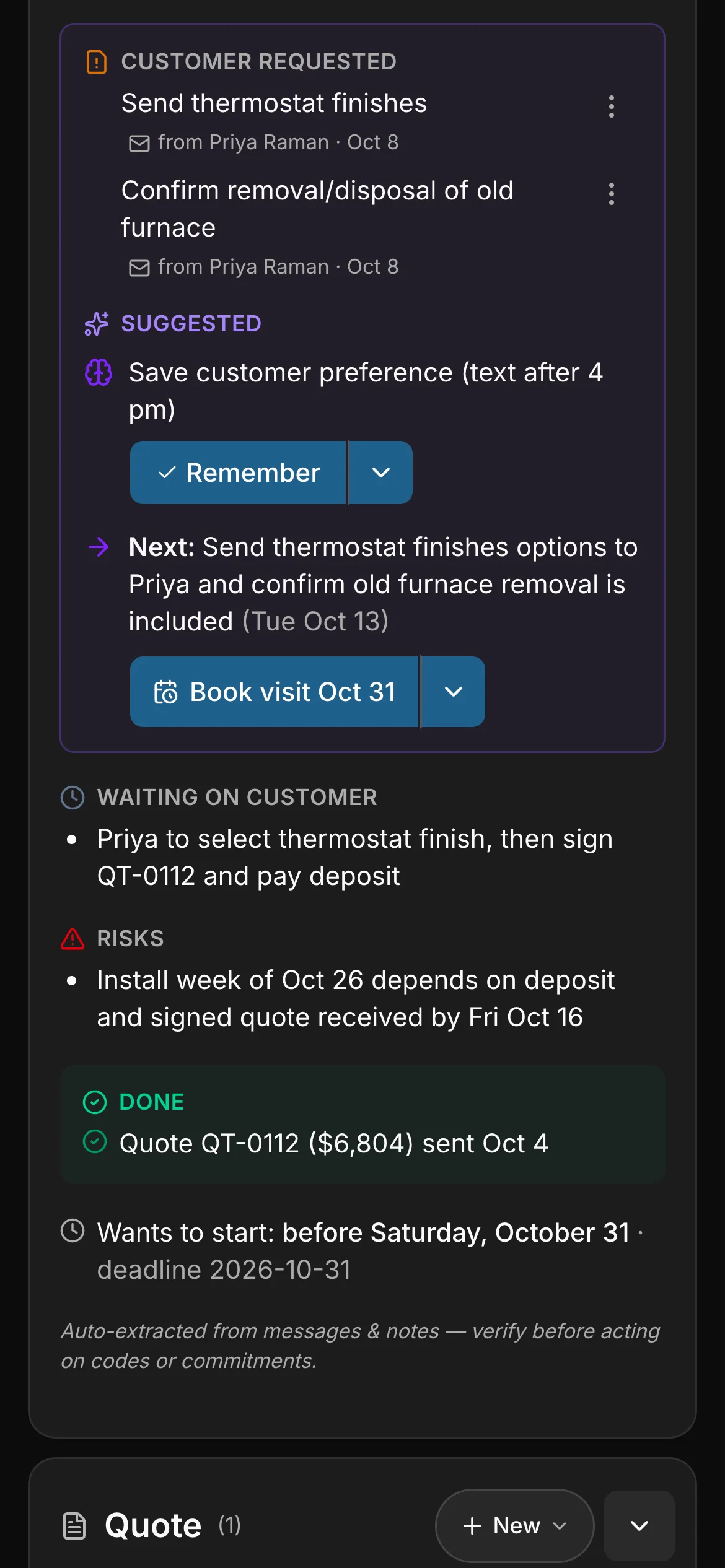
  • What the customer requested, in the brief on a phone: the thermostat finishes, and confirming the old furnace is taken away, each from Priya Raman’s email.

    What the customer asked for. Each request, with the message it came from.

  • The next step, in the brief on a phone: send Priya the thermostat finish options and confirm the old furnace removal, with a Book visit button.

    What we owe, and the next step. One next step, and a button that starts it.

  • Waiting on the customer, in the brief on a phone: pick a thermostat finish, sign the quote and pay the deposit, with the risk under it.

    What the customer owes. So nobody chases the wrong person.

Real captures of a contractor’s job. Daybook wrote every line of this brief from the messages on the job. A camp gets the same brief on a booking, a property manager on a work order.

The septic toolkit.

On top of everything Daybook does for every one of its 44 trades — the full list is here — septic gets its own shape. A visit is a service call, not a site visit; the button says Book a service call; and the drafts, the replies and the job summaries say pump-out, riser and lid, baffle, effluent filter, drain field and lateral, d-box, float and alarm, perc test, as-built and manifest the way a septic contractor does.

The service call

A request becomes a booked call. Not a site visit.

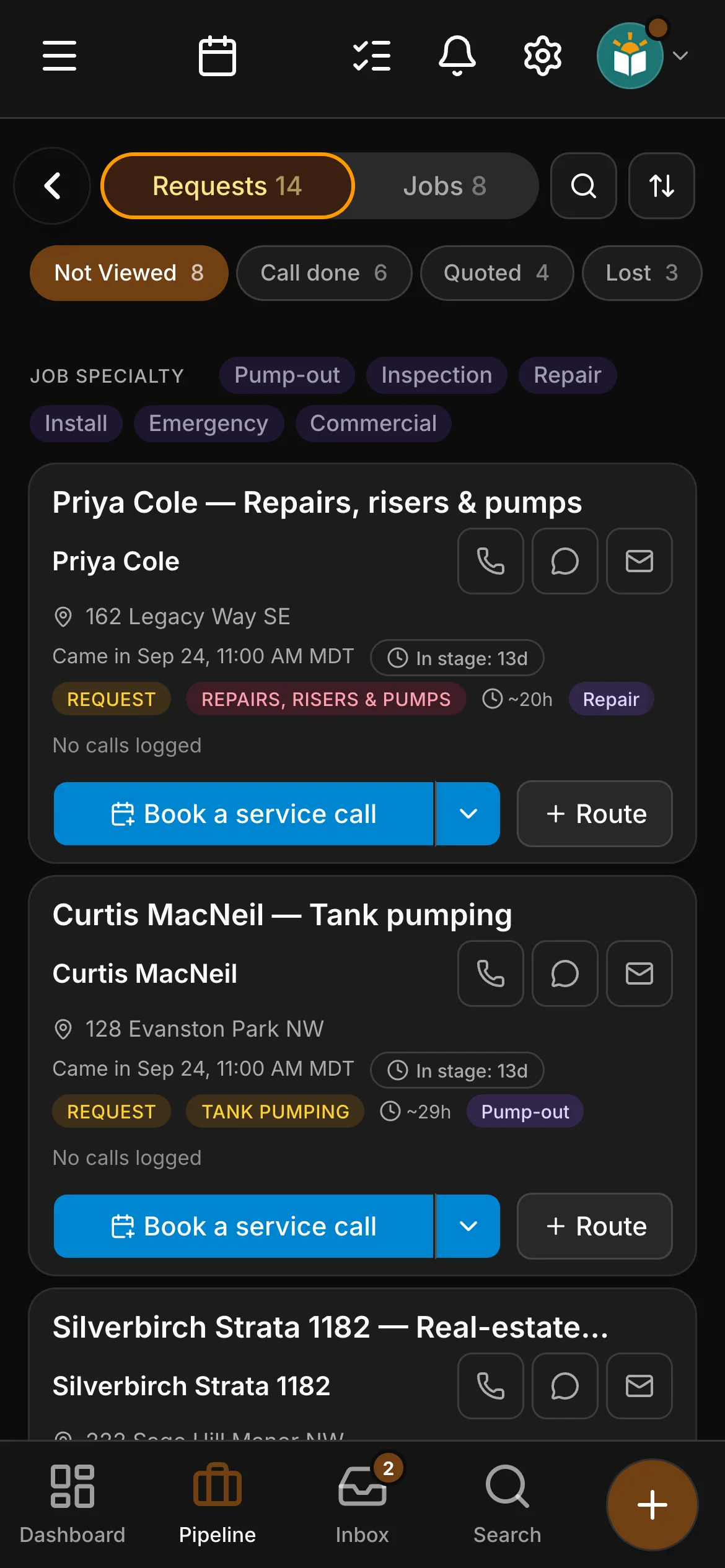
Every request lands on one board with its service type — a pump-out, an inspection for a sale, a riser, a soggy field — and one button: Book a service call. The pumper quotes at the tank; when the call is done, the next step is Mark won.

The requests board in Daybook: “Priya Cole — Repairs, risers & pumps” and “Curtis MacNeil — Tank pumping”.

The service call

A request becomes a booked call. Not a site visit.

Every request lands on one board with its service type — a pump-out, an inspection for a sale, a riser, a soggy field — and one button: Book a service call. The pumper quotes at the tank; when the call is done, the next step is Mark won.

  • The requests board in Daybook: “Priya Cole — Repairs, risers & pumps” and “Curtis MacNeil — Tank pumping”.

    Every request, on your phone. Call the client or email them from the card, and book them in with the button under it.

  • The job on its page in Daybook, its steps across the top: Service call, Quote and Mark won.

    The job’s own page. Its steps across the top, the client a call or a text away, and its photos, notes and messages a swipe apart.

  • Six service types: tank pumping, real-estate inspection, repairs, risers & pumps, drain field & bed, new system install, commercial & grease traps
  • A riser or a float is filed as a repair even when the word is install, an inspection for a sale as an inspection even when it includes a pump-out — sorted for you
  • Book a service call from the request — and plan the day’s route from the same board
  • An arrival window on the booking, and an On my way text that names who is coming, with a link to follow
  • Service call, then Quote, then Mark won — a quote is there when you want one, never in the way
  • Requests from your website’s book-a-pump-out form land here as real requests
Scheduling

The price list

Priced by the tank, the call and the part.

A septic contractor quotes from a price list, not an estimator — so yours starts labelled: pump-outs by the tank size with extra volume by the gallon, holding tanks and grease traps, effluent filter cleaning, the tank locate and lid dig, real-estate inspections with dye and load tests, risers, baffles, pumps and floats, new systems with the design, the permit, the excavation and the electrician beside them, field pipe by the foot and stone by the ton, the tipping fee by the gallon. Your own prices go on it, and every quote and invoice reads from it.

Per tank the pump-out, the gallon over, the inspection, the riser and the system — the way the trade is sold

The price list

Priced by the tank, the call and the part.

A septic contractor quotes from a price list, not an estimator — so yours starts labelled: pump-outs by the tank size with extra volume by the gallon, holding tanks and grease traps, effluent filter cleaning, the tank locate and lid dig, real-estate inspections with dye and load tests, risers, baffles, pumps and floats, new systems with the design, the permit, the excavation and the electrician beside them, field pipe by the foot and stone by the ton, the tipping fee by the gallon. Your own prices go on it, and every quote and invoice reads from it.

  • A labelled starter price list on day one, with your own prices on it
  • Service calls, pumping, inspections, repairs, installs, tanks, pumps and field pipe, subcontractors, fees
  • Cost, price and markup beside each item
  • Quotes and invoices in a septic contractor’s words — approved, or sent back for a revision, in the client’s portal
  • A price book that updates when you scan a supplier invoice — Crew and up
Quoting

The paperwork

Three sheets, written for septic contractors.

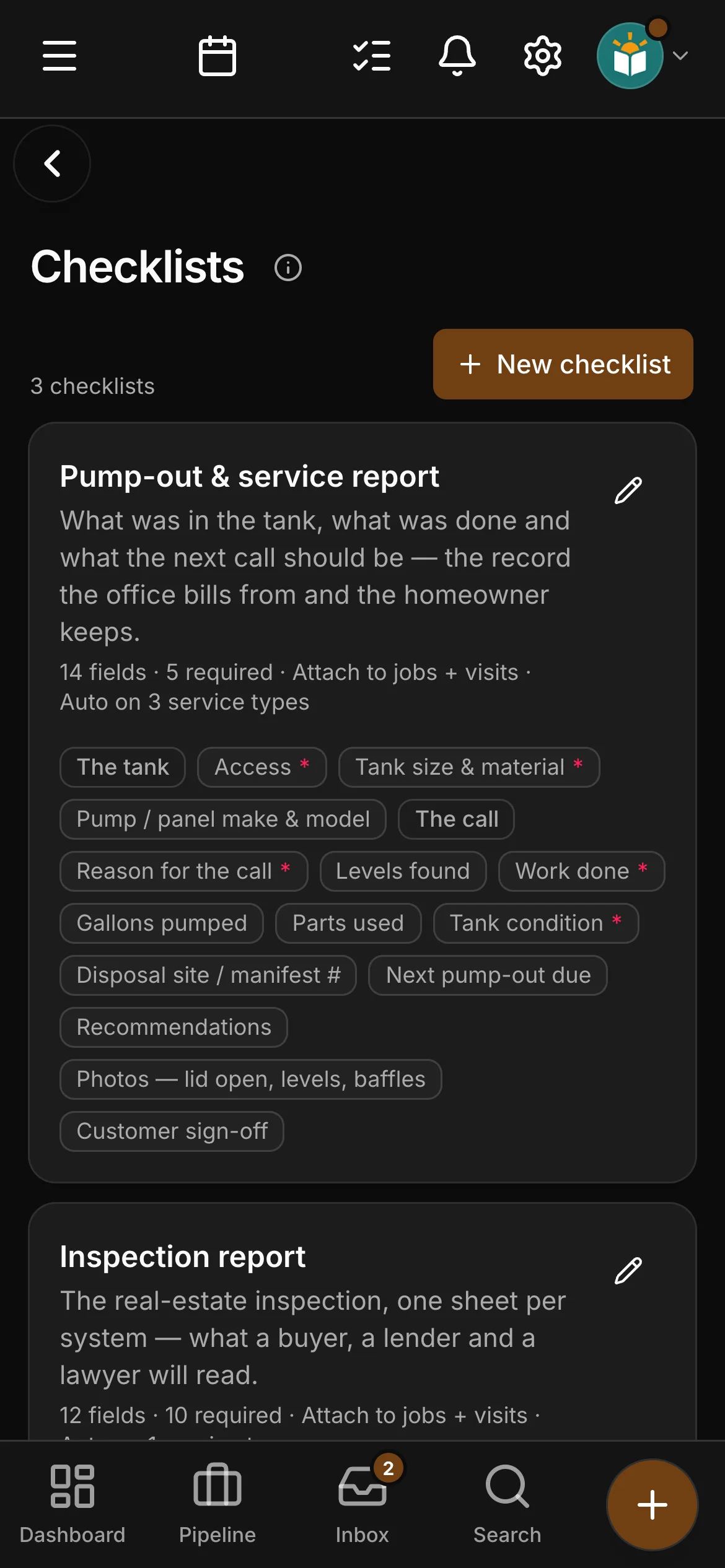
A pump-out and service report with the access, the tank, the levels found, the gallons pumped and the tank’s condition. An inspection report with what a buyer, a lender and a lawyer will read. An install and permit close-out with the permit number, the as-built photographs and the inspection before backfill. They attach themselves to the right jobs, and the last one will not let an install close unfinished.

The checklists in Daybook: “Pump-out & service report” and “Inspection report”.

The paperwork

Three sheets, written for septic contractors.

A pump-out and service report with the access, the tank, the levels found, the gallons pumped and the tank’s condition. An inspection report with what a buyer, a lender and a lawyer will read. An install and permit close-out with the permit number, the as-built photographs and the inspection before backfill. They attach themselves to the right jobs, and the last one will not let an install close unfinished.

  • Pump-out & service report: the access, the tank’s size and material, the reason for the call, levels found, the work done, gallons pumped, the tank’s condition, the disposal site or manifest number, next pump-out due
  • Inspection report: who it is for, the system type, the tank’s size, material and age, the liquid level and baffles, the field walked, a dye or hydraulic load test, the verdict
  • Install & permit close-out: the permit number, the tank and the field that went in, the excavation sub, the authority’s inspection before backfill, the homeowner walked through the system
  • Photographs and a sign-off — the customer’s on the pump-out and the install, the inspector’s on the inspection
  • Attached to the right service types automatically — Crew and up
  • Yours to edit, and you can add your own
The crew app

Equipment and plans

The tank on file, and the plan that looks after it.

Every client has an equipment list: the septic tank, the pump chamber, the effluent pump and the field at each address, with the tank’s size, where the lids are, its serial or permit number and when the next pump-out is due. Sell a care plan on top — a yearly inspection of the tank, the pump and the field, say — and the visits go on your schedule and keep coming, and the plan bills itself.

On file the tank’s size, where the lids are and when it is next due — at the address, for the next call

Equipment and plans

The tank on file, and the plan that looks after it.

Every client has an equipment list: the septic tank, the pump chamber, the effluent pump and the field at each address, with the tank’s size, where the lids are, its serial or permit number and when the next pump-out is due. Sell a care plan on top — a yearly inspection of the tank, the pump and the field, say — and the visits go on your schedule and keep coming, and the plan bills itself.

  • The tank’s size, the lids, the pump’s make and model, the year it went in and a photo
  • Tick the units a call is about, and each unit keeps a history of every job it was on
  • The tech on the job can add a tank or a pump, with a photo
  • Plans with their price, how often they bill and the visits they include
  • Members, what plans bring in each month, and who renews in the next 30 days — on one page
  • The equipment due for service, and the units old enough to replace
Clients & the portal

Safety on site

The FLHA, filled in on the phone. Filed before the lid comes off.

Pick the job and the address and the techs come with it; the day’s conditions, each task with its hazard and its control — submitted from the phone at the start of the day and on the job’s record the moment it lands. Then clock-in, the sheets and the photos, with no signal if it comes to that.

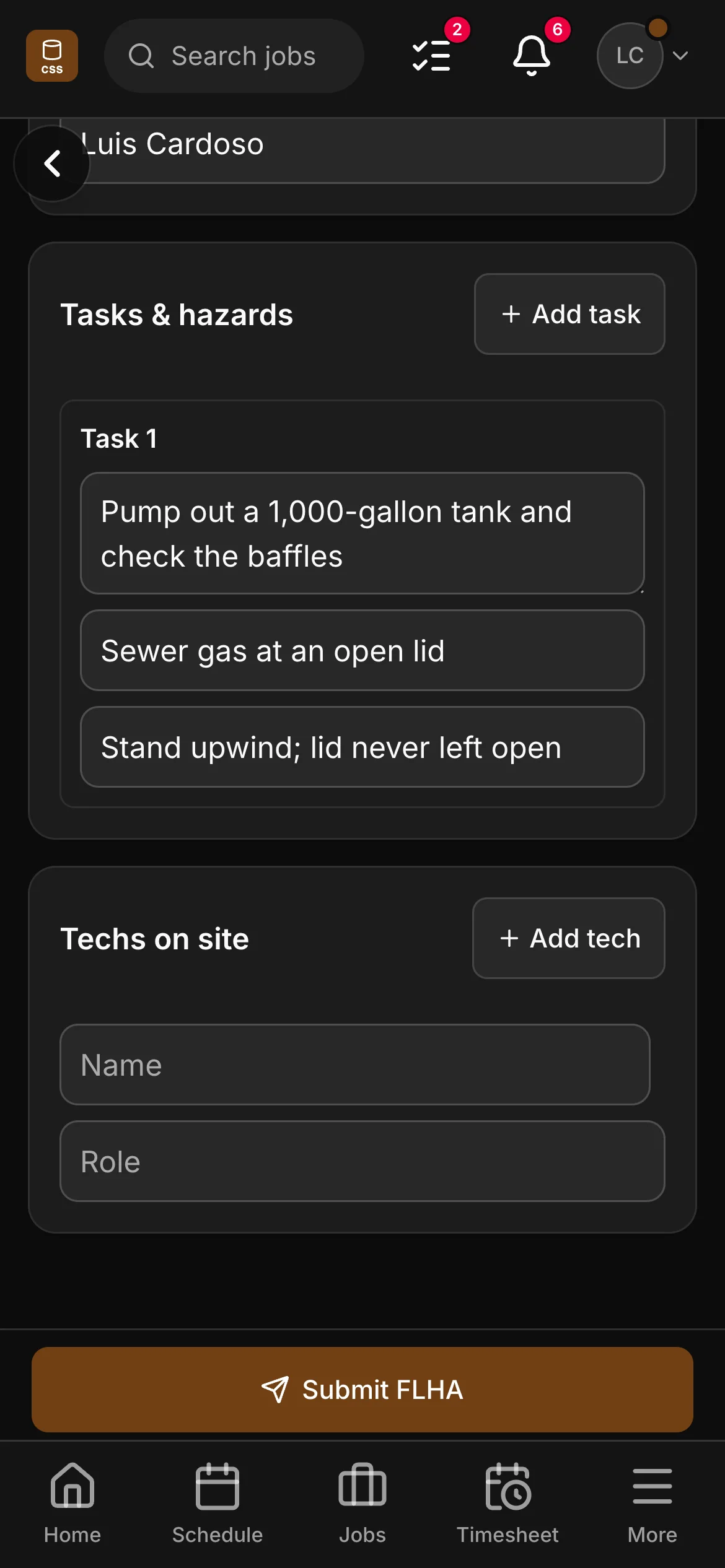
An FLHA in the crew app, “Pump out a 1,000-gallon tank and check the baffles”: the task with its hazard and its control.

Safety on site

The FLHA, filled in on the phone. Filed before the lid comes off.

Pick the job and the address and the techs come with it; the day’s conditions, each task with its hazard and its control — submitted from the phone at the start of the day and on the job’s record the moment it lands. Then clock-in, the sheets and the photos, with no signal if it comes to that.

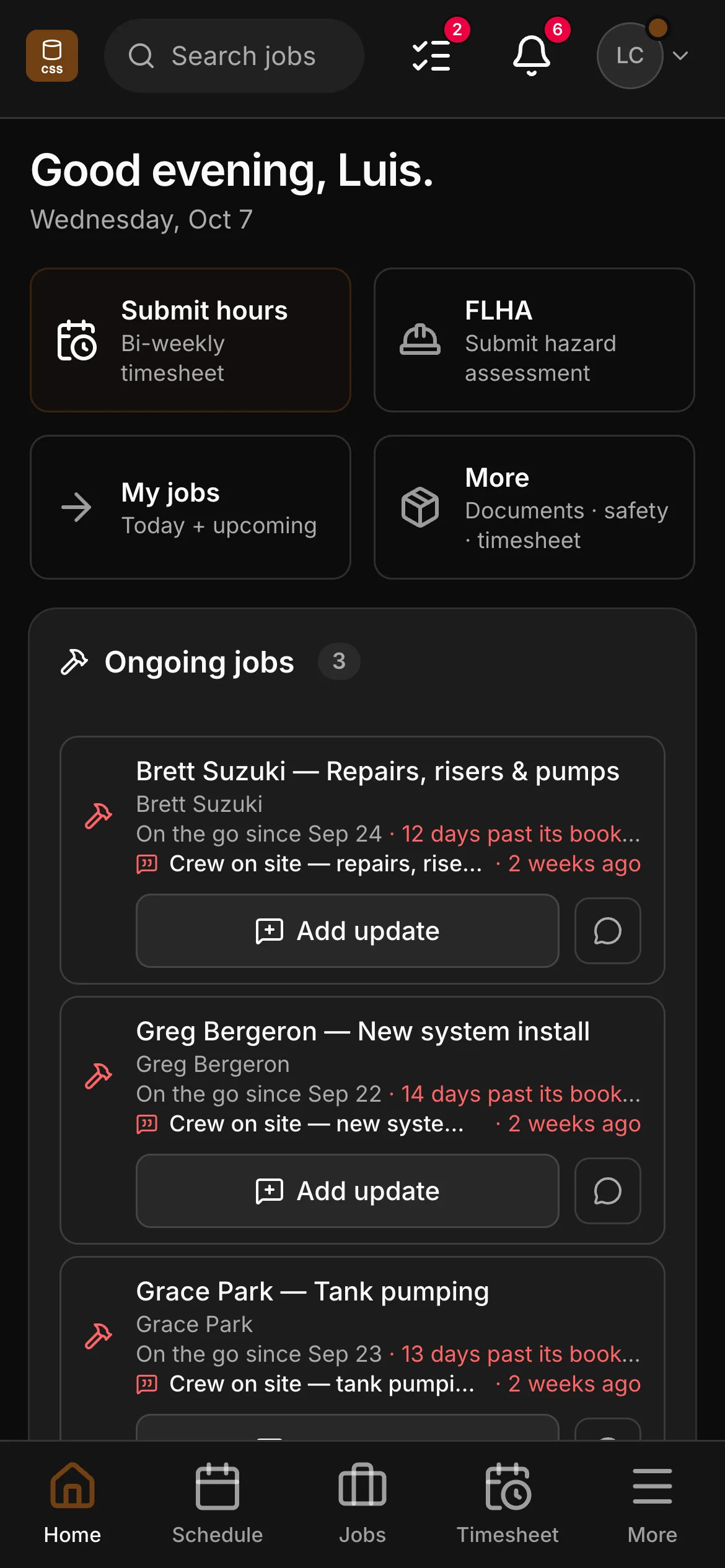
  • The crew app’s home: a greeting by name, then Submit hours, FLHA, My jobs and More, and the jobs on the go below them, each with Add update.

    Their day. Hours, the FLHA and their jobs a tap away — and an update from a job on the go goes straight to the office.

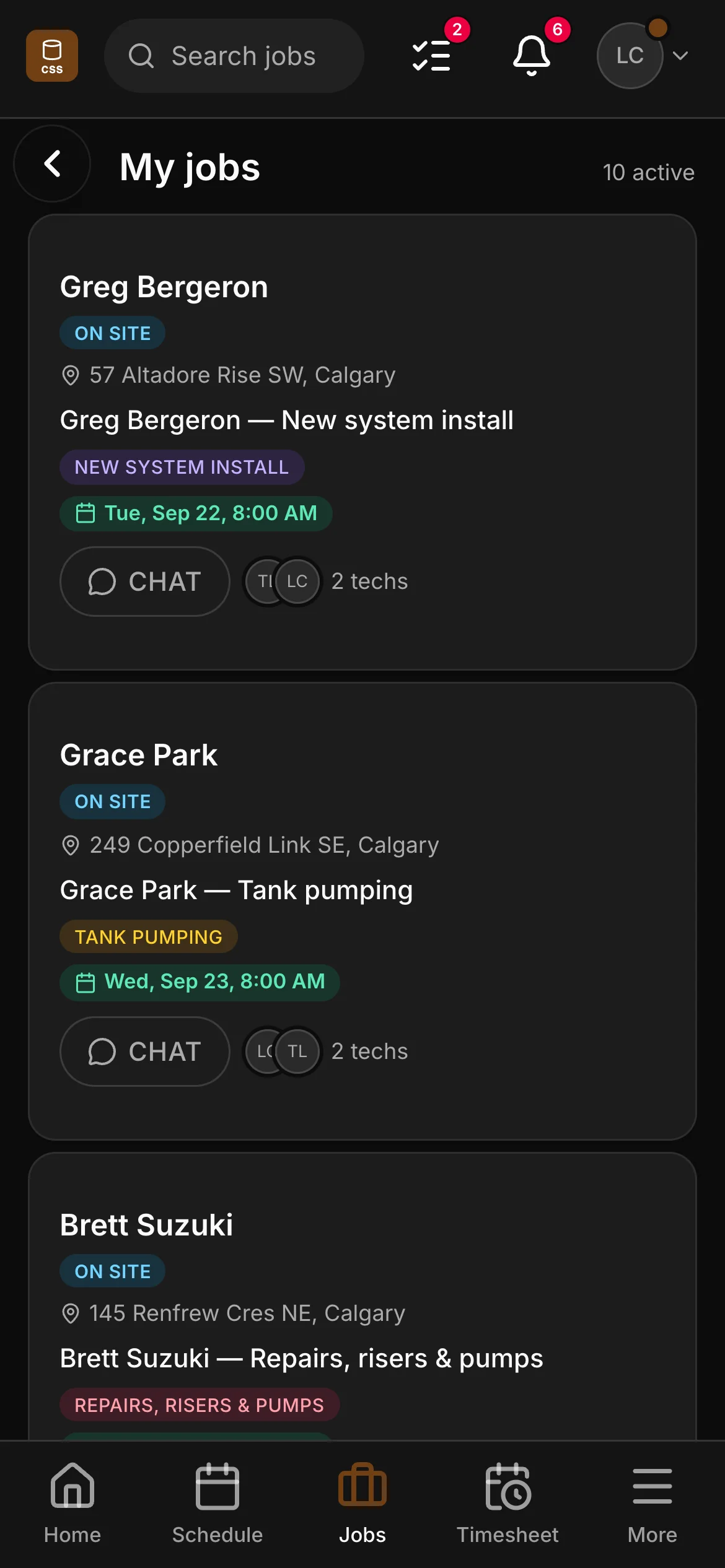
  • A crew member’s list in the crew app, 10 active: “Greg Bergeron — New system install” and “Grace Park — Tank pumping” among them, each with its address and its time.

    Their jobs. Every job they’re on, with its address, its booked day and a chat with the office.

  • An FLHA in the crew app, “Pump out a 1,000-gallon tank and check the baffles”: the task with its hazard and its control.

    Before the work starts. Pick the job and the site, its contact and the crew fill in; they add each task with its hazard and its control, and submit it from the phone.

  • FLHA forms on Crew and up: job, site, conditions, tasks with hazard and control, the techs on site
  • Clock-in and timesheets from the phone in their pocket
  • The pump-out report and the close-out filled in on the job
  • Photos taken where there is no signal, filed when it returns
The crew app

Getting paid

Invoiced off the call. Paid at the door.

The invoice is raised off what was agreed at the tank — the pump-out, the extra gallons, the filter — or by stage on a new system. With a Stripe card reader, the pumper takes a card or Interac debit before the truck leaves. For the rest, a reminder you set once does the following-up, with a Pay Now link; e-transfers are matched to their invoices for you to confirm.

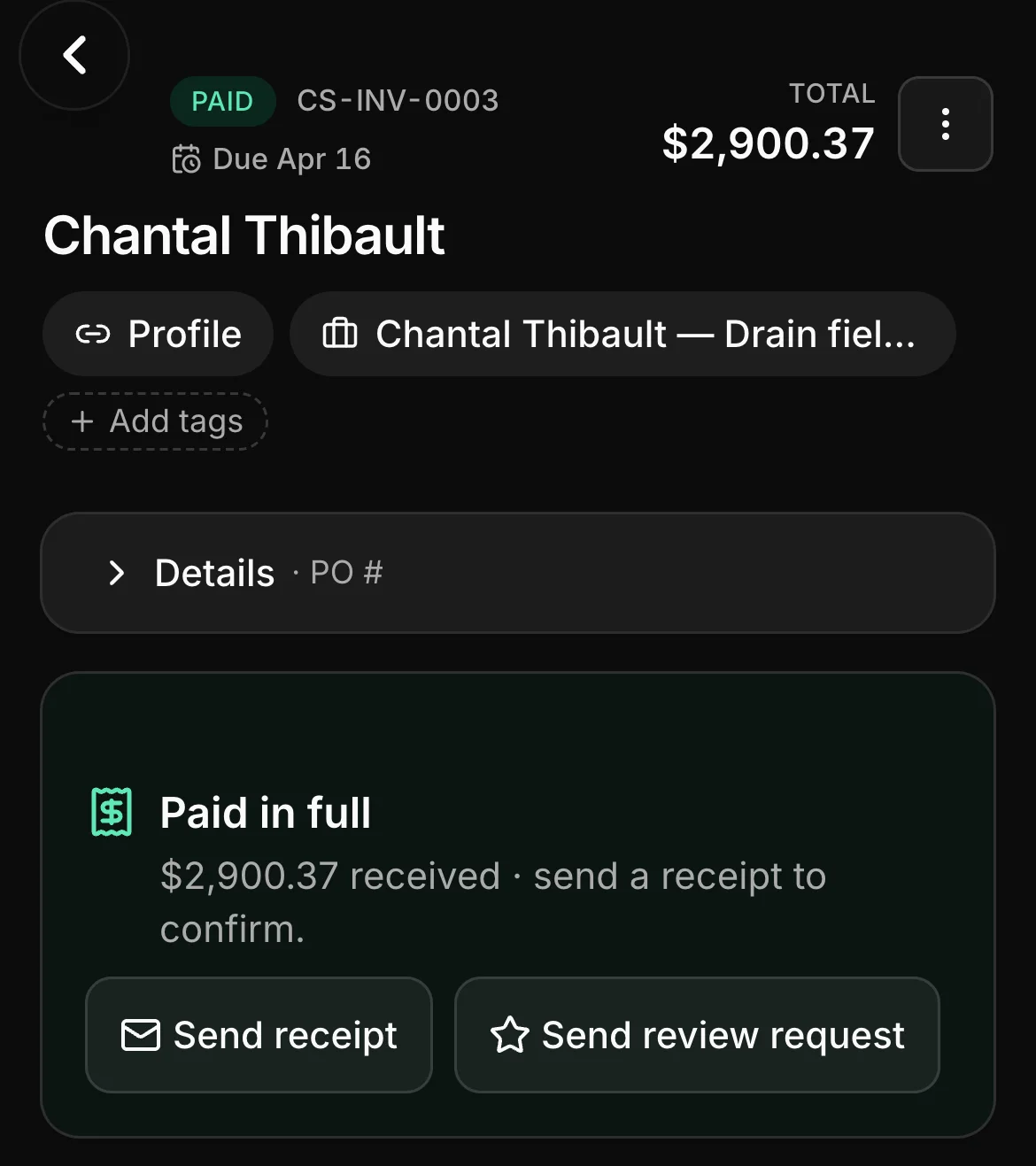
A paid invoice in Daybook: CS-INV-0003, paid, $2,900.37.

Getting paid

Invoiced off the call. Paid at the door.

The invoice is raised off what was agreed at the tank — the pump-out, the extra gallons, the filter — or by stage on a new system. With a Stripe card reader, the pumper takes a card or Interac debit before the truck leaves. For the rest, a reminder you set once does the following-up, with a Pay Now link; e-transfers are matched to their invoices for you to confirm.

  • An invoice off the service call, or progress invoices by stage on a new system
  • A card or Interac debit taken at the door on a Stripe card reader; cash and cheques recorded on the spot
  • A tech you allow can quote from your price list, have it signed and take payment on their own jobs — and never sees your costs
  • An overdue invoice chases itself, with a Pay Now link
  • E-transfer matched for you to confirm; cards online; EFT
  • GST/HST by province, and the Sales Tax report ready for filing
Invoicing & payments

The techs

The phone already in their pocket.

Field seats are free and unlimited on Crew and Company, so every pumper and helper has the app: the day’s calls, clock-in, the FLHA, the sheets, the photos — and the office sees it the moment it lands.

  • A crew member’s list in the crew app, 10 active: “Greg Bergeron — New system install” and “Grace Park — Tank pumping” among them, each with its address and its time.
  • The crew app’s home: a greeting by name, then Submit hours, FLHA, My jobs and More, and the jobs on the go below them, each with Add update.
  • The job on its page in Daybook, its steps across the top: Service call, Quote and Mark won.
  • The checklists in Daybook: “Pump-out & service report” and “Inspection report”.

The economics

Priced on the office. Free for the techs.

Most field-service software charges by the head, in another currency. Daybook charges the office seats, in Canadian dollars, and leaves the people on the truck alone.

Workflow Field-service platforms priced per user Daybook
Currency Often billed in US dollars — the exchange rate and your card’s foreign fee ride along. Canadian dollars. Every plan, every add-on, printed on the pricing page.
The techs Typically an extra monthly fee for every field user past the plan’s cap. Field seats free and unlimited on Crew and Company — every pumper and helper gets the app.
Septic tools A generic job form; the tank’s size and where the lid is live in the driver’s head. The service-call shape, a labelled septic price list, three septic sheets, and the tank on file at the address.
Canadian tax and mileage Usually an accounting add-on, or by hand. GST/HST by province on every invoice, the Sales Tax report, a mileage log at your own rate, receipts read for you.
Your website Usually a separate builder, or a designer. A septic site template on every plan, with a pumping-schedule page and a book-a-pump-out form that mints a real request.

Nothing here is a discount, and there is no setup fee.

Three plans, priced in CAD.

Septic runs on the trades rate card — every plan the same app, the office seats counted and the techs free from Crew up. Solo $99 / Crew $249 / Company $449 a month CAD. Office seats included on every plan. Field seats are free and unlimited on Crew and Company. Crew and Company include selling online, and Company also includes your own domain and texting — a plan without them can add them.

  • Solo — $99/mo CAD · 1 seat · no additions · Start on Solo
  • Crew — $249/mo CAD · 3 office seats · +$39/mo each after · Start on Crew
  • Company — $449/mo CAD · 10 office seats · +$39/mo each after · Start on Company

Start the free trial on CrewSee the plans

Switching

Moving from a spreadsheet, or from another platform.

There is no importer for another product’s export, and the page does not pretend there is. What there is gets a septic company running in an afternoon.

Bring your client list

Upload a CSV or paste it in — names, phones, emails, addresses — and the clients are there. A QuickBooks client list imports straight across.

Put your prices on the list

The septic price list is already labelled, from the pump-out to the tipping fee. Type your own prices in — or, on Crew and up, scan a supplier invoice and the price book fills with your real costs.

Your website, live day one

The septic template is already written for the work, with a pumping-schedule page — your photographs and your words go in, and the book-a-pump-out form drops requests straight into Daybook.

Questions septic contractors ask.

Does it apply for the permit or file the as-built?

No. The install and permit close-out records the permit number, what went in, whether the authority’s inspection passed before backfill and the as-built photographs, and an install will not close without it. The design, the permit application and filing the as-built stay with you.

How do I know whose tank is due?

Each tank on file at a client’s address carries the date its next pump-out is due, and the pump-out report has the same date on it. The Plans page lists the equipment due for service.

Is there a septic estimator?

No — a septic contractor quotes from a price list, so that is what Daybook gives you: the pump-out by the tank, the gallon over, the inspection, the riser and the install with its excavation beside it, labelled on day one, with your own prices on it.

Can the driver take payment at the door?

Yes. With a Stripe card reader, anyone in the field you have allowed to take payment can charge an invoice for a job they are on — tap, insert or Interac debit — and the payment lands on the invoice by itself. Cash and cheques are recorded on the spot.

What does a tech cost?

Nothing on Crew and Company — field seats are free and unlimited. The office seats are what is counted, and the pricing page prints exactly how many each plan includes.

Does it work at the end of a dirt road with no signal?

Clock-in, checklists and photos work with no signal and file themselves when the signal returns. The office sees them the moment they land.

Bring a real pump-out. Watch it booked.

Your own tanks beat any feature list — start the trial, book one, fill in the report and see what the job page already knows.

14-day free trial · No credit card · Bring your client list