Skip to content

Built in Prince Edward Island · Priced in Canadian dollars · Support from the people who built it

Pressure washing

The CRM that knows soft wash from pressure.

Daybook runs a pressure washing company end to end: a request becomes a visit and a quote from your own price list — a house by the storey, a driveway or a deck by the square foot — a storefront or a fleet becomes recurring visits that stay on the schedule, the day’s round opens on a map in the order you will drive it, and the visit log records the method used on each surface. Then the invoice, with GST/HST by province.

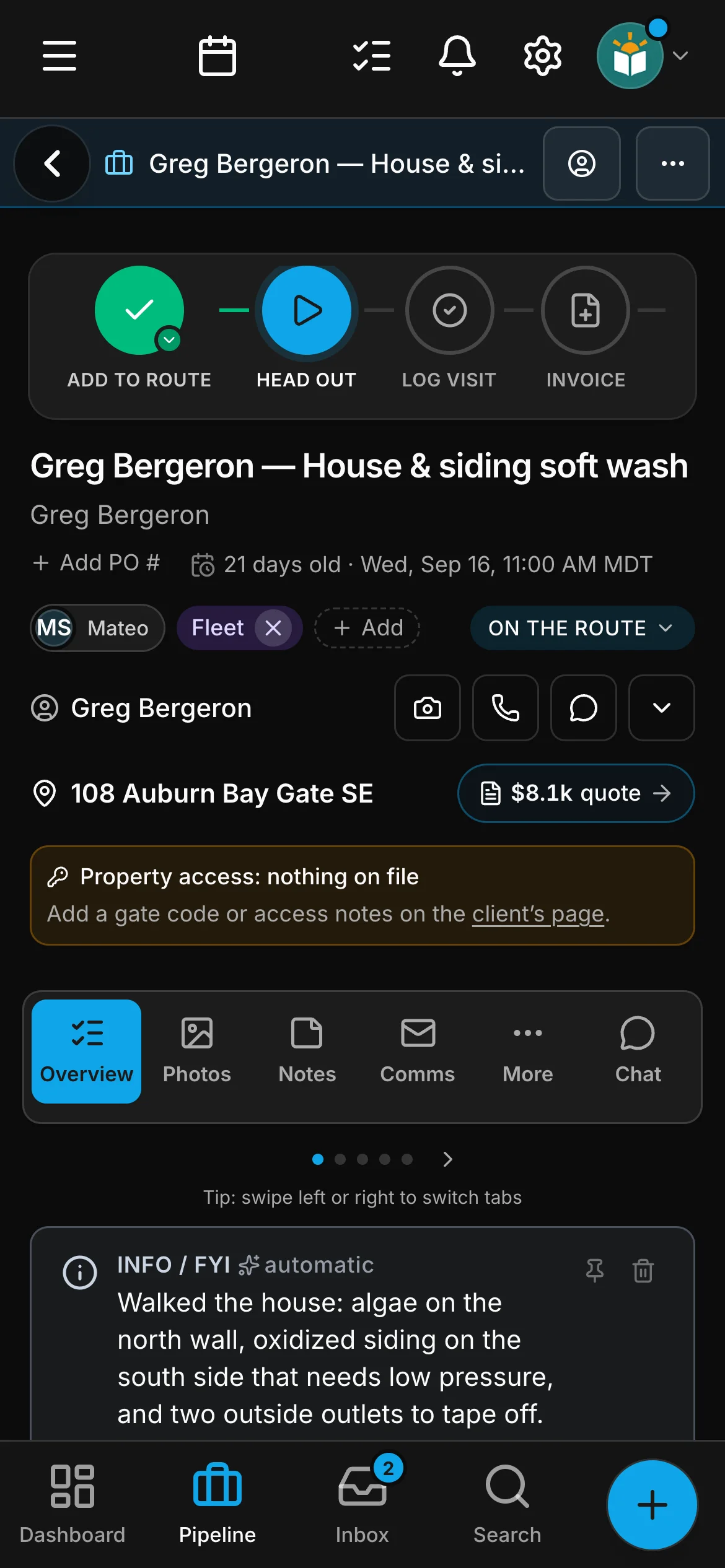
The job “Greg Bergeron — House & siding soft wash” in Daybook, and its brief: “Work starts Monday, October 5”, an update from the crew, the access code pinned from the customer’s email, a short summary of where it stands, the key facts and what the customer asked for (each with the message it came from).

The rules the trade lives under

Built around the paperwork a pressure washing company already answers to.

  • What went on the surface, and the plants

    The visit log records the method on each surface — soft wash, surface cleaner, wand, hot water or hand brush — whether the plants were wet down, covered and rinsed after, and photographs once it is done, with a place for the solution and its strength. On Crew and up.

  • A deck or a fence sealed when it is dry

    A deck or fence job does not close without the dry days since the wash, the weather window, the product, the coats and photographs of it sealed.

  • Ontario’s rules for contracts signed at a client’s home

    A quote signed at an Ontario client’s home shows them their right to cancel for 10 days, and their copy is emailed with the last day to cancel.

  • Provincial OH&S hazard assessments (FLHA)

    FLHA forms in the crew app, on Crew and up: the hazards, the controls, the conditions and the crew on site, filled in on the phone at the start of the day and filed on the job the moment they land.

Daybook names these so you can see where it helps. It is not a compliance product: it does not know your town’s rules for wash water and storm drains, or what a product’s label allows. The log records what you did, the hazard assessment is yours to fill in, and the label and your province have the last word.

Three things that go wrong

The headaches every pressure washing company knows.

“You will strip my siding”

The fear every client brings: a wand too close to vinyl, oxidized paint, an open vent. And afterwards, an argument about what was used.

In Daybook The property setup sheet has the siding material and what to protect; the visit log then records the method on each surface — soft wash for siding, roofs and painted wood, pressure for concrete — with a place for the solution and its strength, and whether the plants were wet down, covered and rinsed.

The deck that was sealed too soon

A wash on Monday, a seal on Wednesday because the calendar was open, and by August it is peeling.

In Daybook The seal and stain record is the return visit: the dry days since the wash, the moisture reading, the weather window, the product and the coats, with photographs of it sealed — and a deck or fence job is not complete until it is filled in.

The annual round, rebuilt every spring

Most houses want the same wash every year, and every April the list is rebuilt from last year’s invoices.

In Daybook On a job, choose Recurring → Make recurring from the ⋯ menu and pick the cadence — yearly for the spring house wash, every six months for spring and fall, monthly for a storefront or a fleet — and its visits go on the schedule, with upcoming ones added every night.

The brief

Everyone talks at once. The job gets one brief.

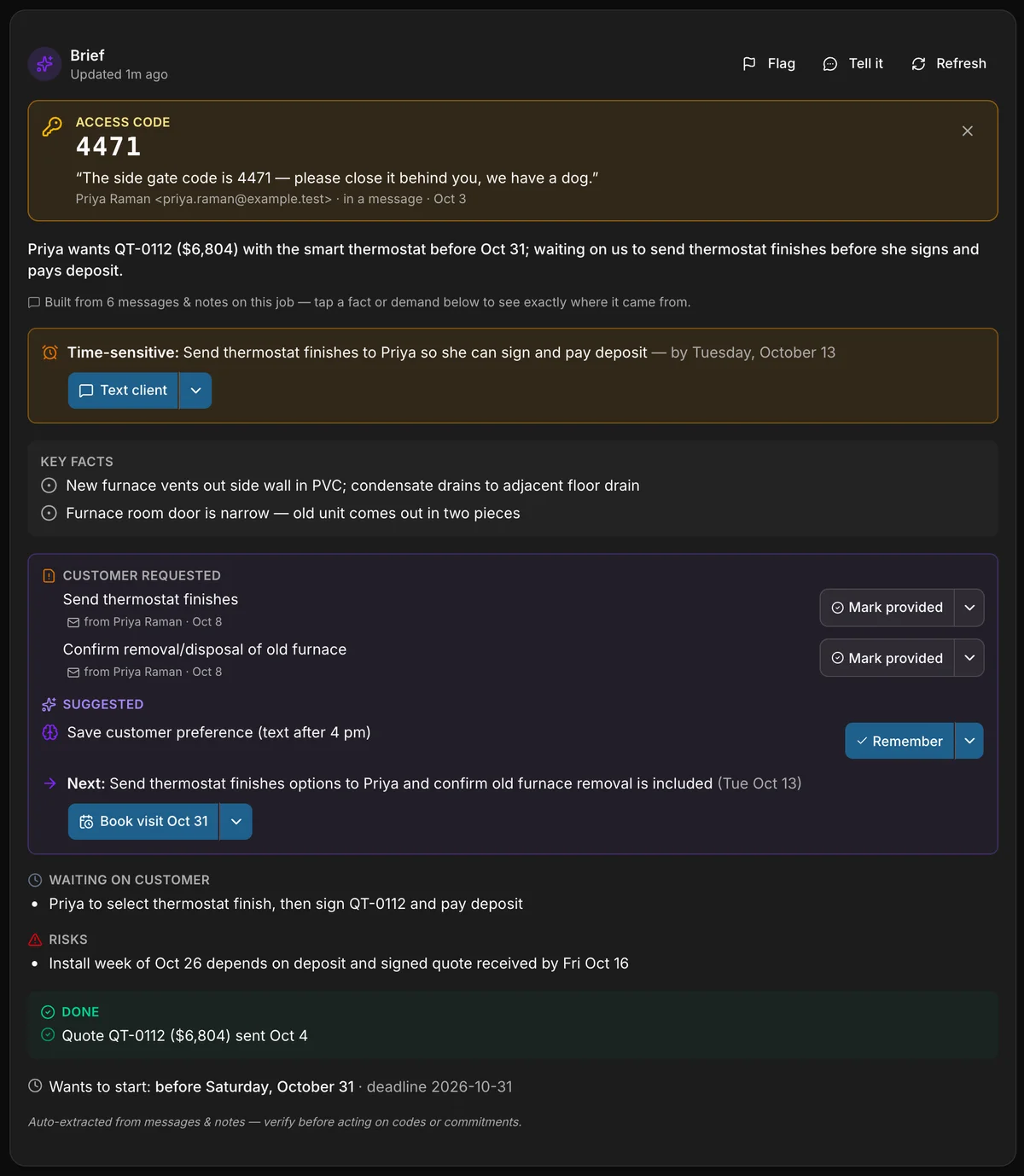
A job is a week of emails, texts, notes and updates from the crew. Daybook files each one on the job it belongs to and writes the brief: the gate code, the deadline, what the customer asked for, what you owe them and what they owe you — rewritten whenever something new arrives.

The brief and the Assistant

Texting comes with the top plan of every rate card (Company, for a trade), from a verified toll-free number of your own.

A job’s brief in Daybook: the gate code pinned at the top, a one-line summary, a time-sensitive deadline, key facts, what the customer requested, a suggestion, the next step and its date, and what is waiting on the customer.
1The gate code, pinned
2The deadline
3What the customer asked for
4What we owe, and the next step
5What the customer owes

A real capture of a contractor’s job. Daybook wrote every line of this brief from the messages on the job; only the five teal labels are added. A camp gets the same brief on a booking, a property manager on a work order.

The customerThe customer, textingThe officeA crew memberA crew memberA crew member
  • Our furnace keeps shutting offThe customer, by email
  • Side-wall vent. Narrow doorThe crew, from the site
  • Your quote is attachedThe office, by email
  • 3 photosThe crew, from the site
  • Done before the 24th?The customer, by text
  • Gate code 4471. Mind the dogThe office, to the crew
  • Checklist doneThe crew, from the site
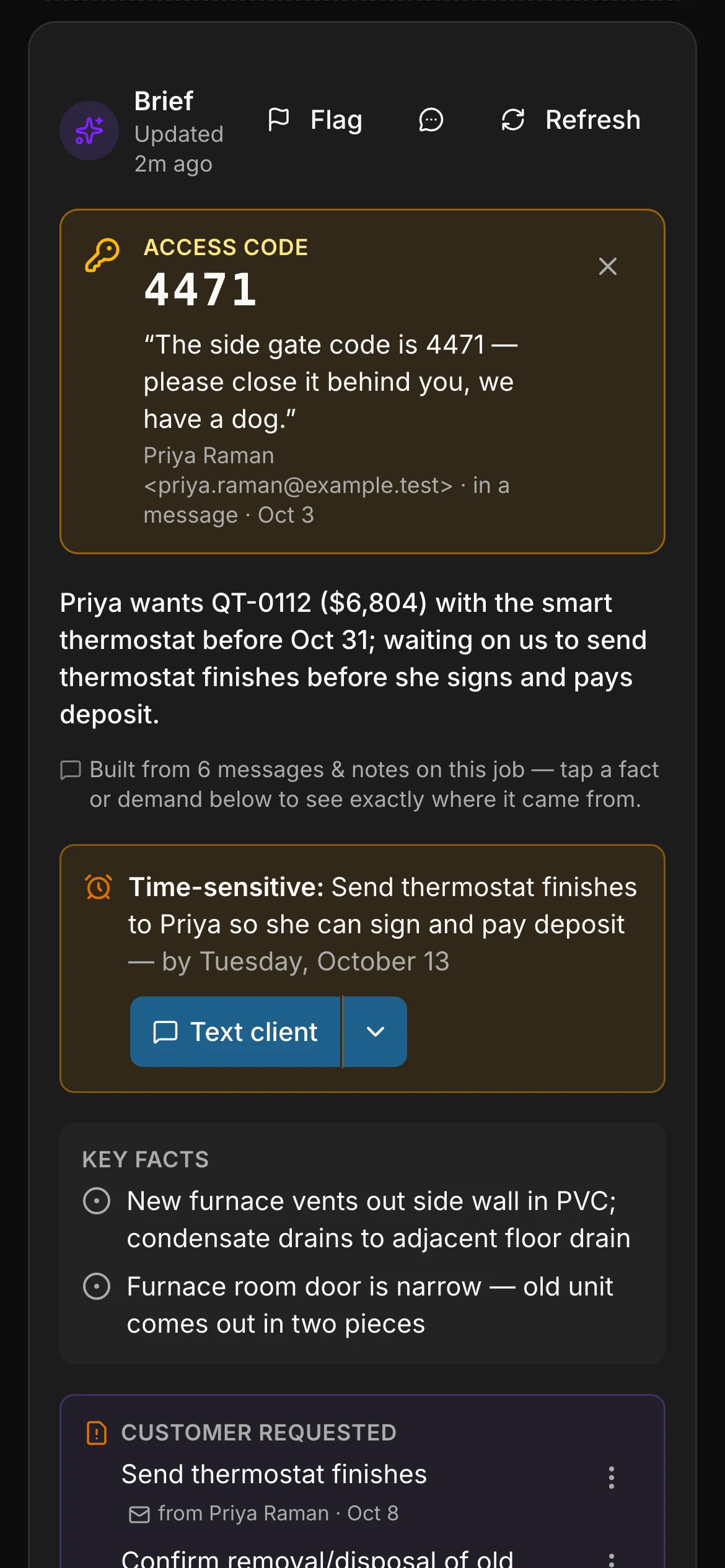
  • The brief’s access code on a phone: 4471, with the customer’s own words — “The side gate code is 4471 — please close it behind you, we have a dog.”

    The gate code, pinned. Said once in an email, and now at the top of the job for the crew.

  • The brief’s time-sensitive line on a phone: send the thermostat finishes to Priya so she can sign and pay the deposit, by Tuesday, October 13, with a Text client button.

    The deadline. What is time-sensitive, and by when.

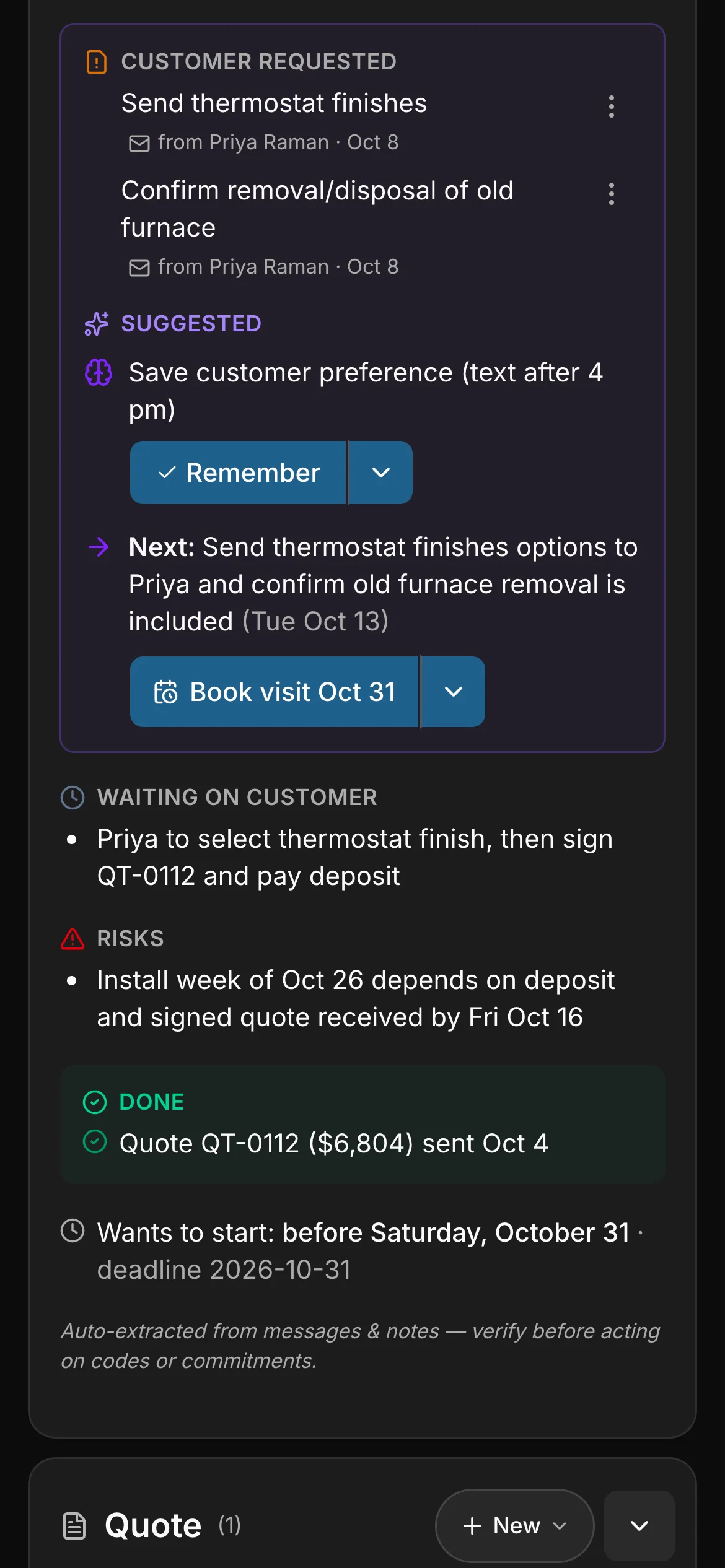
  • What the customer requested, in the brief on a phone: the thermostat finishes, and confirming the old furnace is taken away, each from Priya Raman’s email.

    What the customer asked for. Each request, with the message it came from.

  • The next step, in the brief on a phone: send Priya the thermostat finish options and confirm the old furnace removal, with a Book visit button.

    What we owe, and the next step. One next step, and a button that starts it.

  • Waiting on the customer, in the brief on a phone: pick a thermostat finish, sign the quote and pay the deposit, with the risk under it.

    What the customer owes. So nobody chases the wrong person.

Real captures of a contractor’s job. Daybook wrote every line of this brief from the messages on the job. A camp gets the same brief on a booking, a property manager on a work order.

The pressure washing toolkit.

On top of everything Daybook does for every one of its 44 trades — the full list is here — pressure washing gets its own shape. The place is a property, not a job site; a new job starts as a one-time job, and a storefront or a fleet becomes recurring visits from the job’s own menu; the work is on the route, the crew is out today, and a visit is logged; and the drafts, the replies and the job summaries say soft wash and surface cleaner, house wash, brighten, seal and stain, moss treatment and the spring route the way a washer does.

The request

A request becomes a visit. Then a quote by the storey or the square foot.

Every request lands on one board with its service type — a house wash, a driveway, a deck, a storefront — and one button: Schedule a visit. Walk round the property and quote from your own price list. A new job starts as a one-time job, because a house wash or a driveway clean is quoted and done once; a monthly storefront or a fleet is one choice away.

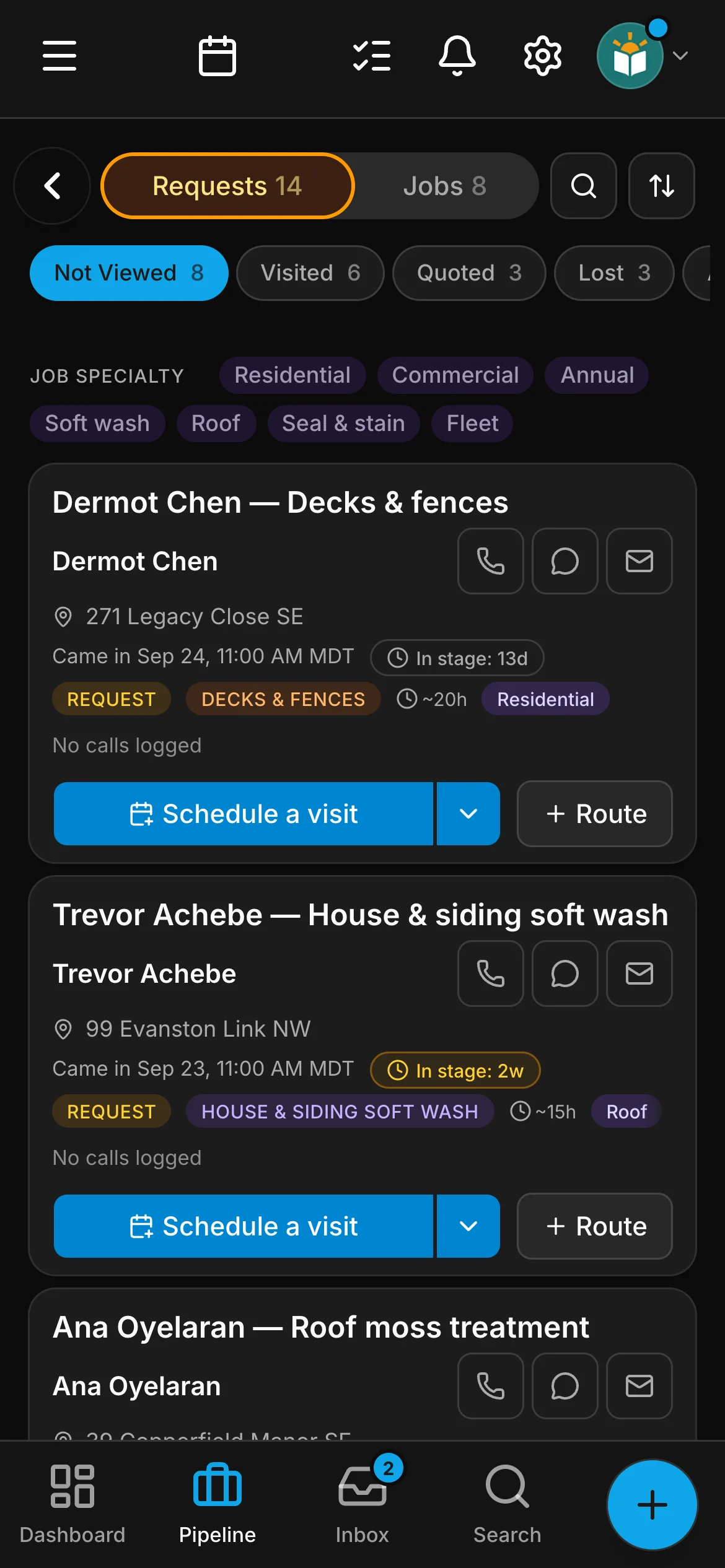
The requests board in Daybook: “Dermot Chen — Decks & fences” and “Trevor Achebe — House & siding soft wash”.

The request

A request becomes a visit. Then a quote by the storey or the square foot.

Every request lands on one board with its service type — a house wash, a driveway, a deck, a storefront — and one button: Schedule a visit. Walk round the property and quote from your own price list. A new job starts as a one-time job, because a house wash or a driveway clean is quoted and done once; a monthly storefront or a fleet is one choice away.

  • The requests board in Daybook: “Dermot Chen — Decks & fences” and “Trevor Achebe — House & siding soft wash”.

    Every request, on your phone. Call the client or email them from the card, and book them in with the button under it.

  • The job on its page in Daybook, its steps across the top: Add to route, Head out, Log visit and Invoice.

    The job’s own page. Its steps across the top, the client a call or a text away, and its photos, notes and messages a swipe apart.

  • Seven service types: house & siding soft wash, driveways, walks & concrete, decks & fences, roof moss treatment, storefronts, lots & buildings, fleet washing, gum & graffiti removal
  • A house with a driveway added is filed as a house wash, black streaks on shingles as a roof moss treatment, a strip mall as commercial, a row of trucks as fleet — sorted for you
  • Schedule a visit from the request — and plan the day’s route from the same board
  • An arrival window on the booking, and an On my way text that names who is coming, with a link to follow
  • The gate code and the access notes live on the property and show on every job
  • Requests from your website’s quote form land here as real requests, with the property address on them
Scheduling

Repeat rounds and route billing

The round that comes back. Billed without retyping it.

A single wash stays a single job. For the house that wants it every spring, a storefront or a fleet, choose Recurring → Make recurring on the job and pick the cadence — monthly, every six months, yearly — and its visits go on the schedule and keep coming, with their arrival window on every reminder. The day’s round opens on the map: every property numbered in the order you will drive it, with the run’s drive time and distance, and the order yours to change. Bill visits then turns the completed visits into draft invoices — one per visit or one a month, as each job’s Billing card says.

Every spring the visit on the schedule, logged when it is done, and billed once it is

Repeat rounds and route billing

The round that comes back. Billed without retyping it.

A single wash stays a single job. For the house that wants it every spring, a storefront or a fleet, choose Recurring → Make recurring on the job and pick the cadence — monthly, every six months, yearly — and its visits go on the schedule and keep coming, with their arrival window on every reminder. The day’s round opens on the map: every property numbered in the order you will drive it, with the run’s drive time and distance, and the order yours to change. Bill visits then turns the completed visits into draft invoices — one per visit or one a month, as each job’s Billing card says.

  • A new job starts as a one-time job; Recurring → Make recurring in the job’s ⋯ menu makes it a repeat contract
  • Weekly, every two weeks, monthly, every few weeks, quarterly or yearly — the editor shows the visits that makes before you save
  • Upcoming visits are added every night; one you moved, skipped or finished is left as it is
  • The schedule opens on the map for a route trade: stops numbered in driving order, drive time and distance, drag to reorder, or let it find the shortest run
  • A Billing card on a recurring job: what a visit bills, and whether the client gets one invoice per visit or one a month
  • Invoices → Bill visits: every completed visit not yet on an invoice, turned into draft invoices for you to review and send
Invoicing & payments

The price list

Priced by the storey, the surface and the square foot.

A washer quotes from a price list, not an estimator — so yours starts labelled: the house soft wash by the storey, soffits and gutter exteriors by the foot, driveways, walks, patios and garage floors by the square foot, paver cleaning and re-sanding, concrete and paver sealing, the deck wash, the seal and the stain, fences by the foot, roof moss treatment, storefronts, lots and dumpster pads, gum and graffiti, fleet by the unit, the cleaners and sealers by the jug and the pail. Your own prices go on it, and every quote and invoice reads from it.

Per square foot the storey, the surface and the square foot — the way the trade is sold

The price list

Priced by the storey, the surface and the square foot.

A washer quotes from a price list, not an estimator — so yours starts labelled: the house soft wash by the storey, soffits and gutter exteriors by the foot, driveways, walks, patios and garage floors by the square foot, paver cleaning and re-sanding, concrete and paver sealing, the deck wash, the seal and the stain, fences by the foot, roof moss treatment, storefronts, lots and dumpster pads, gum and graffiti, fleet by the unit, the cleaners and sealers by the jug and the pail. Your own prices go on it, and every quote and invoice reads from it.

  • A labelled starter price list on day one, with your own prices on it
  • House, concrete and pavers, decks and fences, roof, commercial, fleet, labour, cleaners and sealers, equipment, fees, disposal
  • Cost, price and markup beside each item
  • Quotes and invoices in a washer’s words — approved, or sent back for a revision, in the client’s portal
  • A price book that updates when you scan a supplier invoice — Crew and up
Quoting

The paperwork

Three sheets, written for washers.

A property setup sheet from the walk-round — what each surface is made of, where the water is, what to protect. A visit log, one entry per visit, with the method on each surface and the plants rinsed. A seal and stain record for the return visit once a deck is dry. They attach themselves to the right jobs, and the seal record will not let a deck job close unfinished.

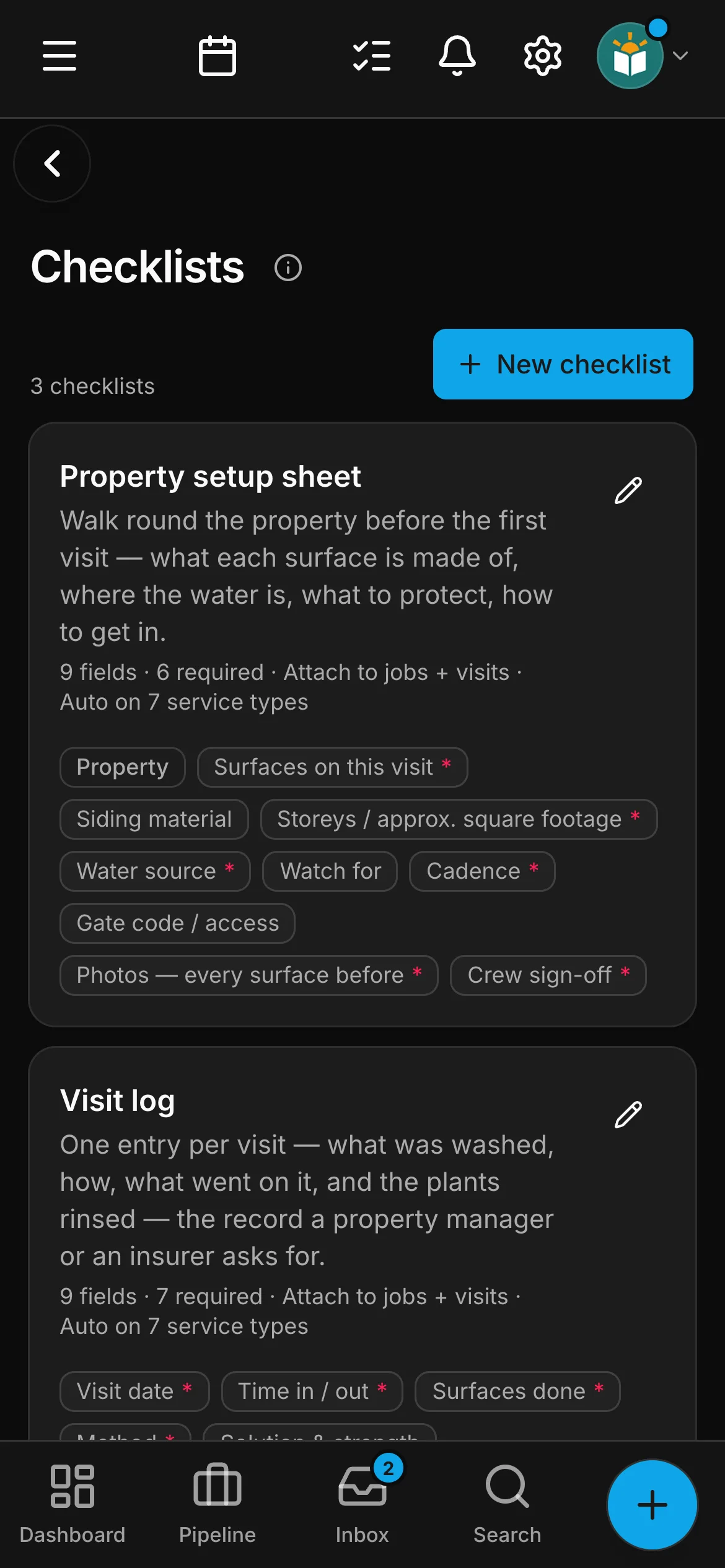
The checklists in Daybook: “Property setup sheet” and “Visit log”.

The paperwork

Three sheets, written for washers.

A property setup sheet from the walk-round — what each surface is made of, where the water is, what to protect. A visit log, one entry per visit, with the method on each surface and the plants rinsed. A seal and stain record for the return visit once a deck is dry. They attach themselves to the right jobs, and the seal record will not let a deck job close unfinished.

  • Property setup sheet: the surfaces on this visit, the siding material, storeys and square footage, the water source, what to watch for, the cadence, the gate code
  • Visit log: the date, time in and out, the surfaces done, the method, the solution and strength, the plants wet down and rinsed, any damage or incident
  • Seal & stain record: the dry days since the wash, the moisture reading, the weather window, the product, the coats, care notes for the client
  • Photographs of every surface before, after, and sealed — and the crew’s sign-off on the setup sheet
  • Attached to the right service types automatically — Crew and up
  • Yours to edit, and you can add your own
The crew app

Safety on site

The FLHA, filled in on the phone. Filed before the rig is unloaded.

Pick the job and the property and the crew come with it; the day’s conditions, each task with its hazard and its control — submitted from the phone at the start of the day and on the job’s record the moment it lands. Then clock-in, the visit log and the photos, with no signal if it comes to that.

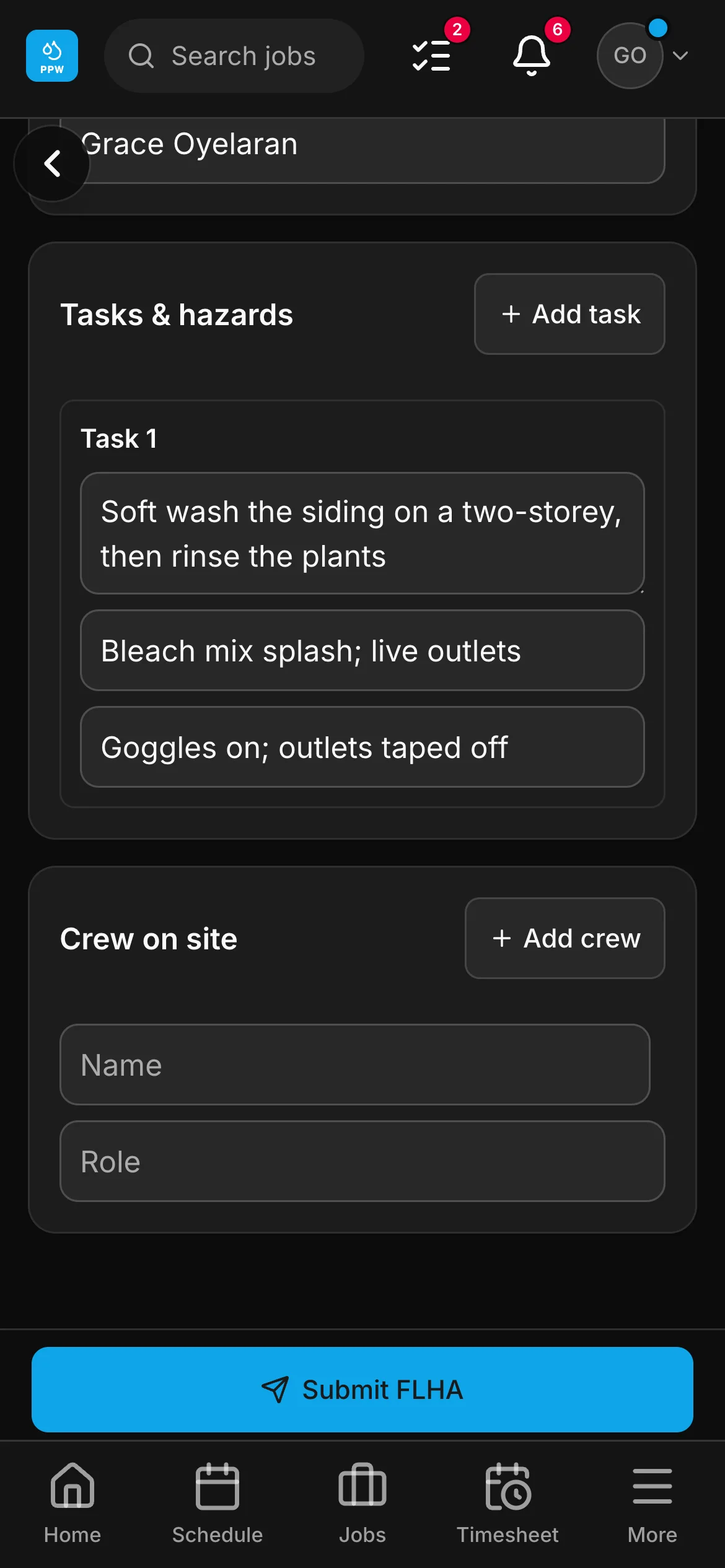
An FLHA in the crew app, “Soft wash the siding on a two-storey, then rinse the plants”: the task with its hazard and its control, and the crew on site under it.

Safety on site

The FLHA, filled in on the phone. Filed before the rig is unloaded.

Pick the job and the property and the crew come with it; the day’s conditions, each task with its hazard and its control — submitted from the phone at the start of the day and on the job’s record the moment it lands. Then clock-in, the visit log and the photos, with no signal if it comes to that.

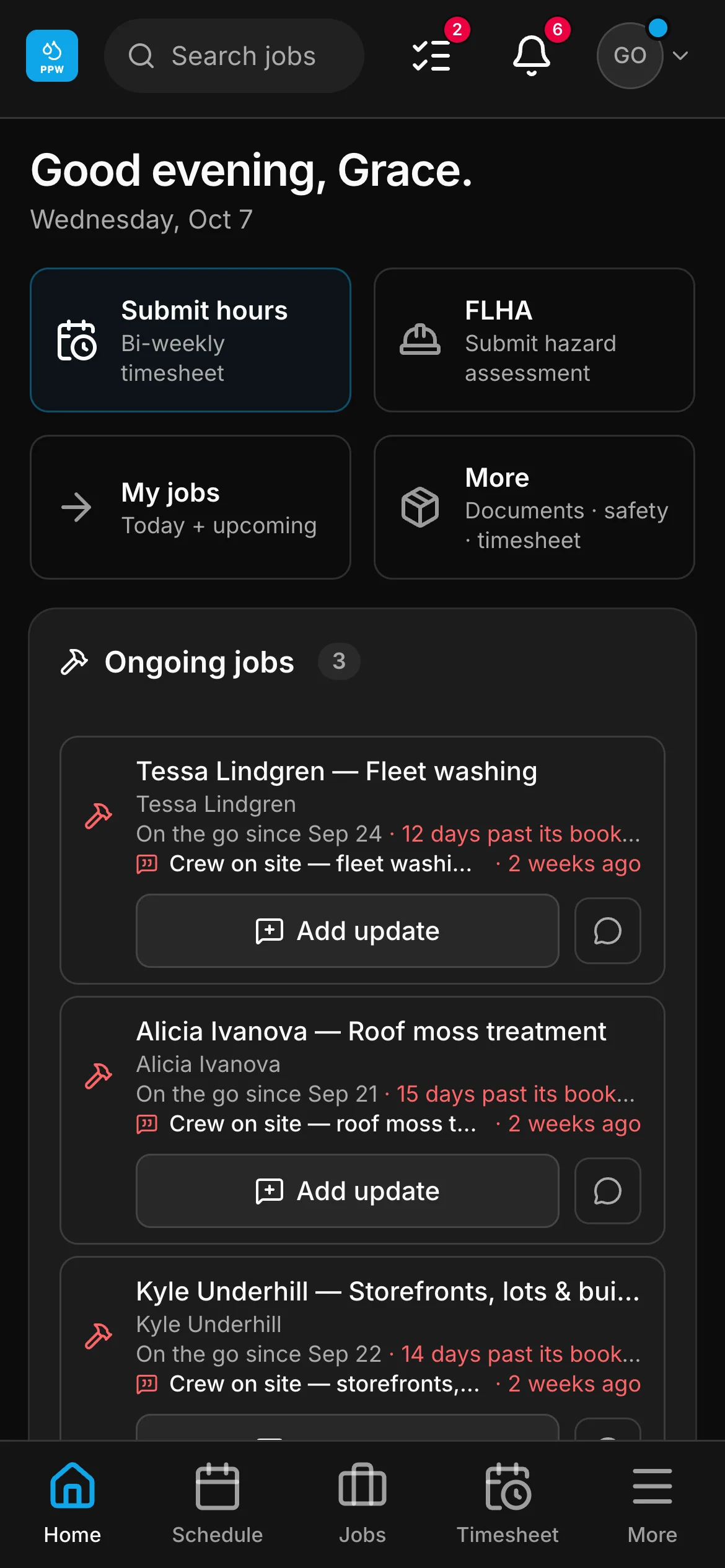
  • The crew app’s home: a greeting by name, then Submit hours, FLHA, My jobs and More, and the jobs on the go below them, each with Add update.

    Their day. Hours, the FLHA and their jobs a tap away — and an update from a job on the go goes straight to the office.

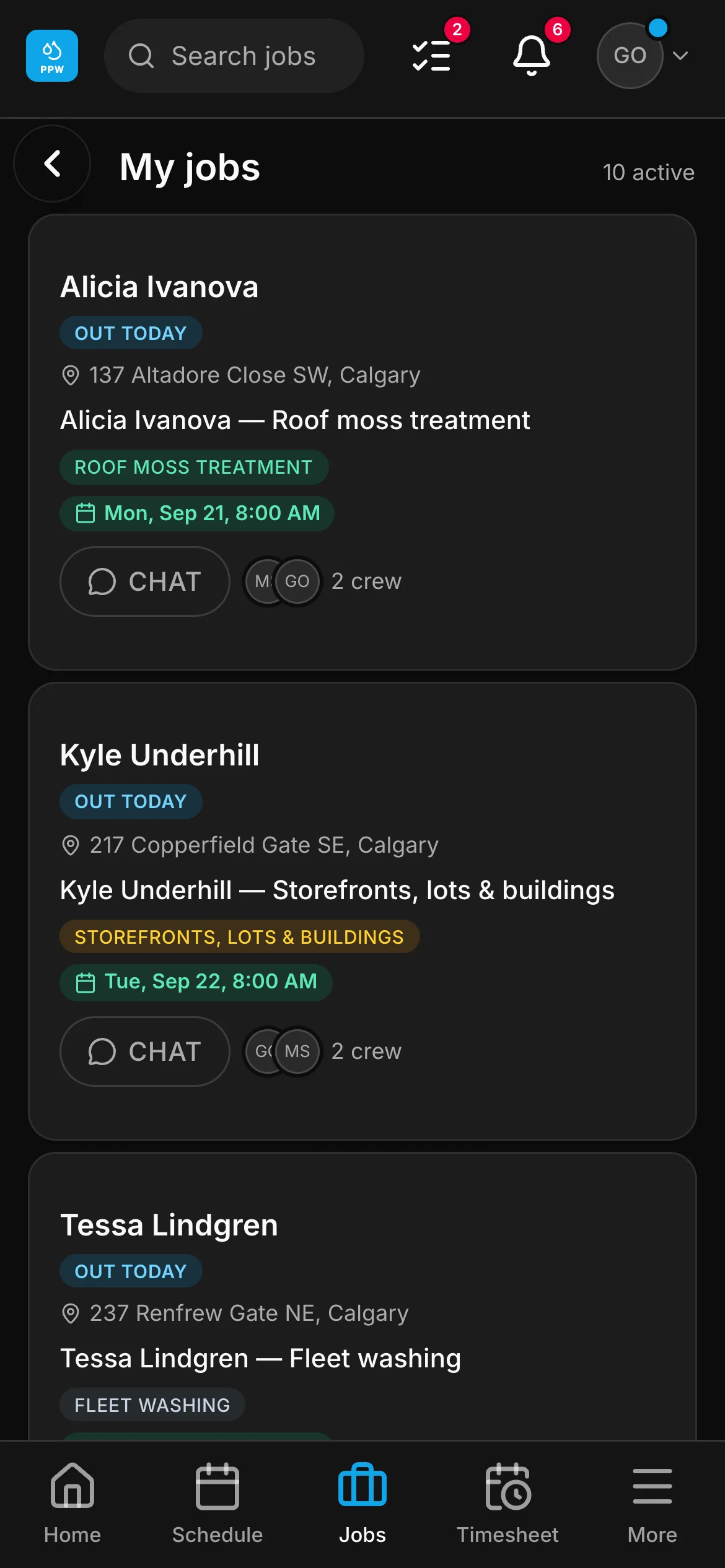
  • A crew member’s list in the crew app, 10 active: “Alicia Ivanova — Roof moss treatment” and “Kyle Underhill — Storefronts, lots & buildings” among them, each with its address and its time.

    Their jobs. Every job they’re on, with its address, its booked day and a chat with the office.

  • An FLHA in the crew app, “Soft wash the siding on a two-storey, then rinse the plants”: the task with its hazard and its control, and the crew on site under it.

    Before the work starts. Pick the job and the site, its contact and the crew fill in; they add each task with its hazard and its control, and submit it from the phone.

  • FLHA forms on Crew and up: job, site, conditions, tasks with hazard and control, the crew on site
  • Clock-in and timesheets from the phone in their pocket
  • The visit log filled in at the property
  • Photos taken where there is no signal, filed when it returns
The crew app

Getting paid

Invoiced off the job. Chased without a phone call.

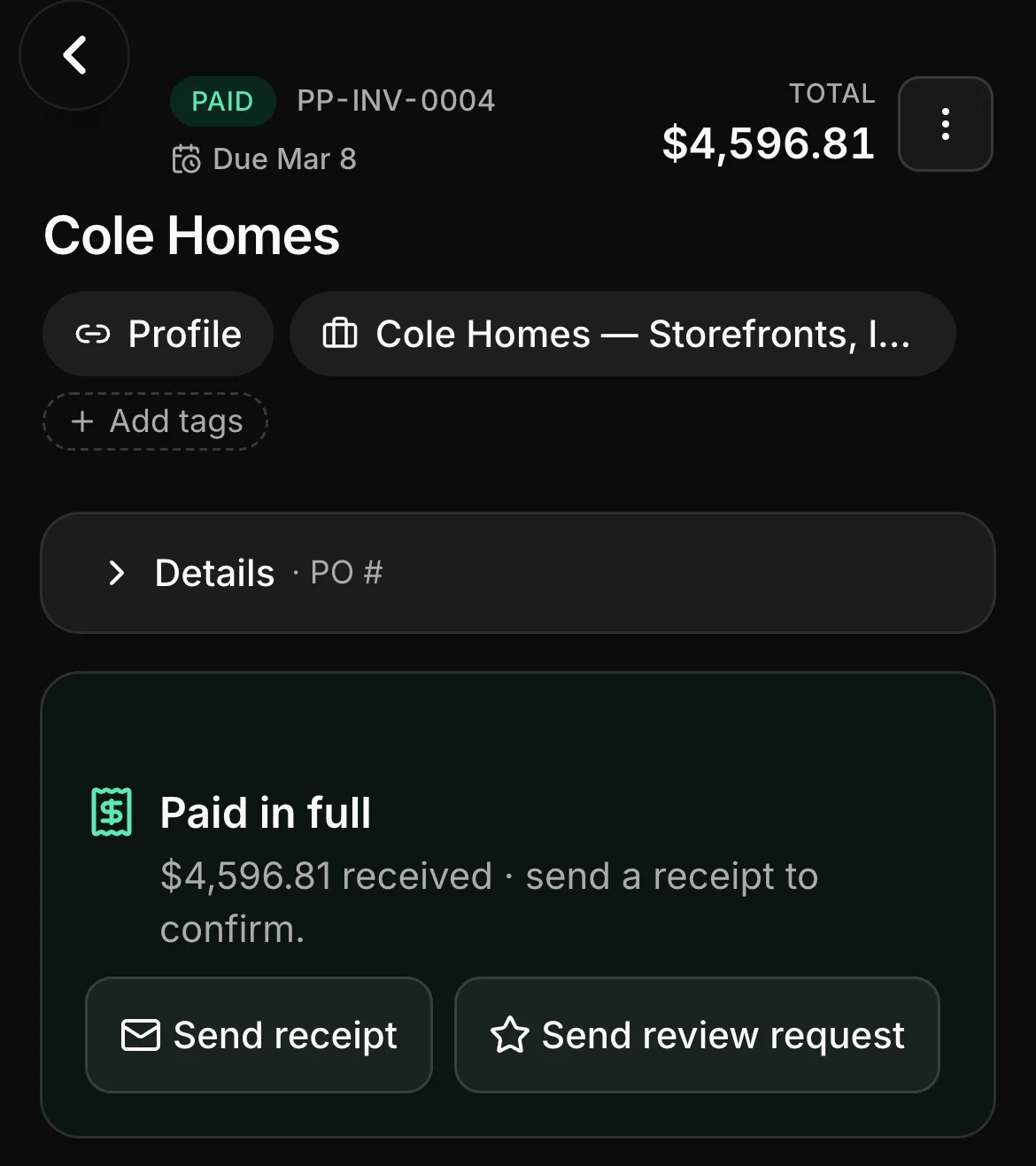
A house wash or a driveway is invoiced the day it is done; a storefront or a fleet contract is billed from its completed visits, by the visit or once a month. A reminder you set once does the following-up, with a Pay Now link; e-transfers are matched to their invoices for you to confirm. And with a Stripe card reader, the crew lead takes a card or Interac debit at the door.

A paid invoice in Daybook: PP-INV-0004, paid, $4,596.81.

Getting paid

Invoiced off the job. Chased without a phone call.

A house wash or a driveway is invoiced the day it is done; a storefront or a fleet contract is billed from its completed visits, by the visit or once a month. A reminder you set once does the following-up, with a Pay Now link; e-transfers are matched to their invoices for you to confirm. And with a Stripe card reader, the crew lead takes a card or Interac debit at the door.

  • Draft invoices from a month’s completed visits — one per visit, or one a month per contract
  • An invoice off a one-off job — offered the moment it is marked complete, quote or no quote
  • An overdue invoice chases itself, with a Pay Now link
  • E-transfer matched for you to confirm; cards online; EFT
  • A card or Interac debit taken at the door on a Stripe card reader; cash and cheques recorded on the spot
  • GST/HST by province, and the Sales Tax report ready for filing
Invoicing & payments

The crew

The phone already in their pocket.

Field seats are free and unlimited on Crew and Company, so every washer has the app: the day’s visits, clock-in, the FLHA, the visit log, the photos — and the office sees it the moment it lands.

  • A crew member’s list in the crew app, 10 active: “Alicia Ivanova — Roof moss treatment” and “Kyle Underhill — Storefronts, lots & buildings” among them, each with its address and its time.
  • The crew app’s home: a greeting by name, then Submit hours, FLHA, My jobs and More, and the jobs on the go below them, each with Add update.
  • The job on its page in Daybook, its steps across the top: Add to route, Head out, Log visit and Invoice.
  • The checklists in Daybook: “Property setup sheet” and “Visit log”.

The economics

Priced on the office. Free for the crew.

Most field-service software charges by the head, in another currency. Daybook charges the office seats, in Canadian dollars, and leaves the people on the wand alone.

Workflow Field-service platforms priced per user Daybook
Currency Often billed in US dollars — the exchange rate and your card’s foreign fee ride along. Canadian dollars. Every plan, every add-on, printed on the pricing page.
The crew Typically an extra monthly fee for every field user past the plan’s cap. Field seats free and unlimited on Crew and Company — every washer gets the app.
Pressure washing tools A generic job form; what went on the siding lives in somebody’s memory. The route shape, one-time washes and repeat rounds that stay on the schedule, a visit log with the method on each surface, a seal and stain record, billing by the visit, and a labelled washing price list.
Canadian tax and mileage Usually an accounting add-on, or by hand. GST/HST by province on every invoice, the Sales Tax report, a mileage log at your own rate, receipts read for you.
Your website Usually a separate builder, or a designer. A pressure washing site template on every plan, with a house-washing page and a quote form that mints a real request.

Nothing here is a discount, and there is no setup fee.

Three plans, priced in CAD.

Pressure washing runs on the trades rate card — every plan the same app, the office seats counted and the crew free from Crew up. Solo $99 / Crew $249 / Company $449 a month CAD. Office seats included on every plan. Field seats are free and unlimited on Crew and Company. Crew and Company include selling online, and Company also includes your own domain and texting — a plan without them can add them.

  • Solo — $99/mo CAD · 1 seat · no additions · Start on Solo
  • Crew — $249/mo CAD · 3 office seats · +$39/mo each after · Start on Crew
  • Company — $449/mo CAD · 10 office seats · +$39/mo each after · Start on Company

Start the free trial on CrewSee the plans

Switching

Moving from a spreadsheet, or from another platform.

There is no importer for another product’s export, and the page does not pretend there is. What there is gets a pressure washing company running in an afternoon.

Bring your client list

Upload a CSV or paste it in — names, phones, emails, addresses — and the clients are there. A QuickBooks client list imports straight across.

Put your prices on the list

The washing price list is already labelled, from the single-storey house wash to a pail of deck sealer. Type your own prices in — or, on Crew and up, scan a supplier invoice and the price book fills with your real costs.

Your website, live day one

The pressure washing template is already written for the work, with a house-washing page — your photographs and your words go in, and the quote form drops requests straight into Daybook.

Questions pressure washing companies ask.

Does a new job start as a recurring one?

No. A new job starts as a one-time job, because a house wash or a driveway clean is quoted and done once. For the house that wants it every spring, a storefront or a fleet, open the job’s ⋯ menu and choose Recurring → Make recurring; from then on its upcoming visits are added to the schedule every night.

Can I bill a month of storefront and fleet washes at once?

Yes. Set what a visit bills on the recurring job’s Billing card — per visit, or one invoice a month — and Invoices → Bill visits lists every completed visit that is not on an invoice yet and turns them into draft invoices in one go. Nothing reaches a client until you review and send it.

Does it plan the round?

The schedule opens on the map for a washing company: the day’s properties numbered in the order you will drive them, with the run’s drive time and distance. Drag to change the order, or let it find the shortest run.

Which jobs will it not let me close?

A deck or fence job. Its seal and stain record wants the dry days since the wash, the weather window, the product, the coats and photographs of it sealed. It is yours to edit.

Is there a pressure washing estimator?

No — a washer quotes from a price list, so that is what Daybook gives you: the house by the storey, the driveway and the deck by the square foot, the seal and the stain, labelled on day one, with your own prices on it.

What does a washer cost?

Nothing on Crew and Company — field seats are free and unlimited. The office seats are what is counted, and the pricing page prints exactly how many each plan includes.

Bring a real deck. Watch it wash, dry and seal.

Your own properties beat any feature list — start the trial, book the wash, and the seal record is waiting for the day the boards are dry.

14-day free trial · No credit card · Bring your client list